前言
从WinForm转向WPF开发时,最需要转变的思维就是布局方式。WPF提供了更加灵活和强大的布局系统,可以轻松实现自适应布局设计。本文将详细介绍WPF中常用的布局控件及其应用。
Grid布局 - 最常用的布局控件
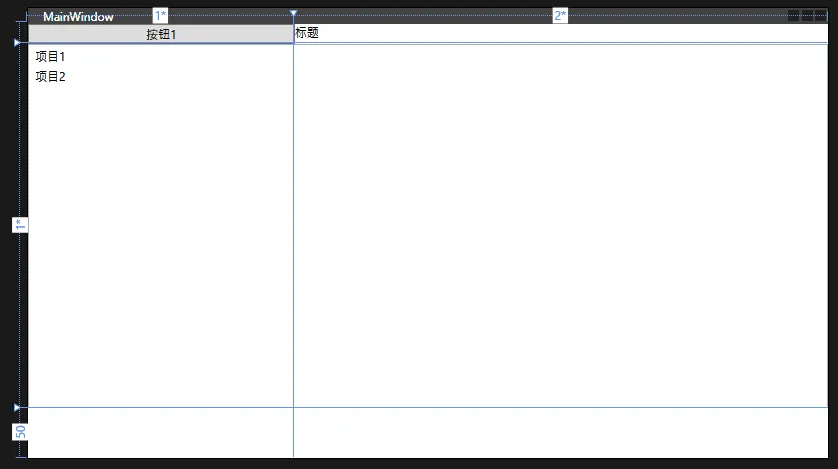
Grid是WPF中最灵活的布局控件,类似于HTML中的表格布局。它允许你定义行和列,并可以设置比例或固定大小。
基础Grid示例
XML<Grid>
    <Grid.RowDefinitions>
        <!-- 第一行高度为Auto,根据内容自动调整 -->
        <RowDefinition Height="Auto"/>
        <!-- 第二行高度为* ,占用剩余所有空间 -->
        <RowDefinition Height="*"/>
        <!-- 第三行固定高度50 -->
        <RowDefinition Height="50"/>
    </Grid.RowDefinitions>

    <Grid.ColumnDefinitions>
        <!-- 第一列宽度占比1 -->
        <ColumnDefinition Width="*"/>
        <!-- 第二列宽度占比2 -->
        <ColumnDefinition Width="2*"/>
    </Grid.ColumnDefinitions>

    <!-- 放置在第0行第0列的按钮 -->
    <Button Grid.Row="0" Grid.Column="0" Content="按钮1"/>
    <!-- 放置在第0行,跨越2列的文本块 -->
    <TextBlock Grid.Row="0" Grid.Column="1" Text="标题"/>
    <!-- 放置在第1行,跨越2列的列表 -->
    <ListBox Grid.Row="1" Grid.ColumnSpan="2">
        <ListBoxItem>项目1</ListBoxItem>
        <ListBoxItem>项目2</ListBoxItem>
    </ListBox>
</Grid>
前言
从WinForm迁移到WPF是很多.NET开发者都会经历的过程。WPF提供了更强大和灵活的布局系统,但对于习惯了WinForm的开发者来说,可能需要一些时间来适应。本文将详细介绍WPF布局嵌套的核心技巧。
WPF布局容器概述
WPF主要的布局容器包括:
- Grid(网格布局)
- StackPanel(堆栈布局)
- DockPanel(停靠布局)
- WrapPanel(自动换行布局)
- Canvas(绝对定位布局)
从WinForm思维转变到WPF思维
WinForm的局限性:
C#// WinForm中的控件定位
button1.Location = new Point(100, 100);
button1.Size = new Size(80, 25);
WPF的优势:
XML<!-- WPF中的控件定位 -->
<Button Margin="100,100,0,0" Width="80" Height="25"/>
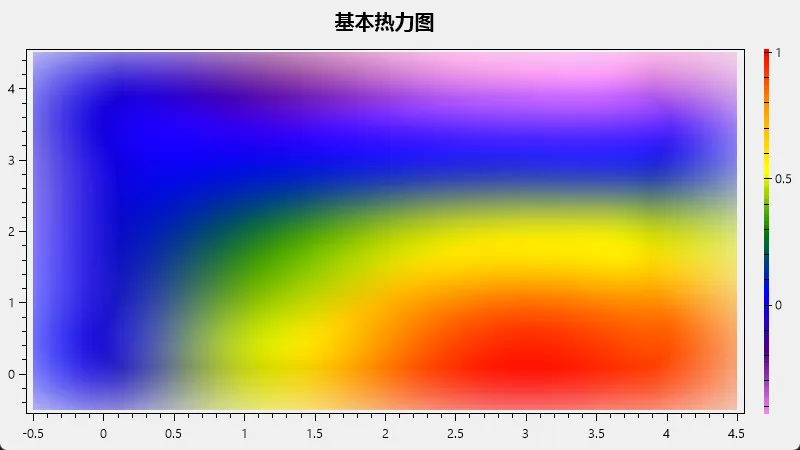
在WinForms中使用OxyPlot创建热力图的详细指南。热力图是一种非常有效的可视化工具,用于表示二维数据的密度或强度。它通过颜色变化来展示数据的分布情况,非常适合用于展示温度分布、人口密度、金融数据等多种场景。
准备工作
首先,我们需要在项目中添加OxyPlot的引用。您可以通过NuGet包管理器来安装OxyPlot。在Visual Studio中,右击您的项目,选择"管理NuGet包",然后搜索并安装以下包:
- OxyPlot.Core
- OxyPlot.WindowsForms
安装完成后,在您的代码文件顶部添加以下using语句:
C#using OxyPlot;
using OxyPlot.Series;
using OxyPlot.WindowsForms;
using OxyPlot.Axes;
创建基本热力图
让我们从一个简单的热力图开始。假设我们要展示一个5x5的温度数据矩阵。
C#public partial class Form1 : Form
{
    public Form1()
    {
        InitializeComponent();
        CreateBasicHeatMap();
    }

    private void CreateBasicHeatMap()
    {
        var plotView = new PlotView();
        plotView.Dock = DockStyle.Fill;

        var model = new PlotModel { Title = "基本热力图" };

        // 创建热力图数据
        double[,] data = new double[5, 5];
        for (int x = 0; x < 5; x++)
        {
            for (int y = 0; y < 5; y++)
            {
                data[x, y] = Math.Sin(x * 0.5) * Math.Cos(y * 0.5);
            }
        }

        var heatMapSeries = new HeatMapSeries
        {
            X0 = 0,
            X1 = 4,
            Y0 = 0,
            Y1 = 4,
            Interpolate = true,
            RenderMethod = HeatMapRenderMethod.Bitmap,
            Data = data
        };

        model.Series.Add(heatMapSeries);

        // 添加颜色轴
        model.Axes.Add(new LinearColorAxis { Position = AxisPosition.Right, Palette = OxyPalettes.Rainbow(100) });

        plotView.Model = model;
        this.Controls.Add(plotView);
    }
}
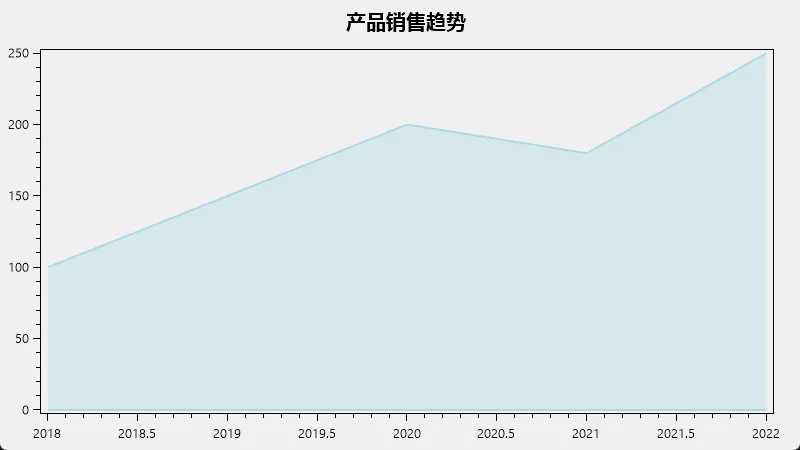
WinForms中使用OxyPlot创建面积图的详细指南。面积图是一种非常有用的图表类型,可以直观地展示数据随时间的变化趋势,并且能够很好地表现数据的累积效果。
准备工作
首先,我们需要在项目中添加OxyPlot的引用。您可以通过NuGet包管理器来安装OxyPlot。在Visual Studio中,右击您的项目,选择"管理NuGet包",然后搜索并安装以下包:
- OxyPlot.Core
- OxyPlot.WindowsForms
安装完成后,在您的代码文件顶部添加以下using语句:
C#using OxyPlot;
using OxyPlot.Series;
using OxyPlot.WindowsForms;
创建基本面积图
让我们从一个简单的面积图开始。假设我们要展示某产品五年的销售数据。
C#public partial class Form1 : Form
{
    public Form1()
    {
        InitializeComponent();
        CreateBasicAreaChart();
    }

    private void CreateBasicAreaChart()
    {
        var plotView = new PlotView();
        plotView.Dock = DockStyle.Fill;

        var model = new PlotModel { Title = "产品销售趋势" };

        var areaSeries = new AreaSeries
        {
            Color = OxyColors.LightBlue,
            StrokeThickness = 2
        };

        // 添加数据点
        areaSeries.Points.Add(new DataPoint(2018, 100));
        areaSeries.Points.Add(new DataPoint(2019, 150));
        areaSeries.Points.Add(new DataPoint(2020, 200));
        areaSeries.Points.Add(new DataPoint(2021, 180));
        areaSeries.Points.Add(new DataPoint(2022, 250));

        model.Series.Add(areaSeries);
        plotView.Model = model;

        this.Controls.Add(plotView);
    }
}
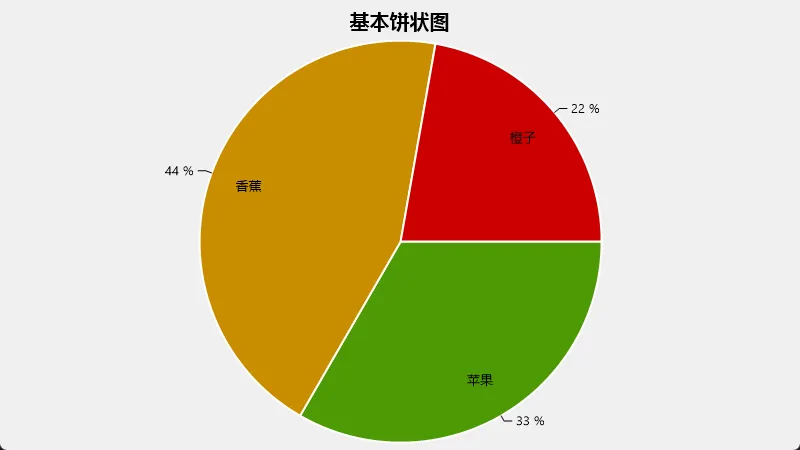
OxyPlot是一个功能强大的跨平台绘图库,可以在WinForms应用程序中创建各种类型的图表,包括饼状图。本指南将介绍如何在WinForms应用程序中使用OxyPlot创建和自定义饼状图。
环境设置
首先,确保您的WinForms项目中已安装OxyPlot库。您可以通过NuGet包管理器安装:
C#Install-Package OxyPlot.WindowsForms
基本饼状图
让我们从一个简单的饼状图开始:
C#using OxyPlot;
using OxyPlot.Series;
using OxyPlot.WindowsForms;

private void CreateBasicPieChart()
{
    var model = new PlotModel { Title = "基本饼状图" };

    var series = new PieSeries
    {
        StrokeThickness = 2.0,
        InsideLabelPosition = 0.8,
        AngleSpan = 360,
        StartAngle = 0
    };

    series.Slices.Add(new PieSlice("苹果", 3) { IsExploded = true });
    series.Slices.Add(new PieSlice("香蕉", 4));
    series.Slices.Add(new PieSlice("橙子", 2));

    model.Series.Add(series);

    var plotView = new PlotView
    {
        Model = model,
        Dock = DockStyle.Fill
    };

    this.Controls.Add(plotView);
}