SQLite是一个轻量级的关系型数据库管理系统,广泛应用于嵌入式系统和移动应用程序。与其他数据库系统不同,SQLite采用了一种独特的"动态类型系统"。本文将详细介绍SQLite的数据类型系统及其特点。
SQLite的动态类型系统
SQLite采用动态类型系统,这意味着存储在数据库中的值本身决定了其数据类型,而不是由列的声明类型决定。这种灵活性使得SQLite可以存储任何类型的数据到任何列中,无论该列是如何声明的。
SQLite的存储类
SQLite使用5种基本的存储类来内部表示数据:
- NULL: 表示空值
- INTEGER: 有符号整数,根据值的大小存储在1、2、3、4、6或8字节中
- REAL: 8字节的IEEE浮点数
- TEXT: 文本字符串,使用数据库编码(UTF-8、UTF-16BE或UTF-16LE)存储
- BLOB: 二进制大对象,完全根据输入存储
SQLite是一个开源的、嵌入式关系型数据库管理系统。它是一个自给自足、无服务器、零配置的数据库引擎。SQLite不同于传统的客户端-服务器数据库管理系统,它直接集成到使用它的应用程序中,无需单独的数据库服务器进程或系统配置。
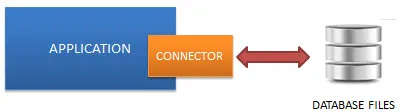
SQLite的主要特点
- 轻量级:整个SQLite库的大小通常小于600KB,这使得它非常适合嵌入式设备和移动应用。
- 零配置:SQLite不需要安装或管理员配置,可以直接使用。
- 自给自足:SQLite数据库是一个单一的跨平台文件,包含了所有的数据和表定义。
- 事务性:SQLite支持原子性、一致性、隔离性和持久性(ACID)的数据库事务。
- 标准兼容:SQLite实现了SQL标准的大部分功能,支持复杂查询、视图和触发器等。
- 多语言支持:SQLite有多种编程语言的绑定,包括C、C++、C#、Python、Java等。
SQLite的优势
- 简单易用:由于其零配置特性,SQLite非常容易集成到应用程序中。
- 可靠性高:SQLite经过广泛测试,拥有接近100%的测试覆盖率。
- 性能优秀:对于本地存储和检索数据,SQLite通常比直接读写磁盘文件更快。
- 跨平台:SQLite可以在几乎所有主流操作系统上运行,包括Windows、Linux、macOS、Android和iOS。
- 无需许可:SQLite是公共领域的软件,可以自由使用、修改和分发。
SQLite的应用场景
- 移动应用:Android和iOS设备广泛使用SQLite作为本地数据存储。
- 桌面应用:许多桌面软件使用SQLite存储配置信息和用户数据。
- 嵌入式系统:由于其小巧轻量,SQLite非常适合嵌入式设备。
- 网站:对于中小型网站,SQLite可以作为后端数据库使用。
- 数据分析:SQLite可以用于处理和分析大量结构化数据。
- 缓存:可以作为应用程序的本地缓存,提高数据访问速度。
- 教育:SQLite是学习SQL和数据库概念的理想工具。
OpenCvSharp 是一个 .NET 包装库,允许开发者在 C# 中使用 OpenCV 的功能。霍夫变换是 OpenCV 中一种强大且常用的图像处理方法,用于检测几何形状。本文将介绍霍夫变换的特点、应用场景,并通过示例代码展示如何在 C# 中使用 OpenCvSharp 实现霍夫变换。
特点
霍夫变换是一种特征提取技术,主要用于识别图像中的直线、圆以及其他简单的几何形状。其特点包括:
- 鲁棒性:能够在具有噪声的图像中识别出部分隐藏或破碎的几何形状。
- 参数化表示:通过将形状参数空间转换为线性空间来实现形状的检测。
- 自动化:能够有效地从图像中自动提取几何形状。
应用场景
霍夫变换在众多领域都能派上用场,包括但不限于:
- 车道检测:在自动驾驶和高级驾驶辅助系统中,用于检测道路车道线。
- 医学成像:用于识别和提取医学图像中的结构,例如血管或组织边缘。
- 目标跟踪:在视频检测和跟踪中用于识别和跟踪特定的几何形状。
- 光学字符识别:通过检测文本字符的边缘和轮廓进行文本分析。
在计算机视觉领域,圆形检测是一项常见并且实用的技术。在这篇文章中,我们将介绍如何使用 C# 和 OpenCvSharp 库来进行圆形检测。OpenCvSharp 是 OpenCV 的 .NET 封装,提供了强大的视觉处理能力。
安装 OpenCvSharp
在开始使用之前,确保你已经安装了 OpenCvSharp 库。你可以通过 NuGet 包管理器来安装它:
PowerShellInstall-Package OpenCvSharp4
使用 HoughCircles 方法进行圆形检测
OpenCvSharp 提供了一个名为 HoughCircles 的方法,可以用来检测图像中的圆形。接下来,我们将详细介绍如何使用这个方法。
基本圆形检测示例
以下是一个基本的圆形检测示例,展示了如何从加载的图像中检测圆形:
OpenCvSharp 是 OpenCV 库的 .NET 封装,使开发者能够在 C# 中使用 OpenCV 的强大功能。其中,直线检测是一个常见的计算机视觉任务,可以用于车道检测、几何分析等多种应用。本文将详细介绍如何使用 OpenCvSharp 在图像中进行直线检测,并提供多个示例代码。
安装 OpenCvSharp
在开始之前,你需要确保在项目中安装 OpenCvSharp 库。你可以通过 NuGet 包管理器安装:
PowerShellInstall-Package OpenCvSharp4
Install-Package OpenCvSharp4.runtime.win
基本概念
在进行直线检测时,最常用的算法是 Hough 变换(Hough Transform)。OpenCvSharp 提供了两种 Hough 变换方法:
HoughLines: 检测参数化空间中的直线。HoughLinesP: 检测端点的概率直线(常称为面向短线的 Hough 变换)。
使用 HoughLines 检测直线
HoughLines 方法用于从二值图像中检测直线。通常需要先对图像进行边缘检测,如使用 Canny 边缘检测。
