你是否曾经为了实现实时通信功能而苦恼?聊天室、在线游戏、实时数据推送...这些场景都离不开WebSocket技术。作为C#开发者,我们经常需要构建WebSocket服务器,但市面上的教程要么过于简单,要么缺乏完整的生产级代码。
今天这篇文章,我将带你从零开始构建一个功能完整、界面精美、代码健壮的WebSocket服务器应用。不仅包含核心的WebSocket处理逻辑,还提供了WinForms可视化管理界面,让你能够实时监控连接状态、管理客户端、广播消息。
本文将解决的核心问题:
- 如何构建生产级WebSocket服务器
- 如何处理多客户端并发连接
- 如何避免UI线程死锁问题
- 如何优雅地关闭服务器资源
💡 问题分析:WebSocket开发的常见痛点
🔍 技术难点梳理
在C#中开发WebSocket服务器,开发者通常会遇到以下问题:
- 并发处理复杂:多个客户端同时连接,如何保证线程安全?
- 资源管理困难:连接异常断开时,如何正确释放资源?
- UI线程阻塞:异步操作导致界面卡死,用户体验极差
- 状态同步问题:客户端连接状态与UI显示不同步
这些问题在实际项目中经常出现,往往让开发者花费大量时间调试。
🛠️ 解决方案架构设计
📐 整体架构
我们采用分层架构设计,将功能模块化:
C#WebSocketServer/
├── WebSocketServerCore.cs    // 核心服务器逻辑
├── ClientConnection.cs       // 客户端连接管理
├── Form1.cs                 // UI逻辑控制
├── Form1.Designer.cs        // 界面设计
└── Program.cs               // 程序入口
🔑 核心特性
- 异步处理:全程使用async/await避免阻塞
- 线程安全:ConcurrentDictionary管理客户端连接
- 优雅关闭:支持超时控制和资源释放
- 实时监控:可视化界面实时显示连接状态
💻 代码实战:核心模块实现
Industrial IoT Era: Are You Still Struggling with Legacy Serial Devices Unable to Connect to Networks?
Are you still experiencing headaches because old serial devices can't directly access the network? Are you working late into the night due to complex protocol conversions? Today, I'll use a complete C# project to teach you step-by-step how to build a high-performance Serial-to-Ethernet converter, transforming traditional devices into smart terminals in seconds!
This is not just a simple conversion tool, but a complete industrial-grade solution featuring multi-client management, asynchronous data processing, real-time status monitoring, and other enterprise-level functions. Whether you're an embedded engineer or a .NET developer, this article will open up a new world of industrial connectivity for you!
🎯 Problem Analysis: Real Pain Points in Industrial Settings
Challenges of Traditional Serial Devices
In factory automation, numerous PLCs, sensors, instruments, and other devices still use RS232/RS485 serial communication. These devices face core problems:
- Distance Limitations: Serial communication typically doesn't exceed 15 meters
- Single Point Connection: One serial port can only connect to one device
- Maintenance Difficulties: Complex wiring, time-consuming troubleshooting
- Poor Scalability: Cannot directly connect to modern network systems
Shortcomings of Existing Solutions
While serial servers on the market can solve basic needs, they have obvious drawbacks:
- High Costs: Industrial-grade products often cost thousands of dollars
- Limited Functionality: Lack flexible data processing capabilities
- Integration Difficulties: Hard to seamlessly integrate with existing systems
💡 Solution: Smart Converter Built with C#
Core Architecture Design
Our solution adopts a Producer-Consumer pattern, implementing efficient bidirectional data conversion through concurrent queues:
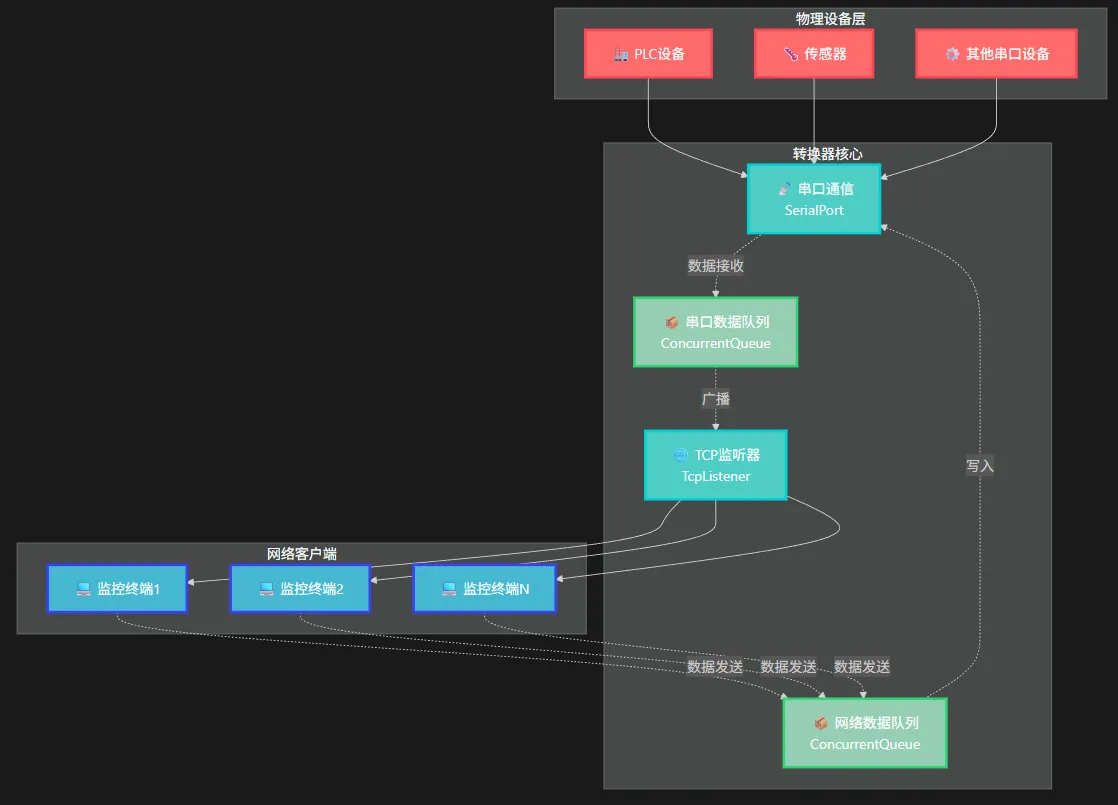
Technical Highlights
- Asynchronous Non-blocking: Task-based asynchronous programming model
- Thread Safety: Using ConcurrentQueue and SemaphoreSlim
- Multi-client Support: Support multiple network devices connecting simultaneously
- Real-time Monitoring: Complete status display and logging
作为一名C#开发者,你是否曾经在排查网络问题时手忙脚乱?服务器端口是否开放、网络连接是否正常、防火墙配置是否生效... 这些问题让多少程序员深夜难眠。
今天,通过一个完整的端口扫描器项目,带你掌握C#网络编程的核心技术,从此告别网络问题排查的痛苦!
🎯 项目概览:我们要做什么?
我们要开发一个功能完整的Windows Forms端口扫描器,它具备以下核心功能:
- 多线程并发扫描:高效处理大量端口检测
- 实时进度显示:用户体验友好
- 智能服务识别:自动识别常见网络服务
- 结果导出功能:支持多种格式保存
- 优雅的取消机制:随时中断扫描任务
💡 核心技术解析
🔥 技术亮点1:异步多线程架构
C#private async Task ScanPortsAsync(string target, int startPort, int endPort,
    int threadCount, int timeout, CancellationToken cancellationToken)
{
    var semaphore = new SemaphoreSlim(threadCount, threadCount);
    var tasks = new List<Task>();

    for (int port = startPort; port <= endPort; port++)
    {
        if (cancellationToken.IsCancellationRequested)
            break;

        int currentPort = port;
        var task = Task.Run(async () =>
        {
            await semaphore.WaitAsync(cancellationToken);
            try
            {
                await ScanPortAsync(target, currentPort, timeout, cancellationToken);
            }
            finally
            {
                semaphore.Release();
            }
        }, cancellationToken);

        tasks.Add(task);
    }

    await Task.WhenAll(tasks);
}
用C#开发一个功能完备的Ping工具,不仅能检测基础连通性,还能实现并发检测、持续监控、结果统计等高级功能。掌握这些技能,让你在处理网络问题时游刃有余!
💡 深度解析:为什么要自己开发Ping工具?
🔍 传统ping命令的局限性
- 功能单一:只能逐个检测,效率低下
- 信息有限:无法获取详细的网络质量数据
- 不易集成:难以融入现有的C#应用系统
- 缺乏定制:无法根据业务需求进行个性化开发
🚀 C#自定义Ping工具的优势
- 高度可控:完全掌控检测逻辑和结果处理
- 功能丰富:支持并发、统计、监控等高级特性
- 易于集成:可无缝融入现有.NET应用
- 扩展性强:可根据业务需求灵活定制
🛠️ 解决方案一:基础Ping功能实现
还在为复杂的业务逻辑写出一堆嵌套代码而头疼吗?还在为方法调用层层套娃而苦恼吗?今天就来聊聊C#中的**链式编程(Method Chaining)**这个神器!
想象一下,原本需要十几行代码才能完成的设备连接、数据采集、导出操作,现在只需要几行流畅的链式调用就能搞定。不仅代码更简洁,逻辑更清晰,维护成本也大大降低。
本文将通过一个设备数据采集系统的完整案例,带你掌握链式编程的精髓,让你的C#代码从此告别"意大利面条式"的混乱!
💔 传统编程的痛点
在日常开发中,我们经常遇到这样的场景:
C#// 传统写法:冗长且容易出错
var client = new DeviceClient();
client.Setup("192.168.1.100", 502);
client.OnLog(msg => Console.WriteLine(msg));
if (client.Connect())
{
    client.Collect(10);
    var data = client.GetCollectedData();
    if (data.Count > 0)
    {
        client.ExportData("Excel", @"C:\data\export.xlsx");
    }
    client.Disconnect();
}
问题显而易见:
- 代码冗长,重复性高
- 层层嵌套,逻辑不够清晰
- 容易遗漏某个步骤
- 异常处理复杂