
Press Ctrl+ and K to search
目录
在工业自动化领域,PID控制器就像汽车的方向盘,是保证系统稳定运行的核心大脑。无论是温度控制、电机调速,还是机器人运动控制,PID算法都扮演着至关重要的角色。
但对于很多C#开发者来说,PID控制往往停留在理论层面,缺乏实际的编程实践。今天,我们将从工程师的角度出发,用C#从零构建一个完整的PID控制仿真系统,不仅要写出能跑的代码,更要写出工业级的稳定代码。
本文将带你深入理解PID控制的核心原理,掌握关键的编程技巧,并避开那些容易踩的技术陷阱。无论你是刚接触控制算法的新手,还是想提升代码质量的资深开发者,这篇文章都将为你提供实用的参考价值。
🎯 PID控制器核心算法剖析
理论基础回顾
PID控制器通过三个参数来调节系统输出:
- 比例项(P):根据当前误差大小调节
- 积分项(I):消除稳态误差
- 微分项(D):预测误差变化趋势
🔥 关键技术难点分析
在实际编程中,PID控制器面临的主要挑战:
- 时间间隔处理不当:频繁调用导致deltaTime为0
- 积分饱和问题:长期误差累积导致系统失控
- 数值计算精度:浮点运算误差影响控制效果
- 系统稳定性:参数调节不当引起震荡
💡 工业级PID控制器实现
基础版本分析
先来看看常见的PID实现存在的问题:
c#public double Calculate(double setpoint, double processVariable)
{
    DateTime currentTime = DateTime.Now;
    double deltaTime = (currentTime - lastTime).TotalSeconds;

    if (deltaTime <= 0) deltaTime = 0.01; // ❌ 简单粗暴的处理方式

    double error = setpoint - processVariable;
    double proportionalTerm = Kp * error;

    integralTerm += Ki * error * deltaTime; // ❌ 缺少积分抗饱和
    integralTerm = Math.Max(-1000, Math.Min(1000, integralTerm)); // ❌ 滞后限幅

    double derivativeTerm = Kd * (error - previousError) / deltaTime;

    lastOutput = proportionalTerm + integralTerm + derivativeTerm;
    lastOutput = Math.Max(-100, Math.Min(100, lastOutput));

    previousError = error;
    lastTime = currentTime;

    return lastOutput;
}
⭐ 优化后的工业级实现
c#public class PIDController
{
    public double Kp { get; set; }
    public double Ki { get; set; }
    public double Kd { get; set; }
    public double OutputMin { get; set; } = -100;
    public double OutputMax { get; set; } = 100;
    public double IntegralMin { get; set; } = -1000;
    public double IntegralMax { get; set; } = 1000;

    private double previousError = 0;
    private double integralTerm = 0;
    private double lastOutput = 0;
    private DateTime lastTime = DateTime.MinValue;
    private bool firstRun = true;

    public double LastOutput => lastOutput;

    public PIDController(double kp, double ki, double kd)
    {
        Kp = kp;
        Ki = ki;
        Kd = kd;
        Reset();
    }

    public double Calculate(double setpoint, double processVariable)
    {
        DateTime currentTime = DateTime.Now;

        if (firstRun)
        {
            lastTime = currentTime;
            firstRun = false;
            previousError = setpoint - processVariable;
            return 0;
        }

        double deltaTime = (currentTime - lastTime).TotalSeconds;

        // 时间间隔验证
        if (deltaTime < 0.001)
        {
            return lastOutput;
        }

        // 计算误差
        double error = setpoint - processVariable;

        // 比例项
        double proportionalTerm = Kp * error;

        // 微分项(在积分之前计算,避免积分影响微分)
        double derivativeTerm = Kd * (error - previousError) / deltaTime;

        // 积分项抗饱和处理
        double tempIntegral = integralTerm + Ki * error * deltaTime;
        double tempOutput = proportionalTerm + tempIntegral + derivativeTerm;

        // 只有在输出不饱和时才更新积分项
        if (tempOutput >= OutputMin && tempOutput <= OutputMax)
        {
            integralTerm = tempIntegral;
        }

        // 积分项限幅
        integralTerm = Math.Max(IntegralMin, Math.Min(IntegralMax, integralTerm));

        // PID输出
        lastOutput = proportionalTerm + integralTerm + derivativeTerm;

        // 输出限幅
        lastOutput = Math.Max(OutputMin, Math.Min(OutputMax, lastOutput));

        // 更新状态
        previousError = error;
        lastTime = currentTime;

        return lastOutput;
    }

    public void Reset()
    {
        previousError = 0;
        integralTerm = 0;
        lastOutput = 0;
        lastTime = DateTime.MinValue;
        firstRun = true;
    }
}
🔧 运动仿真器设计要点
为了验证PID控制器的效果,我们还需要一个运动仿真器来模拟被控对象:
c#using System;
using System.Collections.Generic;
using System.Linq;
using System.Text;
using System.Threading.Tasks;

namespace AppPIDMotionControl
{
    public class MotionSimulator
    {
        public double CurrentPosition { get; private set; }
        public double CurrentVelocity { get; private set; }
        public double CurrentAcceleration { get; private set; }

        // 物理参数
        private double mass = 1.0;
        private double friction = 0.1;
        private double springConstant = 0.5;
        private double dampingFactor = 0.2;

        private double lastTime = 0;

        public MotionSimulator()
        {
            Reset();
        }

        public void Update(double force)
        {
            double currentTime = Environment.TickCount / 1000.0;
            double deltaTime = currentTime - lastTime;

            if (lastTime == 0 || deltaTime <= 0)
            {
                deltaTime = 0.02; // 默认时间步长
            }

            // 限制时间步长,避免数值不稳定
            deltaTime = Math.Min(deltaTime, 0.1);

            // 总力 = 输入力 - 摩擦力 - 阻尼力 - 弹性恢复力
            double frictionForce = -friction * Math.Sign(CurrentVelocity) * Math.Abs(CurrentVelocity);
            double dampingForce = -dampingFactor * CurrentVelocity;
            double springForce = -springConstant * CurrentPosition;

            double totalForce = force + frictionForce + dampingForce + springForce;

            // 计算加速度
            CurrentAcceleration = totalForce / mass;

            // 数值积分 (Euler方法)
            CurrentVelocity += CurrentAcceleration * deltaTime;
            CurrentPosition += CurrentVelocity * deltaTime;

            // 位置限制(模拟物理约束)
            CurrentPosition = Math.Max(-200, Math.Min(200, CurrentPosition));

            // 速度限制(模拟最大速度)
            CurrentVelocity = Math.Max(-50, Math.Min(50, CurrentVelocity));

            lastTime = currentTime;
        }

        public void Reset()
        {
            CurrentPosition = 0;
            CurrentVelocity = 0;
            CurrentAcceleration = 0;
            lastTime = 0;
        }

        public void SetPhysicalParameters(double newMass, double newFriction, double newDamping)
        {
            mass = Math.Max(0.1, newMass);
            friction = Math.Max(0, newFriction);
            dampingFactor = Math.Max(0, newDamping);
        }
    }
}
📊 可视化界面核心功能
实时图表绘制
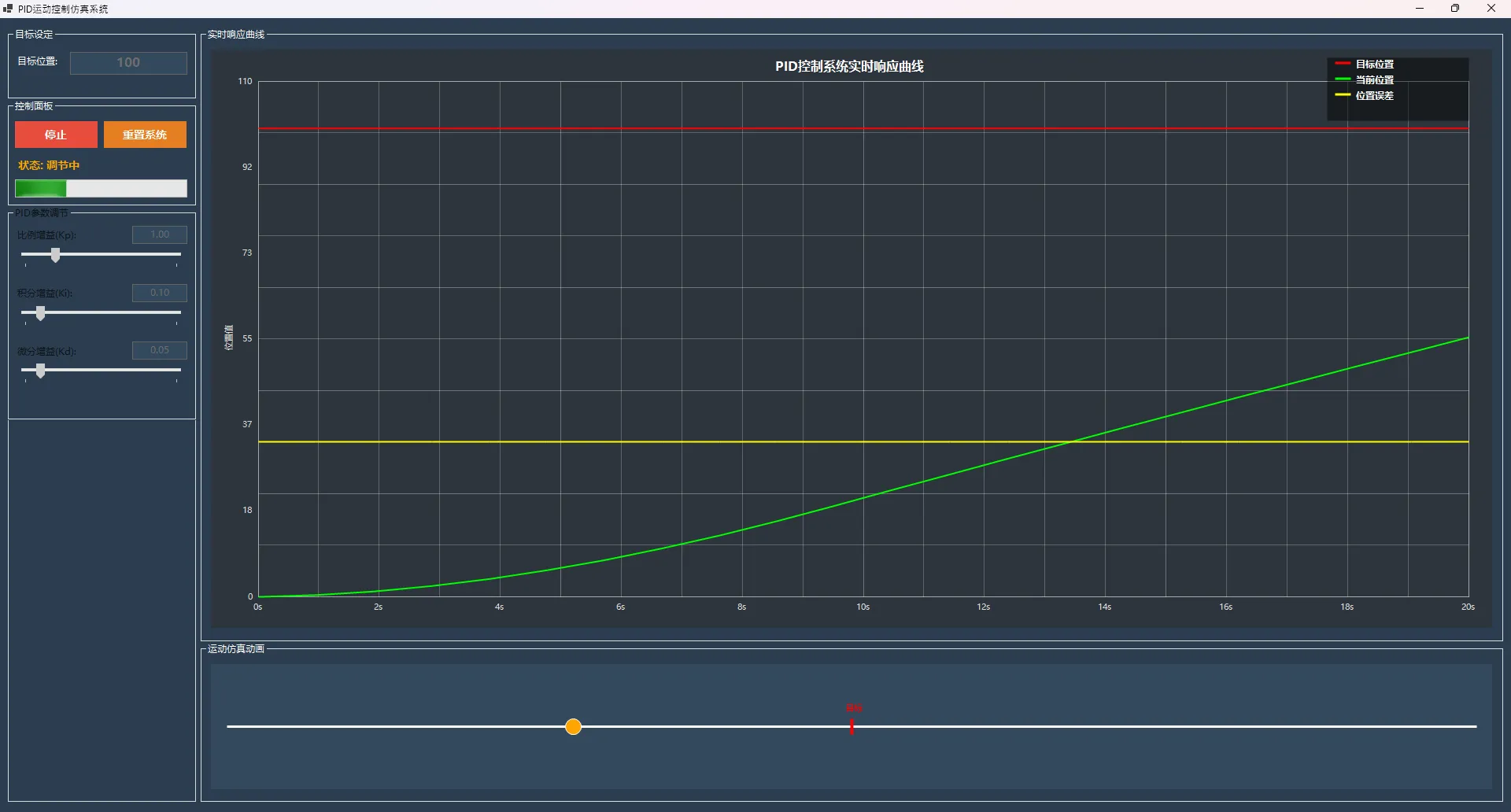
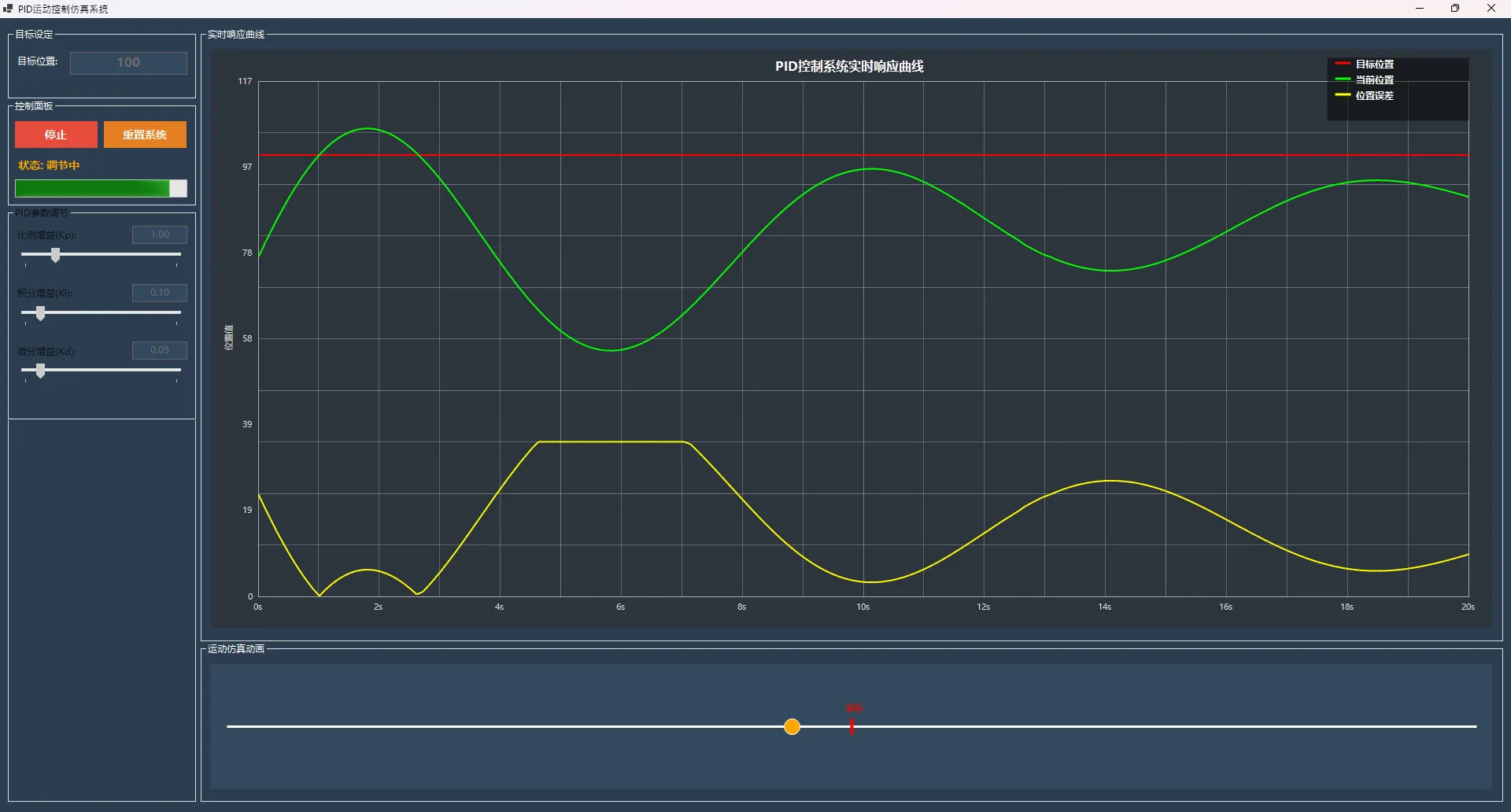
通过WinForms的Paint事件,我们实现了专业的实时数据可视化:
c#private void DrawDataCurves(Graphics g, Rectangle drawingArea)
{
    if (dataIndex < 2) return;

    float maxValue = GetDisplayMaxValue();
    int displayPoints = Math.Min(dataIndex, MAX_DATA_POINTS);

    using (Pen targetPen = new Pen(Color.Red, 2))
    using (Pen currentPen = new Pen(Color.Lime, 2))
    using (Pen errorPen = new Pen(Color.Yellow, 2))
    {
        // ✅ 分别绘制目标值、当前值和误差曲线
        DrawSingleCurve(g, targetData, targetPen, drawingArea, maxValue, displayPoints);
        DrawSingleCurve(g, positionData, currentPen, drawingArea, maxValue, displayPoints);
        DrawErrorCurve(g, errorData, errorPen, drawingArea, maxValue, displayPoints);
    }
}
⚠️ 常见开发陷阱及解决方案
1. 时间处理陷阱
c#// ❌ 错误做法
if (deltaTime <= 0) deltaTime = 0.01;

// ✅ 正确做法
if (deltaTime < 0.001) return lastOutput; // 跳过本次计算
2. 积分饱和陷阱
c#// ❌ 错误做法:先累积后限幅
integralTerm += Ki * error * deltaTime;
integralTerm = Math.Max(-1000, Math.Min(1000, integralTerm));

// ✅ 正确做法:条件积分
if (输出不饱和) {
    integralTerm += Ki * error * deltaTime;
}
3. 数据更新陷阱
c#// ✅ 环形缓冲区正确实现
private void UpdateDataArrays(float position, float target)
{
    positionData[dataIndex % MAX_DATA_POINTS] = position;
    targetData[dataIndex % MAX_DATA_POINTS] = target;
    errorData[dataIndex % MAX_DATA_POINTS] = target - position;

    dataIndex++;

    // 防止索引无限增长
    if (dataIndex > MAX_DATA_POINTS * 2)
        dataIndex = MAX_DATA_POINTS;
}
🎯 实际应用场景
这套PID控制系统可以直接应用于:
- 温度控制系统:空调、加热炉温度调节
- 电机速度控制:直流电机、步进电机调速
- 液位控制:水位、油位自动调节
- 压力控制:气压、液压系统调节
💎 性能优化建议
内存管理优化
c#// ✅ 使用对象池避免频繁GC
private static readonly ObjectPool<PIDController> PidPool =
    new DefaultObjectPool<PIDController>(new PIDControllerPolicy());

// ✅ 预分配数组避免动态扩容
private float[] positionData = new float[MAX_DATA_POINTS];
计算性能优化
c#// ✅ 缓存常用计算结果
private double lastDeltaTime = 0;
private double cachedDerivative = 0;

if (Math.Abs(deltaTime - lastDeltaTime) < 0.0001)
{
    derivativeTerm = cachedDerivative; // 复用计算结果
}
🌟 总结与展望
通过这个完整的PID控制仿真系统,我们掌握了三个核心要点:
- 算法实现:积分抗饱和是工业级PID的关键技术,直接影响系统稳定性
- 工程实践:时间处理、异常保护、性能优化都是生产环境必须考虑的因素
- 可视化设计:实时数据展示不仅便于调试,更是用户体验的重要组成部分
在工业4.0的大背景下,掌握这些底层控制算法的实现原理,对C#开发者来说越来越重要。无论是做工业软件、IoT应用,还是机器人控制,这些技能都将成为你的核心竞争力。
你在项目中遇到过哪些控制算法的难题?或者想了解其他工业控制算法的C#实现?欢迎在评论区分享你的经验和想法!
觉得这篇文章对你有帮助的话,请转发给更多需要的同行朋友。让我们一起推动C#在工业控制领域的应用发展! 🚀
如果对你有用的话,可以打赏哦
打赏


本文作者:技术老小子
本文链接:
版权声明:本博客所有文章除特别声明外,均采用 BY-NC-SA 许可协议。转载请注明出处!
目录