
目录
🎯 你真的了解 WebView2 的"一生"吗?
在 WinForms 项目中嵌入 WebView2 控件,看起来不过是拖一个控件、加几行代码的事。但不少开发者在实际项目里踩过坑:页面加载完才能执行脚本,结果脚本压根没跑;窗口关了,进程还活着;导航事件顺序搞不清,拦截逻辑写错了位置……
这些问题的根源,几乎都指向同一个盲区——对 WebView2 生命周期的理解不够深入。
WebView2 并不是一个普通的 UI 控件,它背后运行着一个独立的 Chromium 浏览器进程,有自己完整的初始化流程、导航状态机和销毁机制。如果把它当普通控件用,迟早会在内存泄漏、进程残留、事件时序这三个地方摔跟头。
读完本文,你将掌握:
- WebView2 从控件创建到 CoreWebView2 就绪的完整初始化流程
- 导航的六个关键事件及其触发顺序与适用场景
- 窗口关闭时如何正确释放 WebView2,避免进程残留
测试环境:.NET 6 / WinForms,Microsoft.Web.WebView2 1.0.2045.28,Windows 11 22H2。
🔬 一、初始化阶段:两步走,缺一不可
WebView2 的"双层结构"
很多人第一次用 WebView2 时,会直接在 Form_Load 里调用 webView21.CoreWebView2.Navigate(url),然后迎来一个经典异常:
NullReferenceException: Object reference not set to an instance of an object.
原因很简单:WebView2 控件和 CoreWebView2 是两个不同层次的对象。
WebView2(控件层):WinForms 控件,随窗体创建而存在,负责 UI 渲染区域。CoreWebView2(引擎层):Chromium 浏览器进程的托管包装,异步初始化,未完成前为null。
这就像买了一台电视(控件),但显像管(引擎)还没装好,你不能直接换台。
正确的初始化姿势
初始化分两步:调用 EnsureCoreWebView2Async + 等待 CoreWebView2InitializationCompleted 事件。
csharppublic partial class MainForm : Form
{
    public MainForm()
    {
        InitializeComponent();
        // 窗体加载时启动异步初始化
        this.Load += MainForm_Load;
    }

    private async void MainForm_Load(object sender, EventArgs e)
    {
        // 第一步:触发 CoreWebView2 异步初始化
        // 可传入 WebView2EnvironmentOptions 自定义用户数据目录、启动参数等
        await webView21.EnsureCoreWebView2Async(null);

        // 到这里,CoreWebView2 已就绪,可以安全操作
        webView21.CoreWebView2.Navigate("https://example.com");
    }
}
EnsureCoreWebView2Async 内部做了什么?简单说,它会:
- 查找或创建 WebView2 运行时环境(
CoreWebView2Environment) - 启动独立的
msedgewebview2.exe子进程 - 建立控件与浏览器进程之间的 IPC 通道
- 将
CoreWebView2对象注入控件
整个过程是异步的,在低配机器上可能需要 300~800ms。在 await 完成之前,CoreWebView2 始终为 null,这是 NullReferenceException 的根本原因。
自定义环境:用户数据目录与启动参数
生产项目里,通常需要指定用户数据目录(避免多实例冲突)或传入 Chromium 启动参数:
csharpprivate async void MainForm_Load(object sender, EventArgs e)
{
    // 自定义用户数据目录,避免多窗口实例争用默认目录
    string userDataFolder = Path.Combine(
        Environment.GetFolderPath(Environment.SpecialFolder.LocalApplicationData),
        "MyApp", "WebView2Data");

    var options = new CoreWebView2EnvironmentOptions(
        additionalBrowserArguments: "--disable-web-security --allow-running-insecure-content"
    );

    var environment = await CoreWebView2Environment.CreateAsync(
        browserExecutableFolder: null,  // null = 使用系统安装的 WebView2 运行时
        userDataFolder: userDataFolder,
        options: options
    );

    await webView21.EnsureCoreWebView2Async(environment);

    // 初始化完成后,配置基础设置
    var settings = webView21.CoreWebView2.Settings;
    settings.IsScriptEnabled = true;
    settings.AreDefaultContextMenusEnabled = false;  // 禁用右键菜单
    settings.IsStatusBarEnabled = false;

    webView21.CoreWebView2.Navigate("https://example.com");
}
注意:同一个 CoreWebView2Environment 实例可以被多个 WebView2 控件共享,这样多个控件共用同一个浏览器进程,能显著降低内存占用(实测在四控件场景下,共享环境比独立环境节省约 120MB 内存)。
🧭 二、导航阶段:六个事件,一条状态机
WebView2 的导航过程不是一个黑盒,它暴露了六个关键事件,按触发顺序排列如下:
NavigationStarting
    ↓
ContentLoading
    ↓
SourceChanged
    ↓
HistoryChanged
    ↓
DOMContentLoaded
    ↓
NavigationCompleted
理解每个事件的触发时机,是写对拦截逻辑和脚本注入逻辑的前提。
各事件详解
NavigationStarting — 导航请求刚发出,页面尚未加载任何内容。这是拦截导航的唯一正确位置。此时可以检查 URL、取消导航、重定向到其他地址。
csharpwebView21.CoreWebView2.NavigationStarting += (sender, e) =>
{
    // 拦截非白名单域名
    var uri = new Uri(e.Uri);
    if (!IsAllowedDomain(uri.Host))
    {
        e.Cancel = true;  // 取消导航
        MessageBox.Show($"访问 {uri.Host} 已被策略阻止");
        return;
    }

    // 可以在这里显示加载进度条
    progressBar1.Visible = true;
};
ContentLoading — 服务器响应已到达,开始接收 HTML 内容,但 DOM 尚未构建完成。适合做加载状态 UI 更新,不适合操作 DOM。
SourceChanged — Source 属性(当前 URL)发生变化。注意:页面内的 hash 跳转(#anchor)也会触发此事件,但不会触发 NavigationStarting,这是一个常见的混淆点。
HistoryChanged — 浏览历史记录更新。适合同步更新"前进/后退"按钮的可用状态:
csharpwebView21.CoreWebView2.HistoryChanged += (sender, e) =>
{
    btnBack.Enabled = webView21.CoreWebView2.CanGoBack;
    btnForward.Enabled = webView21.CoreWebView2.CanGoForward;
};
DOMContentLoaded — HTML 解析完成,DOM 树已构建,但外部资源(图片、CSS、JS)可能尚未加载完毕。这是注入脚本操作 DOM 的最佳时机,比 NavigationCompleted 更早,用户体验更好:
csharpwebView21.CoreWebView2.DOMContentLoaded += async (sender, e) =>
{
    // DOM 已就绪,可以安全执行脚本
    await webView21.CoreWebView2.ExecuteScriptAsync(
        "document.body.style.backgroundColor = '#f0f0f0';"
    );
};
NavigationCompleted — 页面所有资源加载完毕(或加载失败)。适合隐藏进度条、执行依赖完整页面状态的操作。注意检查 e.IsSuccess:
csharpwebView21.CoreWebView2.NavigationCompleted += (sender, e) =>
{
    progressBar1.Visible = false;

    if (!e.IsSuccess)
    {
        // e.WebErrorStatus 包含具体错误类型
        // 如 ConnectionAborted、NameNotResolved 等
        lblStatus.Text = $"加载失败:{e.WebErrorStatus}";
    }
};
一个常被忽略的细节:NavigationId
每次导航都有唯一的 NavigationId,上述所有事件的 EventArgs 都携带这个 ID。在多标签或快速连续导航场景中,用它来匹配"哪次导航的哪个事件",可以避免事件错位的逻辑 bug:
csharpprivate ulong _currentNavigationId;

webView21.CoreWebView2.NavigationStarting += (sender, e) =>
{
    _currentNavigationId = e.NavigationId;
};

webView21.CoreWebView2.NavigationCompleted += (sender, e) =>
{
    if (e.NavigationId != _currentNavigationId) return; // 忽略过期导航的回调
    // 处理当前导航完成逻辑
};
🗑️ 三、销毁阶段:不释放,进程就不死
这是生命周期中最容易被忽视、也最容易出问题的阶段。
典型的"进程僵尸"现象
关闭 WinForms 窗口后,打开任务管理器,你会发现 msedgewebview2.exe 还在运行。这不是 bug,是没有正确释放 WebView2 的结果。
WebView2 控件实现了 IDisposable,但 WinForms 的默认控件销毁机制并不总能可靠地触发 Dispose,尤其是在窗体被强制关闭或异常退出时。
正确的销毁流程
csharppublic partial class MainForm : Form
{
    protected override void OnFormClosing(FormClosingEventArgs e)
    {
        base.OnFormClosing(e);
        DisposeWebView();
    }

    private void DisposeWebView()
    {
        if (webView21 == null) return;

        // 第一步:先移除所有事件订阅,防止销毁过程中事件回调引发异常
        if (webView21.CoreWebView2 != null)
        {
            webView21.CoreWebView2.NavigationStarting -= OnNavigationStarting;
            webView21.CoreWebView2.NavigationCompleted -= OnNavigationCompleted;
            webView21.CoreWebView2.DOMContentLoaded -= OnDOMContentLoaded;
            // ... 其他已订阅的事件
        }

        // 第二步:显式调用 Dispose,触发浏览器进程的优雅退出
        webView21.Dispose();
        webView21 = null;
    }
}
多实例场景:共享 Environment 的释放顺序
如果多个控件共享同一个 CoreWebView2Environment,释放顺序很重要:先释放所有 WebView2 控件,再释放 Environment。反序操作会导致进程退出时抛出 COM 异常。
csharpprivate CoreWebView2Environment _sharedEnvironment;

protected override void OnFormClosing(FormClosingEventArgs e)
{
    base.OnFormClosing(e);

    // 先释放所有控件
    webView21?.Dispose();
    webView22?.Dispose();

    _sharedEnvironment=null;
}
进程级兜底:ProcessFailed 事件
WebView2 的 Chromium 子进程可能因为各种原因崩溃(内存不足、渲染异常等)。ProcessFailed 事件是处理这类情况的正确入口:
csharpwebView21.CoreWebView2.ProcessFailed += async (sender, e) =>
{
    if (e.ProcessFailedKind == CoreWebView2ProcessFailedKind.BrowserProcessExited)
    {
        // 浏览器主进程退出,需要重新初始化
        // 注意:此时 CoreWebView2 已失效,需重走初始化流程
        await ReinitializeWebView();
    }
    else if (e.ProcessFailedKind == CoreWebView2ProcessFailedKind.RenderProcessExited)
    {
        // 渲染进程崩溃,可以尝试重新加载当前页面
        webView21.Reload();
    }
};
🧩 四、完整生命周期示例:把三个阶段串起来
下面是一个将初始化、导航监控、优雅销毁整合在一起的完整示例,可直接作为项目模板使用:
csharpusing Microsoft.Web.WebView2.Core;
using Microsoft.Web.WebView2.WinForms;

namespace AppWebView202603
{
    public partial class FrmBrowser : Form
    {
        private CoreWebView2Environment? _environment;
        private bool _isWebViewReady = false;

        public FrmBrowser()
        {
            InitializeComponent();
            this.Load += FrmBrowser_Load;
            this.FormClosing += BrowserForm_FormClosing;
        }

        // ── 初始化阶段 ──────────────────────────────────────────
        private async void FrmBrowser_Load(object sender, EventArgs e)
        {
            try
            {
                string dataFolder = Path.Combine(
                    Environment.GetFolderPath(Environment.SpecialFolder.LocalApplicationData),
                    "MyApp", "WebView2");

                _environment = await CoreWebView2Environment.CreateAsync(
                    null, dataFolder, new CoreWebView2EnvironmentOptions());

                await webView21.EnsureCoreWebView2Async(_environment);

                // 配置控件设置
                var settings = webView21.CoreWebView2.Settings;
                settings.AreDefaultContextMenusEnabled = false;
                settings.IsStatusBarEnabled = false;

                // 注册导航事件
                RegisterNavigationEvents();

                _isWebViewReady = true;
                webView21.CoreWebView2.Navigate("https://www.bing.com");
            }
            catch (Exception ex)
            {
                MessageBox.Show($"WebView2 初始化失败:{ex.Message}");
            }
        }

        // ── 导航阶段 ──────────────────────────────────────────
        private void RegisterNavigationEvents()
        {
            var cw2 = webView21.CoreWebView2;

            cw2.NavigationStarting += OnNavigationStarting;
            cw2.DOMContentLoaded += OnDOMContentLoaded;
            cw2.NavigationCompleted += OnNavigationCompleted;
            cw2.ProcessFailed += OnProcessFailed;
        }

        private void UnregisterNavigationEvents()
        {
            if (webView21.CoreWebView2 == null) return;
            var cw2 = webView21.CoreWebView2;

            cw2.NavigationStarting -= OnNavigationStarting;
            cw2.DOMContentLoaded -= OnDOMContentLoaded;
            cw2.NavigationCompleted -= OnNavigationCompleted;
            cw2.ProcessFailed -= OnProcessFailed;
        }

        // NavigationStarting:导航请求刚发出,可在此拦截
        private void OnNavigationStarting(object? sender, CoreWebView2NavigationStartingEventArgs e)
        {
            // UI 操作须在主线程,WebView2 事件默认在主线程回调,无需 Invoke
            progressBar1.Visible = true;
            progressBar1.Style = ProgressBarStyle.Marquee;
            txtUrl.Text = e.Uri;
            lblStatus.Text = "正在加载...";
        }

        // DOMContentLoaded:DOM 树构建完毕,适合注入脚本
        private async void OnDOMContentLoaded(
            object? sender, CoreWebView2DOMContentLoadedEventArgs e)
        {
            // 注入自定义 CSS 变量示例
            await webView21.CoreWebView2.ExecuteScriptAsync(
                "document.documentElement.style.setProperty('--app-theme', '#1a73e8');");
        }

        // NavigationCompleted:页面全部资源加载完毕(或失败)
        private void OnNavigationCompleted(
            object? sender, CoreWebView2NavigationCompletedEventArgs e)
        {
            progressBar1.Visible = false;
            progressBar1.Style = ProgressBarStyle.Blocks;

            btnBack.Enabled = webView21.CoreWebView2.CanGoBack;
            btnForward.Enabled = webView21.CoreWebView2.CanGoForward;

            if (e.IsSuccess)
            {
                lblStatus.Text = "加载完成";
                txtUrl.Text = webView21.CoreWebView2.Source;
            }
            else
            {
                lblStatus.Text = $"加载失败:{e.WebErrorStatus}";
            }
        }

        // ProcessFailed:Chromium 子进程崩溃或退出
        private async void OnProcessFailed(
            object? sender, CoreWebView2ProcessFailedEventArgs e)
        {
            switch (e.ProcessFailedKind)
            {
                case CoreWebView2ProcessFailedKind.BrowserProcessExited:
                    // 浏览器主进程退出,需完整重新初始化
                    _isWebViewReady = false;
                    lblStatus.Text = "浏览器进程意外退出,正在重新初始化...";
                    await Task.Delay(1000); // 等待进程完全退出
                    await ReinitializeAsync();
                    break;

                case CoreWebView2ProcessFailedKind.RenderProcessExited:
                    // 渲染进程崩溃,尝试重新加载当前页
                    lblStatus.Text = "渲染进程崩溃,正在重新加载...";
                    webView21.Reload();
                    break;

                default:
                    lblStatus.Text = $"子进程异常:{e.ProcessFailedKind}";
                    break;
            }
        }

        // 进程崩溃后重新初始化
        private async Task ReinitializeAsync()
        {
            try
            {
                await webView21.EnsureCoreWebView2Async(_environment);
                RegisterNavigationEvents();
                _isWebViewReady = true;
                lblStatus.Text = "重新初始化成功";
                webView21.CoreWebView2.Navigate("https://www.bing.com");
            }
            catch (Exception ex)
            {
                MessageBox.Show($"重新初始化失败:{ex.Message}");
            }
        }

        // ── 工具栏按钮事件 ──────────────────────────────────────────
        private void btnBack_Click(object sender, EventArgs e)
        {
            if (_isWebViewReady && webView21.CoreWebView2.CanGoBack)
                webView21.CoreWebView2.GoBack();
        }

        private void btnForward_Click(object sender, EventArgs e)
        {
            if (_isWebViewReady && webView21.CoreWebView2.CanGoForward)
                webView21.CoreWebView2.GoForward();
        }

        private void btnRefresh_Click(object sender, EventArgs e)
        {
            if (_isWebViewReady)
                webView21.Reload();
        }

        private void btnGo_Click(object sender, EventArgs e)
        {
            NavigateToUrl(txtUrl.Text.Trim());
        }

        private void txtUrl_KeyDown(object sender, KeyEventArgs e)
        {
            if (e.KeyCode == Keys.Enter)
            {
                e.SuppressKeyPress = true; // 防止回车键触发系统提示音
                NavigateToUrl(txtUrl.Text.Trim());
            }
        }

        private void NavigateToUrl(string input)
        {
            if (!_isWebViewReady || string.IsNullOrWhiteSpace(input)) return;

            // 简单判断:没有协议头则自动补 https://
            if (!input.StartsWith("http://", StringComparison.OrdinalIgnoreCase) &&
                !input.StartsWith("https://", StringComparison.OrdinalIgnoreCase))
            {
                input = "https://" + input;
            }

            try
            {
                webView21.CoreWebView2.Navigate(input);
            }
            catch (Exception ex)
            {
                MessageBox.Show($"导航失败:{ex.Message}");
            }
        }

        // ── 销毁阶段 ──────────────────────────────────────────
        private void BrowserForm_FormClosing(object sender, FormClosingEventArgs e)
        {
            _isWebViewReady = false;

            // 先取消所有事件订阅,防止销毁过程中触发回调引发异常
            UnregisterNavigationEvents();

            // 显式释放控件,触发 Chromium 子进程优雅退出
            webView21?.Dispose();

            // 置 null 即可,让 GC 自行回收
            _environment = null;
        }
    }
}
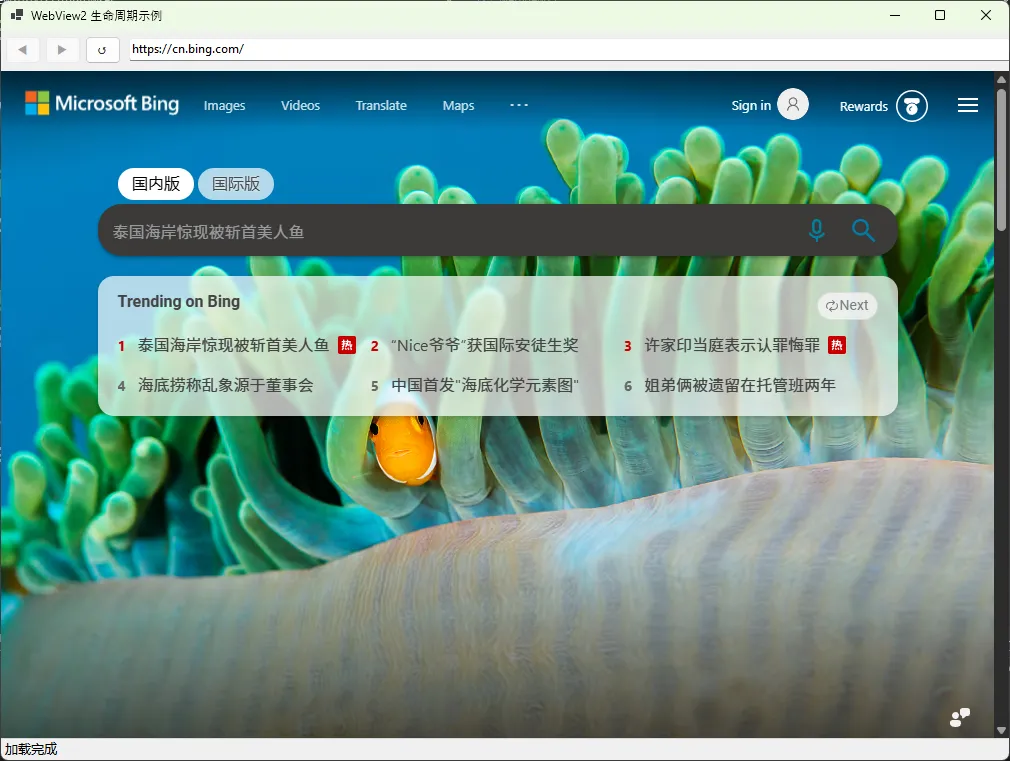
⚠️ 五、高频踩坑预警
坑1:在 NavigationStarting 之外的地方拦截导航
NavigationCompleted 里设置 e.Cancel = true 是无效的,Cancel 属性只在 NavigationStarting 中有效。
坑2:CoreWebView2 为 null 时调用 Navigate
在 EnsureCoreWebView2Async 完成之前,任何对 CoreWebView2 的访问都会抛出空引用。用 _isWebViewReady 标志位做保护是个简单有效的方案。
坑3:忘记取消事件订阅导致内存泄漏
如果用 lambda 订阅了事件,在销毁时无法取消订阅(lambda 没有引用)。建议用命名方法订阅,方便在 Dispose 时显式移除。
坑4:多窗口共用默认用户数据目录
同一个用户数据目录同时被两个 WebView2 实例使用,会导致其中一个初始化失败并抛出 HRESULT: 0x8007010B。每个独立窗口应使用不同的子目录,或共享同一个 CoreWebView2Environment 实例。
📌 核心收获梳理
经过完整的生命周期梳理,有三个要点值得反复回味:
WebView2 的初始化是异步两阶段的,控件创建不等于引擎就绪,必须 await EnsureCoreWebView2Async 完成后才能操作 CoreWebView2。
导航事件有严格的触发顺序,拦截导航只能在 NavigationStarting,注入脚本操作 DOM 的最佳时机是 DOMContentLoaded,不要把逻辑写在错误的事件里。
销毁阶段必须显式调用 Dispose,并在此之前移除所有事件订阅,多实例场景下注意先释放控件再释放 Environment,避免进程残留和 COM 异常。
💬 互动话题
在你的项目中,有没有遇到过 WebView2 进程销毁不干净、或者脚本注入时机不对的问题?你是怎么排查和解决的?欢迎在评论区聊聊你的实战经历。
另外,如果你在项目里用到了 WebView2 与 WinForms 原生控件之间的双向通信(PostWebMessageAsJson / WebMessageReceived),这块的时序问题同样值得深挖,可以作为下一个话题。
#C#开发 #WinForms #WebView2 #性能优化 #桌面应用开发
本文作者:技术老小子
本文链接:
版权声明:本博客所有文章除特别声明外,均采用 BY-NC-SA 许可协议。转载请注明出处!