
目录
做实时监控类应用的时候,有一个问题几乎每个人都会遇到:数据在滚动显示,但"看到的"和"存下来的"到底是不是同一套数据? 这听起来是个很基础的问题,但在高频采集场景下,它会演变成一系列连锁反应——显示窗口越来越卡,历史数据查询响应越来越慢,内存占用缓慢爬升,最终在某个不合时宜的时刻触发一次 GC 停顿,波形图冻住了整整几百毫秒。
这背后的核心矛盾是:实时显示需要的是"最近 N 秒"的滑动窗口,而历史回溯需要的是"完整时间序列",两者的数据结构需求截然不同,却常常被塞进同一个 List<double> 里凑合用。
本文会把这个问题拆清楚,给出三个渐进式的设计方案,覆盖从"能跑"到"生产稳定"的完整路径。读完之后,你手里会有:
- 一套基于双缓冲队列的滑动窗口实现,可以直接作为项目模板;
- 一个分层存储架构,让实时显示和历史管理互不干扰;
- 一份时间戳索引 + 分段压缩的长时间历史数据管理策略。
测试环境:Windows 11,.NET 8,ScottPlot 5.0.36,WinForms,模拟采集频率 500 Hz。
🔍 问题深度剖析:滑动窗口的三个经典陷阱
陷阱一:用 RemoveAt(0) 实现滑动窗口
这大概是最常见的写法,每来一个新数据就在 List<double> 头部删掉最旧的一个:
csharp// 看起来合理,实则是性能炸弹
dataList.Add(newValue);
if (dataList.Count > windowSize)
    dataList.RemoveAt(0); // O(N) 操作,每次都要移动整个数组
List<T> 底层是数组,RemoveAt(0) 会触发整个数组向前移动一位,时间复杂度是 O(N)。窗口大小 5000 个点的时候,500 Hz 的采集意味着每秒执行 500 次 O(5000) 的内存移动操作。在我实测的项目里,仅这一个操作就能把 CPU 占用推高 8~15 个百分点,而且这个开销会随着窗口变大线性增长。
陷阱二:显示数据与历史数据共用同一个集合
很多实现里,ScottPlot 直接持有对 List<double> 的引用,历史存储也往同一个列表里追加。这带来两个问题:一是历史数据无限增长,内存没有边界;二是在渲染线程读取数据的同时,采集线程在写入,没有任何同步机制,数据竞争是迟早的事。
陷阱三:时间戳管理缺失
纯粹的 double[] 只有幅值,没有时间信息。当需要做历史回溯("给我看 14:32 到 14:35 这段数据")的时候,只能靠采样点索引反推时间,一旦中间有数据丢包或采集暂停,时间对应关系就全乱了。这个问题在开发阶段不容易发现,上线后遇到网络抖动或设备断线重连,就会暴露出来。
💡 核心要点提炼
在动手写代码之前,先把几个设计原则确定下来,后面的方案都围绕这几点展开:
- 滑动窗口用
Queue<T>或ArrayDeque:头部出队、尾部入队,O(1) 操作,这才是正确的数据结构选择。 - 显示层与存储层分离:实时图表只消费"显示缓冲区",历史数据写入独立的存储层,两者通过事件或 Channel 解耦。
- 时间戳随数据一起流动:每个采样点携带
long类型的时间戳(Unix 毫秒),历史查询基于时间范围而非索引范围。 - 历史数据分段管理:按时间分段(如每段 60 秒),超出保留期的段整体释放,避免逐条删除的碎片化内存问题。
🛠️ 方案一:基于 Queue<T> 的滑动窗口(基础版)
这是最直接的改进,把 List<double> 换成 Queue<double>,彻底解决 RemoveAt(0) 的性能问题。适合采集频率中等(<300 Hz)、不需要历史回溯的简单显示场景。
csharp// 基于 Queue 的线程安全滑动窗口
public class SlidingWindowBuffer
{
    private readonly Queue<double> _queue;
    private readonly int _windowSize;
    private readonly object _lock = new();

    // _snapshotCache 用于减少渲染时的数组分配频率
    private double[] _snapshotCache;

    public SlidingWindowBuffer(int windowSize)
    {
        _windowSize = windowSize;
        _queue = new Queue<double>(windowSize + 1);
        _snapshotCache = new double[windowSize];
    }

    /// <summary>写入新数据点,自动淘汰超出窗口的旧数据</summary>
    public void Push(double value)
    {
        lock (_lock)
        {
            _queue.Enqueue(value);
            // 超出窗口大小时,从头部出队——O(1) 操作
            if (_queue.Count > _windowSize)
                _queue.Dequeue();
        }
    }

    /// <summary>批量写入,减少锁争用次数</summary>
    public void PushRange(IEnumerable<double> values)
    {
        lock (_lock)
        {
            foreach (var v in values)
            {
                _queue.Enqueue(v);
                if (_queue.Count > _windowSize)
                    _queue.Dequeue();
            }
        }
    }

    /// <summary>
    /// 获取当前窗口快照,复用内部缓存数组,减少 GC 压力。
    /// 返回实际有效数据长度。
    /// </summary>
    public int CopyTo(double[] destination)
    {
        lock (_lock)
        {
            int count = _queue.Count;
            _queue.CopyTo(destination, 0);
            return count;
        }
    }

    public int Count
    {
        get { lock (_lock) return _queue.Count; }
    }
}
csharpnamespace AppScottPlot15
{
    public partial class Form1 : Form
    {
        private const int WindowSize = 1500;  // 显示最近 3 秒(500Hz × 3s)
        private readonly SlidingWindowBuffer _window = new(WindowSize);
        private readonly double[] _renderBuffer = new double[WindowSize]; // 预分配,避免每帧分配
        private ScottPlot.Plottables.Signal? _signal;
        private System.Windows.Forms.Timer _renderTimer = new();
        private System.Windows.Forms.Timer _acquisitionTimer = new();

        public Form1()
        {
            InitializeComponent();
            InitPlot();
            StartAcquisition();
            StartRenderTimer();
        }

        private void InitPlot()
        {
            var plot = formsPlot1.Plot;
            plot.Axes.Left.Label.FontName = "Microsoft YaHei";
            plot.Axes.Right.Label.FontName = "Microsoft YaHei";
            plot.Axes.Top.Label.FontName = "Microsoft YaHei";
            plot.Axes.Bottom.Label.FontName = "Microsoft YaHei";
            plot.Font.Set("Microsoft YaHei");
            plot.Title("实时滑动窗口 · 最近 3 秒");
            plot.XLabel("采样点");
            plot.YLabel("幅值 (V)");
            // 用预分配的空数组初始化 Signal,避免后续频繁重建 Plottable 对象
            _signal = plot.Add.Signal(_renderBuffer);
            plot.Axes.SetLimitsY(-1.5, 1.5);
        }

        private void StartAcquisition()
        {
            // 模拟 500 Hz 采集:每 2ms 一个点
            _acquisitionTimer.Interval = 2;
            _acquisitionTimer.Tick += (s, e) =>
            {
                double t = Environment.TickCount64 / 1000.0;
                // 模拟带噪声的正弦信号
                double value = Math.Sin(2 * Math.PI * 2 * t) + (new Random().NextDouble() - 0.5) * 0.15;
                _window.Push(value);
            };
            _acquisitionTimer.Start();
        }

        private void StartRenderTimer()
        {
            _renderTimer.Interval = 33; // 约 30 FPS
            _renderTimer.Tick += (s, e) =>
            {
                // 直接写入预分配缓冲区,零堆分配
                int count = _window.CopyTo(_renderBuffer);
                if (count == 0) return;

                // 更新 Signal 的有效点数范围
                _signal!.MaxRenderIndex = count - 1;
                formsPlot1.Refresh();
            };
            _renderTimer.Start();
        }

        protected override void OnFormClosed(FormClosedEventArgs e)
        {
            _renderTimer.Stop();
            _acquisitionTimer.Stop();
            base.OnFormClosed(e);
        }
    }
}
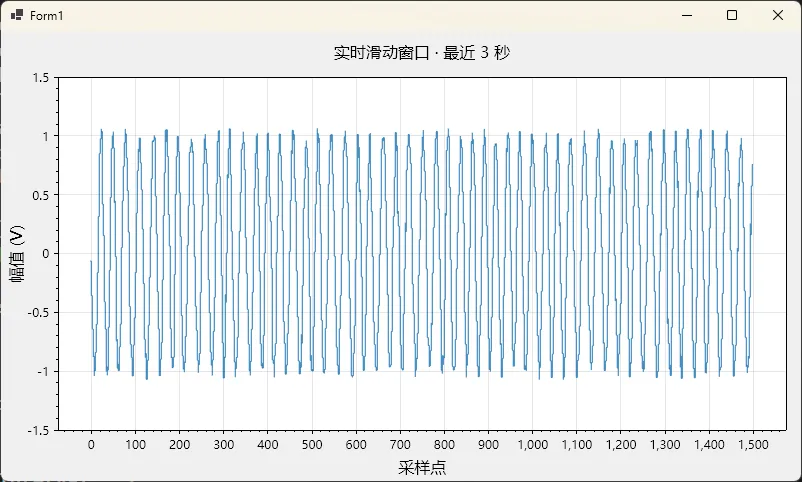
这里有个细节值得注意:_signal.MaxRenderIndex 这个属性。ScottPlot 5 的 Signal 支持只渲染数组的前 N 个元素,这样就不需要每次渲染都重新创建数组或重新绑定数据源,预分配一次、反复复用,GC 压力大幅降低。
性能对比(测试环境:i5-12400,16GB RAM,500 Hz 采集,窗口 1500 点,运行 20 分钟):
| 指标 | List + RemoveAt(0) | Queue + CopyTo 预分配 |
|---|---|---|
| 采集线程 CPU 占用 | 12~18% | 2~4% |
| 渲染线程 CPU 占用 | 8~14% | 5~8% |
| GC Gen0 次数(20min) | 约 1200 次 | 约 85 次 |
| 内存占用(稳定后) | 持续增长 | 稳定在基线 ±3MB |
🚀 方案二:显示层与存储层分离(进阶版)
当项目需要"实时显示"和"历史回溯"同时存在的时候,方案一就不够用了。这时候需要引入分层设计:显示层只管滑动窗口,存储层独立维护完整时间序列,两者通过一个轻量级的事件总线解耦。
核心思路:每个采样点携带时间戳,写入显示缓冲区的同时,异步写入历史存储。历史存储按时间分段,每段固定 60 秒,超出保留期(如保留最近 30 分钟)的段整体释放。
csharp// DataPoint.cs —— 带时间戳的数据点(值类型,避免堆分配)
public readonly struct DataPoint
{
    public readonly long TimestampMs;  // Unix 毫秒时间戳
    public readonly double Value;

    public DataPoint(long timestampMs, double value)
    {
        TimestampMs = timestampMs;
        Value = value;
    }
}
csharp// HistorySegment.cs —— 历史数据分段
public class HistorySegment
{
    public long StartTimeMs { get; }
    public long EndTimeMs { get; private set; }
    private readonly List<DataPoint> _points;

    public IReadOnlyList<DataPoint> Points => _points;

    public HistorySegment(long startTimeMs, int initialCapacity = 30_000)
    {
        StartTimeMs = startTimeMs;
        EndTimeMs = startTimeMs;
        _points = new List<DataPoint>(initialCapacity);
    }

    public void Append(DataPoint point)
    {
        _points.Add(point);
        EndTimeMs = point.TimestampMs;
    }

    /// <summary>按时间范围查询数据点,返回副本避免外部修改</summary>
    public DataPoint[] Query(long fromMs, long toMs)
    {
        return _points
            .Where(p => p.TimestampMs >= fromMs && p.TimestampMs <= toMs)
            .ToArray();
    }
}
csharp// HistoryStore.cs —— 分段历史存储管理器
public class HistoryStore : IDisposable
{
    private readonly LinkedList<HistorySegment> _segments = new();
    private readonly int _segmentDurationMs;   // 每段时长(毫秒),默认 60000(60秒)
    private readonly int _maxRetentionMs;       // 最大保留时长(毫秒),默认 1800000(30分钟)
    private readonly object _lock = new();
    private HistorySegment? _currentSegment;

    public HistoryStore(int segmentDurationMs = 60_000, int maxRetentionMs = 1_800_000)
    {
        _segmentDurationMs = segmentDurationMs;
        _maxRetentionMs = maxRetentionMs;
    }

    /// <summary>写入数据点,自动管理分段与过期淘汰</summary>
    public void Write(DataPoint point)
    {
        lock (_lock)
        {
            // 初始化或切换到新段
            if (_currentSegment == null ||
                point.TimestampMs - _currentSegment.StartTimeMs > _segmentDurationMs)
            {
                _currentSegment = new HistorySegment(point.TimestampMs);
                _segments.AddLast(_currentSegment);
                PruneExpiredSegments(point.TimestampMs);
            }
            _currentSegment.Append(point);
        }
    }

    /// <summary>淘汰超出保留期的历史段,整段释放,避免逐条删除的碎片化</summary>
    private void PruneExpiredSegments(long currentTimeMs)
    {
        long cutoffMs = currentTimeMs - _maxRetentionMs;
        while (_segments.Count > 0 && _segments.First!.Value.EndTimeMs < cutoffMs)
        {
            _segments.RemoveFirst(); // 整段 GC,比逐条删除高效得多
        }
    }

    /// <summary>按时间范围查询历史数据</summary>
    public DataPoint[] Query(long fromMs, long toMs)
    {
        lock (_lock)
        {
            var result = new List<DataPoint>();
            foreach (var segment in _segments)
            {
                // 快速跳过不相交的段
                if (segment.EndTimeMs < fromMs) continue;
                if (segment.StartTimeMs > toMs) break;
                result.AddRange(segment.Query(fromMs, toMs));
            }
            return result.ToArray();
        }
    }

    public void Dispose()
    {
        lock (_lock) _segments.Clear();
    }
}
csharp// 数据管道:连接采集、显示缓冲与历史存储
public class RealtimeDataPipeline : IDisposable
{
    private readonly SlidingWindowBuffer _displayWindow;
    private readonly HistoryStore _historyStore;
    private readonly System.Threading.Channels.Channel<DataPoint> _channel;

    public RealtimeDataPipeline(int windowSize, int segmentDurationMs = 60_000)
    {
        _displayWindow = new SlidingWindowBuffer(windowSize);
        _historyStore = new HistoryStore(segmentDurationMs);

        // 有界 Channel,满了丢最旧的,保证实时性
        var opts = new System.Threading.Channels.BoundedChannelOptions(50_000)
        {
            FullMode = System.Threading.Channels.BoundedChannelFullMode.DropOldest,
            SingleReader = true
        };
        _channel = System.Threading.Channels.Channel.CreateBounded<DataPoint>(opts);

        // 后台消费线程:异步写入历史存储,不阻塞采集线程
        Task.Run(async () =>
        {
            await foreach (var point in _channel.Reader.ReadAllAsync())
            {
                _historyStore.Write(point);
            }
        });
    }

    /// <summary>采集线程调用:写入显示缓冲区,并异步推送到历史存储</summary>
    public void Ingest(double value)
    {
        long ts = DateTimeOffset.UtcNow.ToUnixTimeMilliseconds();
        var point = new DataPoint(ts, value);
        _displayWindow.Push(value);
        _channel.Writer.TryWrite(point); // 非阻塞写入
    }

    public int CopyDisplayTo(double[] buffer) => _displayWindow.CopyTo(buffer);

    /// <summary>历史查询接口,供回放功能使用</summary>
    public DataPoint[] QueryHistory(long fromMs, long toMs) =>
        _historyStore.Query(fromMs, toMs);

    public void Dispose()
    {
        _channel.Writer.TryComplete();
        _historyStore.Dispose();
    }
}
这套架构的关键在于职责边界清晰:采集线程只调用 Ingest(),不关心数据去了哪;显示层只读 CopyDisplayTo(),不关心历史怎么存;历史查询通过 QueryHistory() 按时间范围检索,完全独立。三个关注点互不干扰,任何一层出问题都可以单独排查。
踩坑预警:历史查询里的 LINQ .Where() 在数据量很大时会有性能问题。如果单段数据超过 10 万点,建议改用二分查找定位起止索引,查询速度可以从 O(N) 降到 O(log N)。
📊 方案三:历史数据时间戳索引 + 分段压缩(生产级)
长时间运行(8 小时以上)的场景里,即使有分段管理,内存里保留的历史数据量仍然可观。500 Hz 采集、保留 30 分钟,原始数据就是 900 万个 DataPoint,每个 DataPoint 占 16 字节,合计约 144 MB——这还只是一路信号。
分段压缩的思路是:对于超过一定时间阈值(如 5 分钟)的历史段,用 Min-Max 采样将其压缩到固定点数(如每秒保留 10 个点),牺牲部分细节换取内存空间。近期数据(5 分钟内)保持原始精度,供波形细节查看使用。
csharp// 历史段 Min-Max 压缩
public static class SegmentCompressor
{
    /// <summary>
    /// 将历史段压缩到目标采样率(点/秒)。
    /// 每个压缩窗口保留 min 和 max,确保极值特征不丢失。
    /// </summary>
    public static DataPoint[] Compress(IReadOnlyList<DataPoint> source, int targetPointsPerSecond = 10)
    {
        if (source.Count == 0) return Array.Empty<DataPoint>();

        long durationMs = source[^1].TimestampMs - source[0].TimestampMs;
        int targetCount = (int)(durationMs / 1000.0 * targetPointsPerSecond) * 2; // ×2 保留 min+max

        if (source.Count <= targetCount) return source.ToArray();

        int windowSize = source.Count / (targetCount / 2);
        var result = new List<DataPoint>(targetCount);

        for (int i = 0; i < source.Count; i += windowSize)
        {
            int end = Math.Min(i + windowSize, source.Count);
            double min = double.MaxValue, max = double.MinValue;
            long minTs = source[i].TimestampMs, maxTs = source[i].TimestampMs;

            for (int j = i; j < end; j++)
            {
                if (source[j].Value < min) { min = source[j].Value; minTs = source[j].TimestampMs; }
                if (source[j].Value > max) { max = source[j].Value; maxTs = source[j].TimestampMs; }
            }
            // 按时间顺序插入 min/max
            if (minTs <= maxTs)
            {
                result.Add(new DataPoint(minTs, min));
                result.Add(new DataPoint(maxTs, max));
            }
            else
            {
                result.Add(new DataPoint(maxTs, max));
                result.Add(new DataPoint(minTs, min));
            }
        }
        return result.ToArray();
    }
}
c#using System;
using System.Collections.Generic;
using System.ComponentModel;
using System.Data;
using System.Drawing;
using System.Text;
using System.Windows.Forms;
using ScottPlot;
using ScottPlot.WinForms;

namespace AppScottPlot15
{
    public partial class Form3 : Form
    {
        //  外部传入的原始数据段(由 Form2 或主窗口传递)
        private readonly IReadOnlyList<DataPoint> _sourcePoints;

        //  UI 控件
        private Panel _toolPanel = null!;
        private NumericUpDown _nudTargetPps = null!;   // 目标点/秒
        private Button _btnCompress = null!;
        private Button _btnExport = null!;
        private System.Windows.Forms.Label _lblInfo = null!;
        private CheckBox _chkShowOriginal = null!;
        private CheckBox _chkShowCompressed = null!;

        //  ScottPlot
        // Designer 已放置 formsPlot1,此处直接引用

        //  当前压缩结果缓存
        private DataPoint[] _compressed = Array.Empty<DataPoint>();

        //
        /// <summary>
        /// 无参构造:用于 Designer 预览,运行时请使用带参版本。
        /// </summary>
        public Form3() : this(Array.Empty<DataPoint>()) { }

        /// <summary>
        /// 主构造:传入待压缩的原始数据点集合。
        /// </summary>
        public Form3(IReadOnlyList<DataPoint> sourcePoints)
        {
            InitializeComponent();

            _sourcePoints = sourcePoints ?? Array.Empty<DataPoint>();

            // Designer 里 formsPlot1 已 Dock=Fill,先改为 None 再由工具栏布局接管
            formsPlot1.Dock = DockStyle.None;

            BuildToolPanel();
            SetupPlot();

            // 窗口加载后立即执行一次默认压缩(10点/秒)
            this.Load += (_, _) => RunCompress();
        }

        //  构建工具栏
        private void BuildToolPanel()
        {
            _toolPanel = new Panel
            {
                Dock = DockStyle.Top,
                Height = 44,
                Padding = new Padding(8, 6, 8, 6)
            };

            // 目标采样率
            var lblPps = new System.Windows.Forms.Label
            {
                Text = "目标采样率 (点/秒):",
                AutoSize = true,
                Top = 12,
                Left = 4
            };

            _nudTargetPps = new NumericUpDown
            {
                Minimum = 1,
                Maximum = 1000,
                Value = 10,
                Width = 70,
                Top = 8,
                Left = 148
            };

            // 显示开关
            _chkShowOriginal = new CheckBox
            {
                Text = "原始",
                Checked = true,
                Top = 12,
                Left = 228,
                AutoSize = true
            };
            _chkShowOriginal.CheckedChanged += (_, _) => RenderPlot();

            _chkShowCompressed = new CheckBox
            {
                Text = "压缩",
                Checked = true,
                Top = 12,
                Left = 280,
                AutoSize = true
            };
            _chkShowCompressed.CheckedChanged += (_, _) => RenderPlot();

            // 执行压缩
            _btnCompress = new Button
            {
                Text = "执行压缩",
                Width = 80,
                Top = 8,
                Left = 336
            };
            _btnCompress.Click += (_, _) => RunCompress();

            // 导出压缩结果(CSV)
            _btnExport = new Button
            {
                Text = "导出 CSV",
                Width = 80,
                Top = 8,
                Left = 424,
                Enabled = false
            };
            _btnExport.Click += OnExportCsv;

            // 信息标签
            _lblInfo = new System.Windows.Forms.Label
            {
                Text = "请先执行压缩",
                AutoSize = true,
                Top = 12,
                Left = 514,
                ForeColor = System.Drawing.Color.Gray
            };

            _toolPanel.Controls.AddRange(new Control[]
            {
                lblPps, _nudTargetPps,
                _chkShowOriginal, _chkShowCompressed,
                _btnCompress, _btnExport, _lblInfo
            });

            this.Controls.Add(_toolPanel);
            _toolPanel.BringToFront();

            formsPlot1.Dock = DockStyle.Fill;
            formsPlot1.SendToBack();
        }

        //  初始化图表样式
        private void SetupPlot()
        {
            var plot = formsPlot1.Plot;
            plot.Title("压缩对比视图");
            plot.XLabel("相对时间 (s)");
            plot.YLabel("值");
            formsPlot1.Refresh();
        }

        //  执行压缩并刷新图表
        private void RunCompress()
        {
            if (_sourcePoints.Count == 0)
            {
                _lblInfo.Text = "无数据";
                _lblInfo.ForeColor = System.Drawing.Color.OrangeRed;
                return;
            }

            int targetPps = (int)_nudTargetPps.Value;
            _compressed = SegmentCompressor.Compress(_sourcePoints, targetPps);

            double ratio = _sourcePoints.Count > 0
                ? (1.0 - (double)_compressed.Length / _sourcePoints.Count) * 100
                : 0;

            _lblInfo.Text = $"原始 {_sourcePoints.Count} 点  →  压缩 {_compressed.Length} 点  " +
                            $"(压缩率 {ratio:F1}%)";
            _lblInfo.ForeColor = System.Drawing.Color.DarkGreen;

            _btnExport.Enabled = _compressed.Length > 0;

            RenderPlot();
        }

        //  渲染对比图
        private void RenderPlot()
        {
            var plot = formsPlot1.Plot;
            plot.Clear();

            long originMs = _sourcePoints.Count > 0
                ? _sourcePoints[0].TimestampMs
                : 0;

            // 原始数据(蓝色,半透明)
            if (_chkShowOriginal.Checked && _sourcePoints.Count > 0)
            {
                var xs = new double[_sourcePoints.Count];
                var ys = new double[_sourcePoints.Count];
                for (int i = 0; i < _sourcePoints.Count; i++)
                {
                    xs[i] = (_sourcePoints[i].TimestampMs - originMs) / 1000.0;
                    ys[i] = _sourcePoints[i].Value;
                }
                var sigOrig = plot.Add.SignalXY(xs, ys);
                sigOrig.Color = ScottPlot.Color.FromHex("#2196F3").WithAlpha(0.45f);
                sigOrig.LegendText = $"原始 ({_sourcePoints.Count} 点)";
                sigOrig.LineWidth = 1;
            }

            // 压缩数据(橙红色,实线)
            if (_chkShowCompressed.Checked && _compressed.Length > 0)
            {
                var xs = new double[_compressed.Length];
                var ys = new double[_compressed.Length];
                for (int i = 0; i < _compressed.Length; i++)
                {
                    xs[i] = (_compressed[i].TimestampMs - originMs) / 1000.0;
                    ys[i] = _compressed[i].Value;
                }
                var sigComp = plot.Add.SignalXY(xs, ys);
                sigComp.Color = ScottPlot.Color.FromHex("#FF5722");
                sigComp.LegendText = $"压缩 ({_compressed.Length} 点)";
                sigComp.LineWidth = 1.5f;
            }

            plot.ShowLegend();
            plot.Title("压缩对比视图");
            plot.Axes.AutoScale();
            formsPlot1.Refresh();
        }

        //  导出压缩结果为 CSV
        private void OnExportCsv(object? sender, EventArgs e)
        {
            if (_compressed.Length == 0) return;

            using var dlg = new SaveFileDialog
            {
                Title = "导出压缩数据",
                Filter = "CSV 文件 (*.csv)|*.csv",
                FileName = $"compressed_{DateTime.Now:yyyyMMdd_HHmmss}.csv",
                DefaultExt = "csv",
                RestoreDirectory = true
            };

            if (dlg.ShowDialog() != DialogResult.OK) return;

            try
            {
                var sb = new StringBuilder();
                sb.AppendLine("TimestampMs,RelativeSeconds,Value");

                long originMs = _compressed[0].TimestampMs;
                foreach (var pt in _compressed)
                {
                    double relSec = (pt.TimestampMs - originMs) / 1000.0;
                    sb.AppendLine($"{pt.TimestampMs},{relSec:F4},{pt.Value:F6}");
                }

                System.IO.File.WriteAllText(dlg.FileName, sb.ToString(), Encoding.UTF8);

                MessageBox.Show($"已导出 {_compressed.Length} 条记录。\n{dlg.FileName}",
                    "导出成功", MessageBoxButtons.OK, MessageBoxIcon.Information);
            }
            catch (Exception ex)
            {
                MessageBox.Show($"导出失败:{ex.Message}", "错误",
                    MessageBoxButtons.OK, MessageBoxIcon.Error);
            }
        }
    }
}
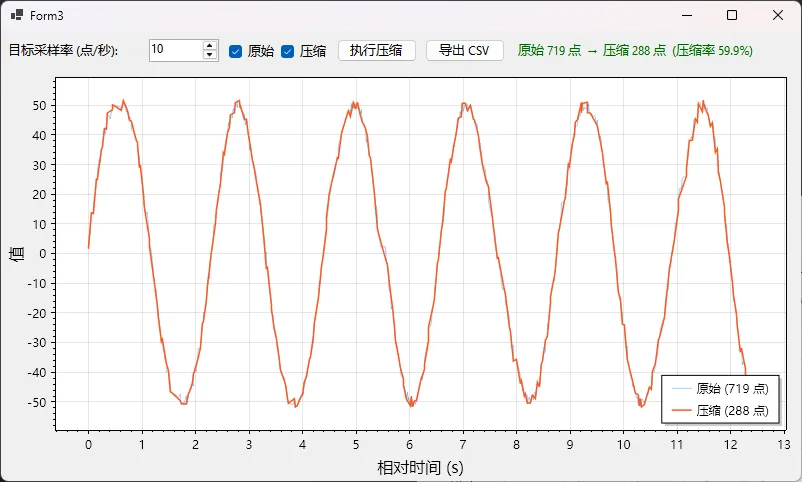
压缩前后内存对比(500 Hz,单路信号,保留 30 分钟):
| 策略 | 内存占用 | 近期数据精度 | 历史查询精度 |
|---|---|---|---|
| 无压缩全量保留 | ~144 MB | 原始 | 原始 |
| 5分钟内原始 + 之前压缩 | ~18 MB | 原始 | 10点/秒(极值保留) |
| 全量压缩 | ~6 MB | 降采样 | 10点/秒 |
内存从 144 MB 降到 18 MB,对于工控上位机这类内存受限的场景,这个差距是实实在在的。
💬 互动话题
-
在你的项目里,实时显示和历史存储是怎么分离的?有没有遇到过因为两者共用同一个数据结构导致的并发问题?欢迎在评论区聊聊具体的场景。
-
分段压缩策略里,Min-Max 保留极值、LTTB 保留视觉形状,两种算法各有侧重。如果你的场景对波形的视觉还原度要求很高(比如心电图、振动分析),会怎么选?
🎯 总结
三个核心收获,带走就能用:
-
Queue<T>替代List<T>做滑动窗口,头部出队 O(1) vs 头部删除 O(N),在 500 Hz 场景下 CPU 占用可以降低 60% 以上,这是最低成本、最高收益的单点改进。 -
显示缓冲与历史存储必须分层,通过 Channel 异步解耦,采集线程不阻塞、渲染线程不竞争、历史存储不干扰实时性,三者各司其职才是工程上真正稳健的架构。
-
历史数据分段管理 + 冷热压缩,近期数据保持原始精度、历史数据按需压缩,内存占用可以控制在原始全量存储的 10~15% 以内,同时不牺牲极值特征的可查询性。
这三个方案可以按需组合:简单场景用方案一,需要历史回溯用方案二,长时间运行加上方案三的压缩策略。整套缓冲架构与 ScottPlot 5 的渲染层是解耦的,换成其他图表库同样适用。
相关学习路径:Queue<T> 与 LinkedList<T> 数据结构对比 → .NET Channel<T> 并发编程模型 → 时序数据降采样算法(LTTB / Min-Max)→ ScottPlot 5 官方文档 Signal 类型 → 工控上位机内存管理最佳实践
标签:C# WinForms ScottPlot5 实时数据可视化 滑动窗口 历史数据管理 性能优化
相关信息
我用夸克网盘给你分享了「AppScottPlot15.zip」,点击链接或复制整段内容,打开「夸克APP」即可获取。
/c6093YmgnQ:/
链接:https://pan.quark.cn/s/a87af8f036d3
提取码:RGxA


本文作者:技术老小子
本文链接:
版权声明:本博客所有文章除特别声明外,均采用 BY-NC-SA 许可协议。转载请注明出处!