
目录
你是不是也遇到过这种情况?
客户说要换一批控制卡,从雷赛换成固高。然后你打开代码一看——完犊子,满屏幕都是LTDMC.dmc_pmove()这种硬编码调用。改一个地方,牵一发动全身。加班三天三夜,bug还是按下葫芦起了瓢。
说实话,我干了这么多年工控项目,见过太多这样的"屎山代码"了。
问题的根源在哪? 没有做好硬件抽象。上层业务逻辑和底层硬件驱动搅和在一起,像一锅粥。换个控制卡品牌,基本等于重写半个系统。
今天这篇文章,我要给你一套完整的解决方案。从架构设计到代码实现,从界面布局到踩坑预警,全都给你安排明白。看完这篇,你也能搭出一个真正可扩展、易维护的运动控制系统。
当然这个是一个通用仿真,只能算是一个框架意思。
🏗️ 架构设计:地基打不好,楼盖得再漂亮也白搭
问题深度剖析
咱们先聊聊,为啥大多数工控项目最后都变成了"改不动、不敢改"的状态?
根本原因就三个字:耦合紧。
csharp// ❌ 反面教材:业务代码直接调用SDK
public void MoveToPosition(double pos)
{
    LTDMC.dmc_set_profile(0, 0, 100, 5000, 100, 100, 0);
    LTDMC.dmc_pmove(0, 0, pos, 1);
    while(LTDMC.dmc_check_done(0, 0) == 0)
    {
        Thread.Sleep(1);
    }
}
这代码能跑吗?能跑。但问题是:
- 换卡就废:雷赛SDK的函数名和固高完全不一样
- 测试困难:没有真实硬件就没法调试
- 维护噩梦:SDK调用散落在各处,改一个漏十个
我见过最夸张的项目,光是LTDMC这个关键字就出现了800多次。后来客户要求支持研华的卡,那个程序员直接提了离职。
核心设计思想
解决方案其实很简单——硬件抽象层(HAL)。
说白了就是在业务逻辑和硬件SDK之间加一层"翻译官"。上层代码只跟接口打交道,具体用哪家的卡,交给工厂类去决定。
┌─────────────────────────────────────┐
│         业务逻辑层                    │
│    (只认识IMotionAxis接口)          │
├─────────────────────────────────────┤
│         硬件抽象层(HAL)             │
│    IMotionAxis / MotionResult       │
├─────────────────────────────────────┤
│  雷赛实现  │  固高实现  │  模拟实现   │
└─────────────────────────────────────┘
这玩意儿有啥好处?
- 换卡无痛:只需要新增一个实现类,业务代码一行不用改
- 方便测试:用模拟实现类就能在没硬件的情况下调试
- 职责清晰:每个类只干一件事,出问题一眼就能定位
运行效果
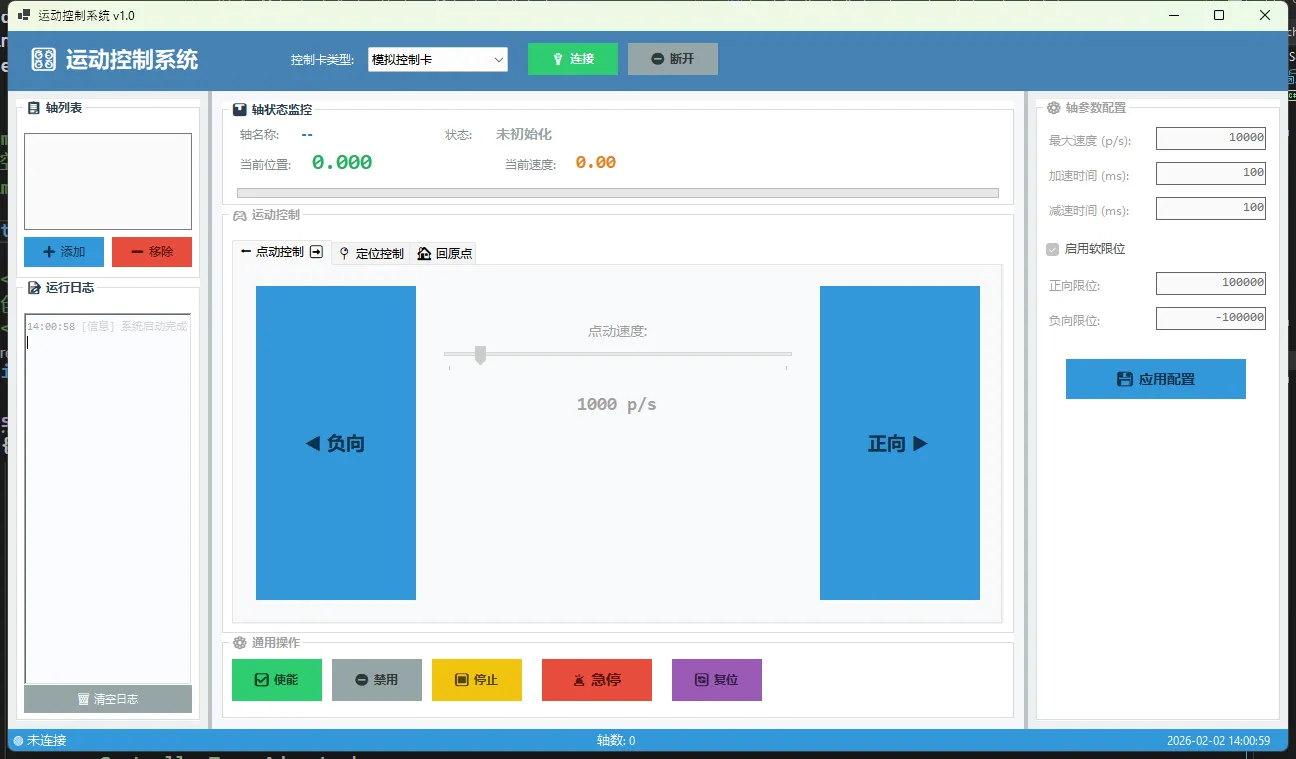
🔧 接口设计:契约精神很重要
IMotionAxis接口
这是整个架构的灵魂。设计得好不好,直接决定了系统的扩展性。
csharpusing System;
using System.Collections.Generic;
using System.Linq;
using System.Text;
using System.Threading.Tasks;

namespace AppMotionControlSystem.Core.Models
{
    /// <summary>
    /// 轴配置参数
    /// </summary>
    public class AxisConfig
    {
        /// <summary>
        /// 轴名称
        /// </summary>
        public string AxisName { get; set; } = "Axis";

        /// <summary>
        /// 脉冲模式
        /// </summary>
        public int PulseMode { get; set; } = 0;

        /// <summary>
        /// 起始速度
        /// </summary>
        public double StartVelocity { get; set; } = 100;

        /// <summary>
        /// 最大速度
        /// </summary>
        public double MaxVelocity { get; set; } = 10000;

        /// <summary>
        /// 加速时间(ms)
        /// </summary>
        public double AccTime { get; set; } = 100;

        /// <summary>
        /// 减速时间(ms)
        /// </summary>
        public double DecTime { get; set; } = 100;

        /// <summary>
        /// 停止速度
        /// </summary>
        public double StopVelocity { get; set; } = 0;

        /// <summary>
        /// 是否启用软限位
        /// </summary>
        public bool EnableSoftLimit { get; set; } = true;

        /// <summary>
        /// 负向软限位
        /// </summary>
        public double NegativeSoftLimit { get; set; } = -100000;

        /// <summary>
        /// 正向软限位
        /// </summary>
        public double PositiveSoftLimit { get; set; } = 100000;

        /// <summary>
        /// 运动超时时间(ms)
        /// </summary>
        public int MoveTimeout { get; set; } = 30000;

        /// <summary>
        /// 脉冲当量(脉冲/mm)
        /// </summary>
        public double PulseEquivalent { get; set; } = 1000;
    }
}
几个设计要点,划重点:
1. 全部用异步方法
运动控制是典型的IO密集型操作。用同步方法会阻塞UI线程,界面直接卡死。async/await是标配。
2. 返回值统一封装
别直接返回bool,信息量太少。出错了连原因都不知道。
csharp/// <summary>
/// 运动结果
/// </summary>
public class MotionResult
{
    public bool Success { get; set; }
    public string ErrorMessage { get; set; }
    public double FinalPosition { get; set; }
    public TimeSpan ElapsedTime { get; set; }

    public static MotionResult Ok(double position, TimeSpan elapsed)
        => new MotionResult { Success = true, FinalPosition = position, ElapsedTime = elapsed };

    public static MotionResult Fail(string error)
        => new MotionResult { Success = false, ErrorMessage = error };
}
3. 状态用枚举,别用字符串
字符串比较容易出错,IDE也没法给你做检查。
csharppublic enum AxisState
{
    NotInitialized,  // 未初始化
    Ready,           // 就绪
    Moving,          // 运动中
    Homing,          // 回原点
    Jogging,         // 点动中
    Error,           // 错误
    Disabled         // 禁用
}
🎮 模拟实现:没硬件也能开发
这是整个方案里最实用的部分。
做工控项目,最头疼的就是"离了机器啥也干不了"。有了模拟实现类,你在家也能写代码、调界面、跑测试。
csharpusing AppMotionControlSystem.Core.Events;
using AppMotionControlSystem.Core.Interfaces;
using AppMotionControlSystem.Core.Models;
using System;
using System.Collections.Generic;
using System.Diagnostics;
using System.Linq;
using System.Text;
using System.Threading.Tasks;

namespace AppMotionControlSystem.Hardware
{
    /// <summary>
    /// 模拟运动轴实现 - 用于测试和演示
    /// </summary>
    public class SimulatedMotionAxis : IMotionAxis
    {
        private readonly object _lockObj = new object();
        private AxisState _currentState = AxisState.NotInitialized;
        private double _currentPosition = 0;
        private double _currentVelocity = 0;
        private AxisConfig _config;
        private CancellationTokenSource _motionCts;
        private bool _disposed = false;

        public int AxisIndex { get; }
        public string AxisName => _config?.AxisName ?? $"轴{AxisIndex}";

        public AxisState CurrentState
        {
            get => _currentState;
            private set
            {
                if (_currentState != value)
                {
                    var oldState = _currentState;
                    _currentState = value;
                    StateChanged?.Invoke(this, new AxisStateChangedEventArgs(AxisIndex, oldState, value));
                }
            }
        }

        public double CurrentPosition
        {
            get { lock (_lockObj) { return _currentPosition; } }
            private set
            {
                lock (_lockObj)
                {
                    _currentPosition = value;
                }
                PositionChanged?.Invoke(this, value);
            }
        }

        public double CurrentVelocity
        {
            get { lock (_lockObj) { return _currentVelocity; } }
            private set { lock (_lockObj) { _currentVelocity = value; } }
        }

        public event EventHandler<AxisStateChangedEventArgs> StateChanged;
        public event EventHandler<double> PositionChanged;

        public SimulatedMotionAxis(int axisIndex)
        {
            AxisIndex = axisIndex;
        }

        public async Task<bool> InitializeAsync(AxisConfig config)
        {
            return await Task.Run(() =>
            {
                try
                {
                    _config = config ?? throw new ArgumentNullException(nameof(config));

                    // 模拟初始化延时
                    Thread.Sleep(200);

                    CurrentState = AxisState.Disabled;
                    return true;
                }
                catch (Exception)
                {
                    CurrentState = AxisState.Error;
                    return false;
                }
            });
        }

        public async Task<bool> EnableAsync()
        {
            return await Task.Run(() =>
            {
                if (CurrentState == AxisState.NotInitialized)
                    return false;

                Thread.Sleep(100);
                CurrentState = AxisState.Ready;
                return true;
            });
        }

        public async Task<bool> DisableAsync()
        {
            return await Task.Run(async () =>
            {
                await StopAsync(StopMode.Immediate);
                Thread.Sleep(50);
                CurrentState = AxisState.Disabled;
                return true;
            });
        }

        public async Task<MotionResult> MoveAbsoluteAsync(double position, double velocity)
        {
            if (CurrentState != AxisState.Ready)
            {
                return MotionResult.Fail($"轴状态异常:{CurrentState},无法执行运动");
            }

            // 检查软限位
            if (_config.EnableSoftLimit)
            {
                if (position < _config.NegativeSoftLimit || position > _config.PositiveSoftLimit)
                {
                    return MotionResult.Fail($"目标位置超出软限位范围 [{_config.NegativeSoftLimit}, {_config.PositiveSoftLimit}]");
                }
            }

            _motionCts = new CancellationTokenSource();
            var stopwatch = Stopwatch.StartNew();

            try
            {
                CurrentState = AxisState.Moving;
                var startPosition = CurrentPosition;
                var distance = position - startPosition;
                var direction = Math.Sign(distance);
                var absDistance = Math.Abs(distance);

                // 模拟运动过程
                var effectiveVelocity = Math.Min(velocity, _config.MaxVelocity);
                CurrentVelocity = effectiveVelocity * direction;

                // 计算运动时间(简化模型,不考虑加减速)
                var estimatedTime = absDistance / effectiveVelocity * 1000; // ms

                var elapsed = 0.0;
                var updateInterval = 10; // ms

                while (elapsed < estimatedTime)
                {
                    if (_motionCts.Token.IsCancellationRequested)
                    {
                        CurrentVelocity = 0;
                        CurrentState = AxisState.Ready;
                        return MotionResult.Fail("运动被取消");
                    }

                    await Task.Delay(updateInterval);
                    elapsed += updateInterval;

                    // 更新位置
                    var progress = Math.Min(elapsed / estimatedTime, 1.0);
                    CurrentPosition = startPosition + distance * progress;

                    // 超时检测
                    if (stopwatch.ElapsedMilliseconds > _config.MoveTimeout)
                    {
                        CurrentVelocity = 0;
                        CurrentState = AxisState.Error;
                        return MotionResult.Fail("运动超时");
                    }
                }

                CurrentPosition = position;
                CurrentVelocity = 0;
                stopwatch.Stop();
                CurrentState = AxisState.Ready;
                return MotionResult.Ok(CurrentPosition, stopwatch.Elapsed);
            }
            catch (Exception ex)
            {
                CurrentVelocity = 0;
                CurrentState = AxisState.Error;
                return MotionResult.Fail($"运动异常:{ex.Message}");
            }
        }

        public async Task<MotionResult> MoveRelativeAsync(double distance, double velocity)
        {
            var targetPosition = CurrentPosition + distance;
            return await MoveAbsoluteAsync(targetPosition, velocity);
        }

        public async Task<MotionResult> HomeAsync(HomeConfig homeConfig)
        {
            if (CurrentState != AxisState.Ready && CurrentState != AxisState.Disabled)
            {
                return MotionResult.Fail($"当前状态{CurrentState}不允许回原点");
            }

            _motionCts = new CancellationTokenSource();
            var stopwatch = Stopwatch.StartNew();

            try
            {
                CurrentState = AxisState.Homing;

                // 模拟回原点过程
                var startPosition = CurrentPosition;
                var direction = homeConfig.HomeDir == 0 ? -1 : 1;

                // 第一阶段:高速寻找原点
                CurrentVelocity = homeConfig.HighVelocity * direction;
                var homingDistance = Math.Abs(startPosition) + 1000; // 模拟需要移动的距离

                for (int i = 0; i < 50; i++)
                {
                    if (_motionCts.Token.IsCancellationRequested)
                    {
                        CurrentVelocity = 0;
                        CurrentState = AxisState.Ready;
                        return MotionResult.Fail("回原点被取消");
                    }

                    await Task.Delay(20);
                    CurrentPosition += direction * homeConfig.HighVelocity * 0.02;

                    if (stopwatch.ElapsedMilliseconds > homeConfig.Timeout)
                    {
                        CurrentVelocity = 0;
                        CurrentState = AxisState.Error;
                        return MotionResult.Fail("回原点超时");
                    }
                }

                // 第二阶段:低速精确定位
                CurrentVelocity = homeConfig.LowVelocity * (-direction);
                for (int i = 0; i < 20; i++)
                {
                    await Task.Delay(20);
                    CurrentPosition -= direction * homeConfig.LowVelocity * 0.02;
                }

                // 完成回原点
                CurrentPosition = 0;
                CurrentVelocity = 0;
                stopwatch.Stop();
                CurrentState = AxisState.Ready;
                return MotionResult.Ok(0, stopwatch.Elapsed);
            }
            catch (Exception ex)
            {
                CurrentVelocity = 0;
                CurrentState = AxisState.Error;
                return MotionResult.Fail($"回原点异常:{ex.Message}");
            }
        }

        public async Task JogPositiveAsync(double velocity)
        {
            if (CurrentState != AxisState.Ready)
                return;

            _motionCts = new CancellationTokenSource();
            CurrentState = AxisState.Jogging;
            CurrentVelocity = Math.Min(velocity, _config.MaxVelocity);

            _ = Task.Run(async () =>
            {
                while (!_motionCts.Token.IsCancellationRequested && CurrentState == AxisState.Jogging)
                {
                    var newPos = CurrentPosition + CurrentVelocity * 0.01;

                    if (_config.EnableSoftLimit && newPos >= _config.PositiveSoftLimit)
                    {
                        CurrentPosition = _config.PositiveSoftLimit;
                        CurrentVelocity = 0;
                        CurrentState = AxisState.Ready;
                        break;
                    }

                    CurrentPosition = newPos;
                    await Task.Delay(10);
                }
            });
        }

        public async Task JogNegativeAsync(double velocity)
        {
            if (CurrentState != AxisState.Ready)
                return;

            _motionCts = new CancellationTokenSource();
            CurrentState = AxisState.Jogging;
            CurrentVelocity = -Math.Min(velocity, _config.MaxVelocity);

            _ = Task.Run(async () =>
            {
                while (!_motionCts.Token.IsCancellationRequested && CurrentState == AxisState.Jogging)
                {
                    var newPos = CurrentPosition + CurrentVelocity * 0.01;

                    if (_config.EnableSoftLimit && newPos <= _config.NegativeSoftLimit)
                    {
                        CurrentPosition = _config.NegativeSoftLimit;
                        CurrentVelocity = 0;
                        CurrentState = AxisState.Ready;
                        break;
                    }

                    CurrentPosition = newPos;
                    await Task.Delay(10);
                }
            });
        }

        public async Task StopAsync(StopMode mode = StopMode.Decelerate)
        {
            await Task.Run(() =>
            {
                _motionCts?.Cancel();

                if (mode == StopMode.Immediate)
                {
                    CurrentVelocity = 0;
                }
                else
                {
                    // 模拟减速过程
                    Thread.Sleep(50);
                    CurrentVelocity = 0;
                }

                if (CurrentState == AxisState.Moving || CurrentState == AxisState.Jogging)
                {
                    CurrentState = AxisState.Ready;
                }
            });
        }

        public async Task<bool> ClearAlarmAsync()
        {
            return await Task.Run(() =>
            {
                if (CurrentState == AxisState.Error)
                {
                    Thread.Sleep(100);
                    CurrentState = AxisState.Disabled;
                    return true;
                }
                return false;
            });
        }

        public void Dispose()
        {
            if (!_disposed)
            {
                _motionCts?.Cancel();
                _motionCts?.Dispose();
                _disposed = true;
            }
        }
    }
}
这个模拟实现的精髓在于:它的行为和真实硬件一模一样。
- 会检查软限位
- 会更新实时位置
- 支持中途取消
- 状态转换逻辑完整
🏭 工厂模式:一键切换硬件品牌
有了接口和实现类,还差一个"调度员"来负责创建具体的实例。
csharppublic enum ControllerType
{
    Simulated,   // 模拟
    Leadshine,   // 雷赛
    Googoltech,  // 固高
    Advantech,   // 研华
    Siemens      // 西门子
}

public static class MotionControllerFactory
{
    public static IMotionAxis CreateAxis(ControllerType type, int cardIndex, int axisIndex)
    {
        switch (type)
        {
            case ControllerType.Simulated:
                return new SimulatedMotionAxis(axisIndex);

            case ControllerType.Leadshine:
                // return new LeadshineMotionAxis(cardIndex, axisIndex);
                return new SimulatedMotionAxis(axisIndex); // 暂用模拟

            case ControllerType.Googoltech:
                // return new GoogoltechMotionAxis(cardIndex, axisIndex);
                return new SimulatedMotionAxis(axisIndex);

            default:
                return new SimulatedMotionAxis(axisIndex);
        }
    }
}
业务代码里这样用:
csharp// 切换控制卡品牌?改这一行就行
var axis = MotionControllerFactory.CreateAxis(ControllerType.Leadshine, 0, 0);
await axis.InitializeAsync(config);
await axis.EnableAsync();
await axis.MoveAbsoluteAsync(10000, 5000);
多清爽!
⚠️ 踩坑预警:血泪教训大放送
这些都是我用加班换来的经验,白送你们了。
坑1:线程安全
控制卡SDK通常不是线程安全的。多线程同时调用会导致各种诡异问题——偶发崩溃、位置读取错误、运动抖动……
csharp// ✅ 正确做法:加锁保护
private readonly object _lockObj = new object();

public double CurrentPosition
{
    get
    {
        lock (_lockObj)
        {
            double pos = 0;
            LTDMC.dmc_get_position(_cardIndex, (ushort)AxisIndex, ref pos);
            return pos;
        }
    }
}
坑2:超时检测
永远不要假设运动指令一定能完成。机械卡住、驱动报警、限位触发……各种意外都可能发生。
csharp// 等待运动完成时必须加超时
var timeout = _config.MoveTimeout;
var elapsed = 0;

while (LTDMC.dmc_check_done(_cardIndex, (ushort)AxisIndex) == 0)
{
    Thread.Sleep(10);
    elapsed += 10;

    if (elapsed > timeout)
    {
        LTDMC.dmc_stop(_cardIndex, (ushort)AxisIndex, 1);
        return MotionResult.Fail("运动超时");
    }
}
坑3:UI线程更新
后台线程不能直接操作UI控件,会抛异常。
csharpprivate void UpdateDisplay()
{
    if (InvokeRequired)
    {
        BeginInvoke(new Action(UpdateDisplay));
        return;
    }

    // 这里才能安全更新UI
    lblPositionValue.Text = _selectedAxis.CurrentPosition.ToString("F3");
}
坑4:资源释放
窗体关闭时一定要停止所有轴、释放资源。不然下次启动可能连接不上。
csharpprivate void FrmMain_FormClosing(object sender, FormClosingEventArgs e)
{
    tmrUpdate.Stop();

    foreach (var axis in _axes)
    {
        try
        {
            axis.StopAsync(StopMode.Immediate).Wait();
            axis.Dispose();
        }
        catch { /* 忽略释放异常 */ }
    }
}
💡 三个核心收获
-
架构先行:硬件抽象层是工控项目的生命线,前期多花两天设计,后期能省两个月维护
-
模拟优先:有了模拟实现类,开发效率翻倍,再也不用守着机器加班
-
防御编程:超时检测、线程安全、异常处理,这三样一个都不能少
🚀 进阶学习路线
如果你想继续深入,推荐这个学习顺序:
- 设计模式:工厂模式、策略模式、观察者模式
- 异步编程:
async/await、Task、CancellationToken - MVVM架构:如果要做WPF版本
- 单元测试:用模拟类做自动化测试
💬 聊两句
这篇文章的代码都是我在实际项目中用过的,不是为了写文章现编的。
有些同学可能会说:"我们项目小,不需要这么复杂。"
确实,如果只是做个一次性的小工具,直接调SDK也没毛病。但只要你的项目有以下任何一个特点,就建议用这套架构:
- 项目周期超过3个月
- 后期可能换控制卡品牌
- 需要多人协作开发
- 要写自动化测试
你在工控项目中踩过什么坑?欢迎评论区分享,咱们一起吐槽一起进步!
#C#开发 #运动控制 #工业软件 #架构设计 #WinForms
相关信息
我用夸克网盘给你分享了「AppMotionControlSystem.zip」,点击链接或复制整段内容,打开「夸克APP」即可获取。
/15e93YsPAl:/
链接:https://pan.quark.cn/s/e2b25ca48954
提取码:HndT


本文作者:技术老小子
本文链接:
版权声明:本博客所有文章除特别声明外,均采用 BY-NC-SA 许可协议。转载请注明出处!