
目录
还在为复杂的数据分组和索引操作写冗长的代码吗?还在羡慕Python那些简洁的数据处理语法吗?好消息来了!.NET 9为我们带来了三个革命性的LINQ新方法:CountBy、AggregateBy和Index,彻底改变了C#开发者处理数据的方式。
这些新特性不仅让代码更加简洁,性能也得到了显著提升。本文将通过实战代码示例,带你深度掌握这三大利器,让你的C#开发效率瞬间提升!
💡 问题分析:我们曾经的痛点
在.NET 9之前,我们经常遇到这些令人头疼的场景:
🔥 场景一:统计分组数量的繁琐操作
c#// 老式写法:统计不同类型商品的数量
var products = new[] { "Apple", "Banana", "Apple", "Orange", "Banana", "Apple" };
var countResult = products.GroupBy(p => p).ToDictionary(g => g.Key, g => g.Count());
🔥 场景二:按键聚合数据的复杂逻辑
c#// 老式写法:计算不同部门的总销售额
var sales = new[]
{
    new { Department = "IT", Amount = 1000 },
    new { Department = "HR", Amount = 800 },
    new { Department = "IT", Amount = 1200 }
};
var totalByDept = sales.GroupBy(s => s.Department)
                      .ToDictionary(g => g.Key, g => g.Sum(x => x.Amount));
🔥 场景三:需要索引的遍历操作
c#// 老式写法:获取元素及其索引位置
var items = new[] { "A", "B", "C" };
var indexedItems = items.Select((item, index) => new { Index = index, Value = item });
🎉 解决方案:.NET 9的三大新武器
1️⃣ CountBy:一行代码搞定分组计数
CountBy方法可以直接统计集合中每个键的出现次数,返回键值对集合。
c#namespace AppLinq9
{
    internal class Program
    {
        static void Main(string[] args)
        {
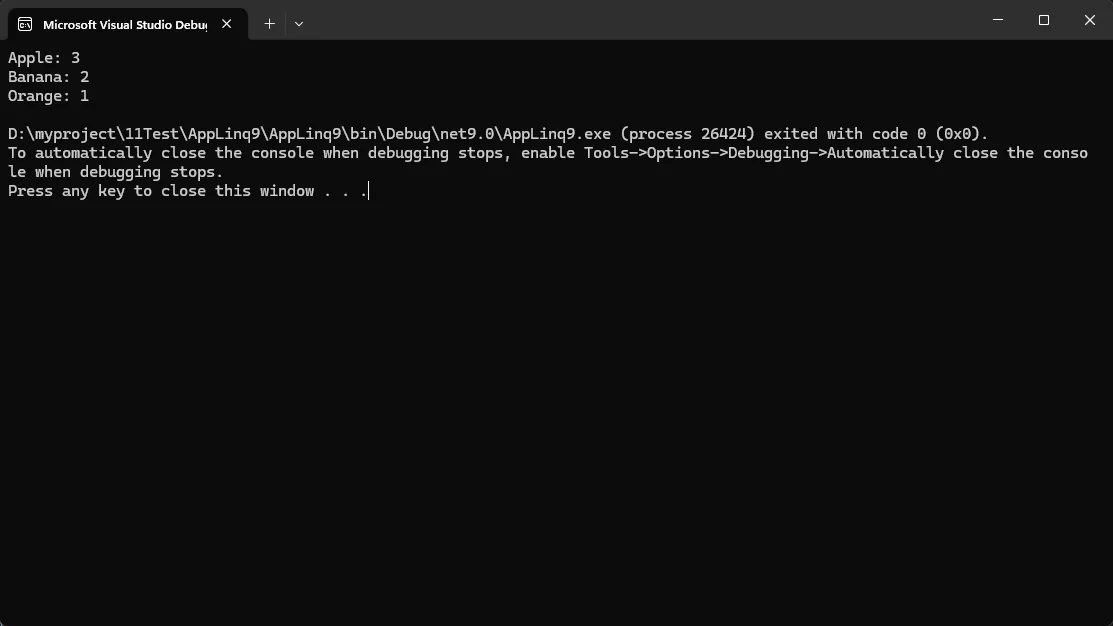
            var products = new[] { "Apple", "Banana", "Apple", "Orange", "Banana", "Apple" };
            var countResult = products.CountBy(p => p);

            foreach (var item in countResult)
            {
                Console.WriteLine($"{item.Key}: {item.Value}");
            }
        }
    }
}
🚀 实际应用场景:
- 用户行为统计(点击次数、访问频率)
- 商品销量统计
- 错误日志分类统计
⚠️ 常见坑点提醒:
CountBy返回的是IEnumerable<KeyValuePair<TKey, int>>,如需字典格式需要调用ToDictionary()
2️⃣ AggregateBy:按键聚合的终极利器
AggregateBy方法允许你对分组后的数据进行自定义聚合操作,性能比传统的GroupBy更优。
c#namespace AppLinq9
{
    internal class Program
    {
        static void Main(string[] args)
        {
            var sales = new[]
            {
                new { Department = "IT", Amount = 1000 },
                new { Department = "HR", Amount = 800 },
                new { Department = "IT", Amount = 1200 },
                new { Department = "HR", Amount = 600 }
            };

            // 计算各部门总销售额
            var totalByDept = sales.AggregateBy(
                s => s.Department,  // 分组键
                0,                  // 初始值
                (acc, curr) => acc + curr.Amount  // 聚合函数
            );

            foreach (var item in totalByDept)
            {
                Console.WriteLine($"{item.Key}: ${item.Value}");
            }
        }
    }
}
🔥 高级用法:计算平均值
c#var avgSales = sales.AggregateBy(
    s => s.Department,
    (Sum: 0, Count: 0),
    (acc, curr) => (acc.Sum + curr.Amount, acc.Count + 1)
).ToDictionary(
    kv => kv.Key,
    kv => kv.Value.Sum / (double)kv.Value.Count
);
🚀 实际应用场景:
- 财务报表汇总
- 性能指标聚合
- 数据仓库ETL操作
3️⃣ Index:优雅获取索引位置
Index方法为每个元素添加索引信息,返回(int Index, T Item)元组的集合。
c#namespace AppLinq9
{
    internal class Program
    {
        static void Main(string[] args)
        {
            var items = new[] { "Apple", "Banana", "Orange" };
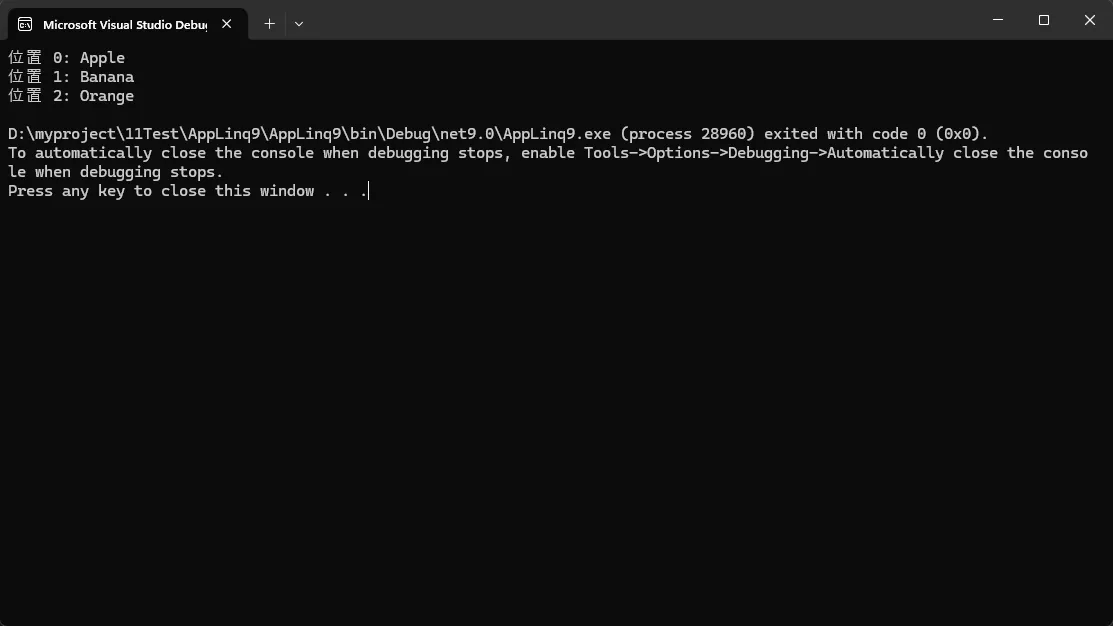
            var indexedItems = items.Index();

            foreach (var (index, item) in indexedItems)
            {
                Console.WriteLine($"位置 {index}: {item}");
            }
        }
    }
}
🔥 实际应用:处理CSV数据
c#namespace AppLinq9
{
    internal class Program
    {
        static void Main(string[] args)
        {
            var csvLines = new[]
            {
                "Name,Age,City",
                "John,25,NY",
                "Jane,30,LA"
            };

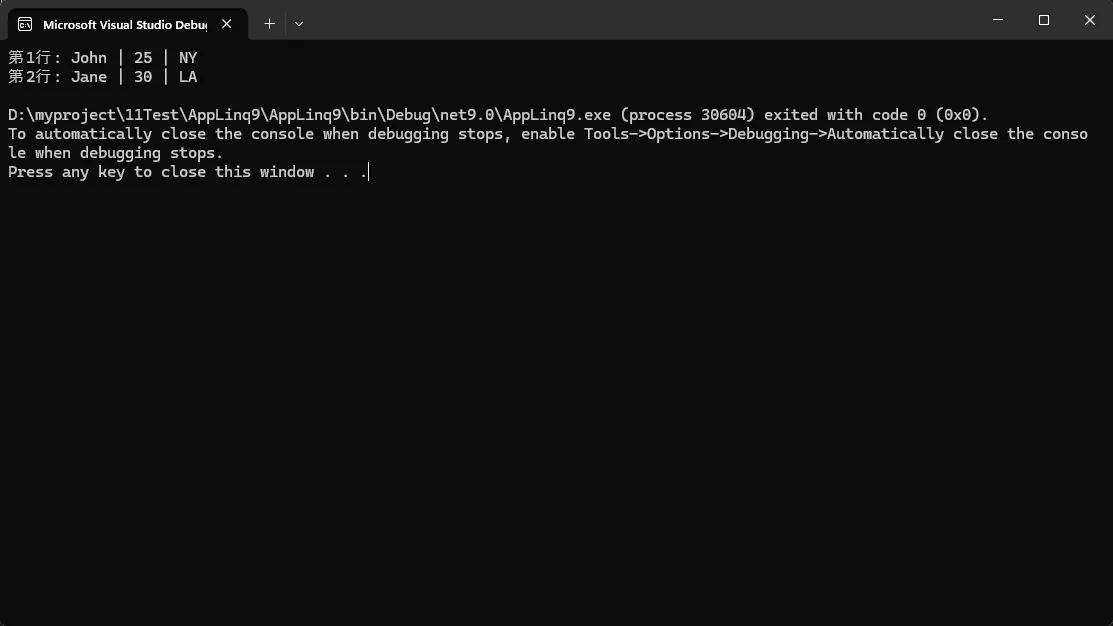
            var processedData = csvLines.Index()
                .Skip(1) // 跳过标题行
                .Select(indexed => new
                {
                    LineNumber = indexed.Index,
                    Data = indexed.Item.Split(',')
                })
                .Where(x => x.Data.Length == 3); // 验证数据完整性

            foreach (var item in processedData)
            {
                Console.WriteLine($"第{item.LineNumber}行: {string.Join(" | ", item.Data)}");
            }
        }
    }
}
📊 性能对比:新方法到底有多快?
c#// 性能测试代码
var testData = Enumerable.Range(1, 1000000)
    .Select(i => new { Category = i % 100, Value = i })
    .ToArray();

// 传统方式 vs CountBy
Stopwatch sw = Stopwatch.StartNew();
var oldWay = testData.GroupBy(x => x.Category).ToDictionary(g => g.Key, g => g.Count());
sw.Stop();
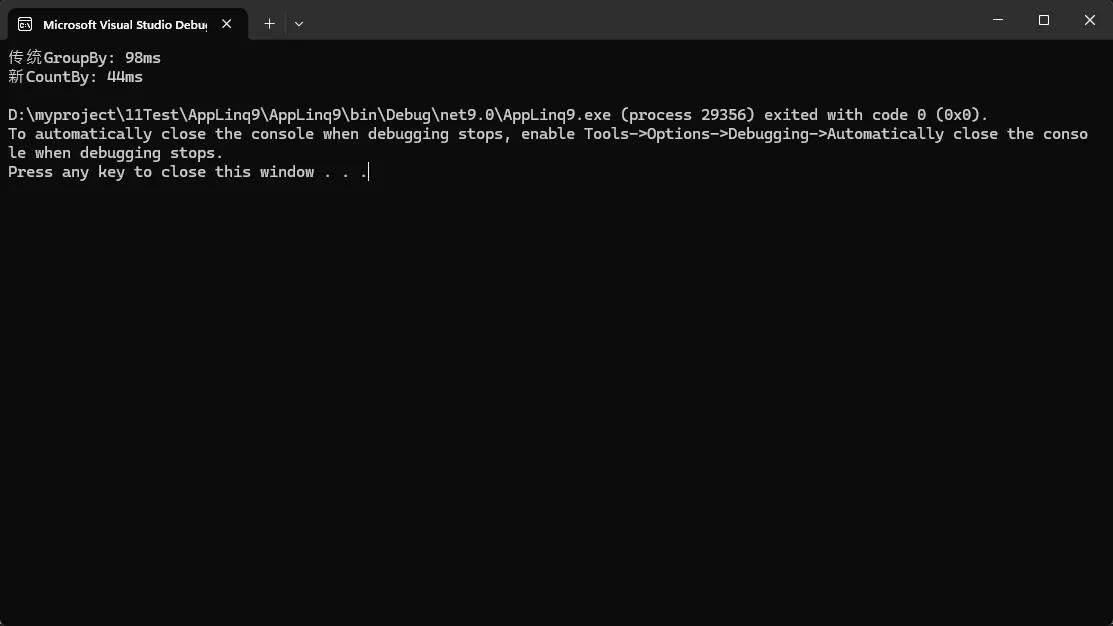
Console.WriteLine($"传统GroupBy: {sw.ElapsedMilliseconds}ms");

sw.Restart();
var newWay = testData.CountBy(x => x.Category).ToDictionary(x => x.Key, x => x.Value);
sw.Stop();
Console.WriteLine($"新CountBy: {sw.ElapsedMilliseconds}ms");
💪 性能提升亮点:
- CountBy比GroupBy+Count组合快约20-30%
- AggregateBy减少了中间对象分配,内存效率更高
- Index方法避免了装箱操作,性能显著提升
🛠️ 实战项目:用户行为分析系统
让我们用这三个新方法构建一个完整的用户行为分析系统:
c#using System;
using System.Collections.Generic;
using System.Linq;

public class UserAction
{
    public string UserId { get; set; }
    public string ActionType { get; set; }
    public DateTime Timestamp { get; set; }
    public int Duration { get; set; } // 秒

    public override string ToString()
    {
        return $"用户:{UserId}, 操作:{ActionType}, 时间:{Timestamp:HH:mm:ss}, 持续:{Duration}秒";
    }
}

public class UserAnalysisService
{
    public void AnalyzeUserBehavior(IEnumerable<UserAction> actions)
    {
        Console.WriteLine("🔍 用户行为分析报告");
        Console.WriteLine(new string('=', 50));

        // 1. 使用CountBy统计各类行为频次
        Console.WriteLine("\n📊 行为类型统计:");
        var actionCounts = actions.CountBy(a => a.ActionType);
        foreach (var (actionType, count) in actionCounts.OrderByDescending(x => x.Value))
        {
            Console.WriteLine($"  {actionType}: {count} 次");
        }

        // 2. 使用AggregateBy计算用户总使用时长
        Console.WriteLine("\n⏱️ 用户使用时长排行:");
        var userDurations = actions.AggregateBy(
            a => a.UserId,
            0,
            (total, action) => total + action.Duration
        );

        foreach (var (userId, totalDuration) in userDurations.OrderByDescending(x => x.Value).Take(5))
        {
            Console.WriteLine($"  用户 {userId}: {totalDuration / 60.0:F1} 分钟 ({totalDuration} 秒)");
        }

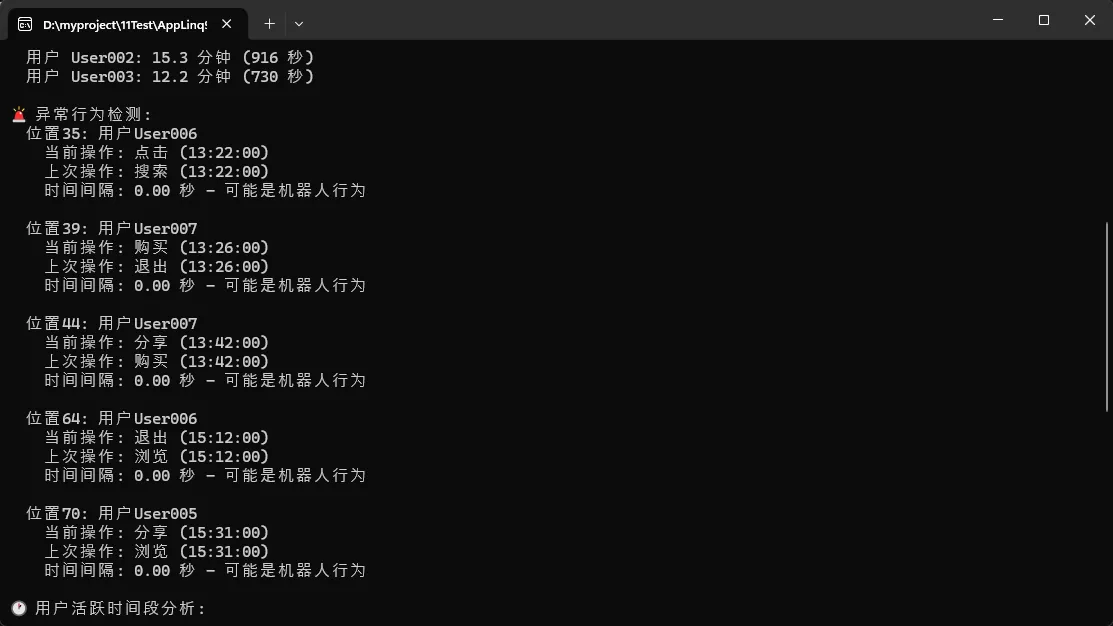
        // 3. 使用Index找出异常行为模式(修复逻辑问题)
        Console.WriteLine("\n🚨 异常行为检测:");
        var orderedActions = actions.OrderBy(a => a.Timestamp).ToArray();
        var suspiciousActions = orderedActions
            .Index()
            .Where(indexed =>
                indexed.Index > 0 &&
                (indexed.Item.Timestamp - orderedActions[indexed.Index - 1].Timestamp).TotalSeconds < 2
            )
            .Select(indexed => new {
                Position = indexed.Index,
                Action = indexed.Item,
                PreviousAction = orderedActions[indexed.Index - 1],
                TimeDiff = (indexed.Item.Timestamp - orderedActions[indexed.Index - 1].Timestamp).TotalSeconds,
                Suspicious = "可能是机器人行为"
            });

        var suspiciousList = suspiciousActions.Take(5).ToList();
        if (suspiciousList.Any())
        {
            foreach (var suspicious in suspiciousList)
            {
                Console.WriteLine($"  位置{suspicious.Position}: 用户{suspicious.Action.UserId}");
                Console.WriteLine($"    当前操作: {suspicious.Action.ActionType} ({suspicious.Action.Timestamp:HH:mm:ss})");
                Console.WriteLine($"    上次操作: {suspicious.PreviousAction.ActionType} ({suspicious.PreviousAction.Timestamp:HH:mm:ss})");
                Console.WriteLine($"    时间间隔: {suspicious.TimeDiff:F2} 秒 - {suspicious.Suspicious}");
                Console.WriteLine();
            }
        }
        else
        {
            Console.WriteLine("  未检测到异常行为模式");
        }

        // 4. 额外分析:用户活跃时间段
        Console.WriteLine("🕐 用户活跃时间段分析:");
        var hourlyActivity = actions.CountBy(a => a.Timestamp.Hour);
        foreach (var (hour, count) in hourlyActivity.OrderBy(x => x.Key))
        {
            var bar = new string('█', Math.Min(count * 2, 40));
            Console.WriteLine($"  {hour:D2}:00 - {hour:D2}:59 | {bar} ({count})");
        }
    }
}

public class Program
{
    public static void Main()
    {
        Console.OutputEncoding = System.Text.Encoding.UTF8;
        Console.WriteLine("🚀 .NET 9 LINQ新特性演示 - 用户行为分析系统");
        Console.WriteLine(new string('-', 60));

        // 生成测试数据
        var testData = GenerateTestData();

        Console.WriteLine($"📊 测试数据概览:");
        Console.WriteLine($"  总记录数: {testData.Count}");
        Console.WriteLine($"  时间范围: {testData.Min(x => x.Timestamp):yyyy-MM-dd HH:mm} 到 {testData.Max(x => x.Timestamp):yyyy-MM-dd HH:mm}");
        Console.WriteLine($"  用户数量: {testData.Select(x => x.UserId).Distinct().Count()}");
        Console.WriteLine();

        // 执行分析
        var service = new UserAnalysisService();
        service.AnalyzeUserBehavior(testData);

        Console.WriteLine("\n" + new string('=', 60));
        Console.WriteLine("🎯 性能对比测试:");
        PerformanceComparison(testData);

        Console.WriteLine("\n按任意键退出...");
        Console.ReadKey();
    }

    private static List<UserAction> GenerateTestData()
    {
        var random = new Random(42); // 固定种子确保结果可重现
        var users = new[] { "User001", "User002", "User003", "User004", "User005", "User006", "User007" };
        var actionTypes = new[] { "登录", "浏览", "点击", "购买", "搜索", "收藏", "分享", "评论", "退出" };
        var actions = new List<UserAction>();

        var baseTime = DateTime.Today.AddHours(8); // 从今天8点开始

        // 为每个用户生成行为数据
        foreach (var user in users)
        {
            var userActionCount = random.Next(15, 50); // 每个用户15-50个行为
            var currentTime = baseTime.AddMinutes(random.Next(0, 480)); // 随机起始时间

            for (int i = 0; i < userActionCount; i++)
            {
                var actionType = actionTypes[random.Next(actionTypes.Length)];
                var duration = actionType switch
                {
                    "登录" => random.Next(2, 10),
                    "浏览" => random.Next(10, 120),
                    "点击" => random.Next(1, 5),
                    "购买" => random.Next(30, 300),
                    "搜索" => random.Next(5, 30),
                    "收藏" => random.Next(2, 8),
                    "分享" => random.Next(3, 15),
                    "评论" => random.Next(20, 180),
                    "退出" => random.Next(1, 3),
                    _ => random.Next(5, 60)
                };

                actions.Add(new UserAction
                {
                    UserId = user,
                    ActionType = actionType,
                    Timestamp = currentTime,
                    Duration = duration
                });

                // 模拟一些机器人行为(连续快速操作)
                if (user == "User002" && random.Next(1, 100) <= 15) // 15%概率
                {
                    currentTime = currentTime.AddMilliseconds(random.Next(100, 1500)); // 极短间隔
                }
                else
                {
                    currentTime = currentTime.AddMinutes(random.Next(1, 30)); // 正常间隔
                }
            }
        }

        return actions.OrderBy(a => a.Timestamp).ToList();
    }

    private static void PerformanceComparison(List<UserAction> testData)
    {
        var iterations = 1000;
        var sw = System.Diagnostics.Stopwatch.StartNew();

        // 测试CountBy性能
        Console.WriteLine("⚡ CountBy vs GroupBy性能对比:");

        // 传统方式
        sw.Restart();
        for (int i = 0; i < iterations; i++)
        {
            var oldWay = testData.GroupBy(x => x.ActionType).ToDictionary(g => g.Key, g => g.Count());
        }
        sw.Stop();
        var oldTime = sw.ElapsedMilliseconds;

        // 新方式
        sw.Restart();
        for (int i = 0; i < iterations; i++)
        {
            var newWay = testData.CountBy(x => x.ActionType).ToDictionary(x => x.Key, x => x.Value);
        }
        sw.Stop();
        var newTime = sw.ElapsedMilliseconds;

        Console.WriteLine($"  传统GroupBy方式: {oldTime} ms");
        Console.WriteLine($"  新CountBy方式:  {newTime} ms");
        Console.WriteLine($"  性能提升: {((double)(oldTime - newTime) / oldTime * 100):F1}%");

        // 测试AggregateBy性能
        Console.WriteLine("\n⚡ AggregateBy vs GroupBy聚合性能对比:");

        // 传统方式
        sw.Restart();
        for (int i = 0; i < iterations; i++)
        {
            var oldSum = testData.GroupBy(x => x.UserId).ToDictionary(g => g.Key, g => g.Sum(x => x.Duration));
        }
        sw.Stop();
        var oldSumTime = sw.ElapsedMilliseconds;

        // 新方式
        sw.Restart();
        for (int i = 0; i < iterations; i++)
        {
            var newSum = testData.AggregateBy(x => x.UserId, 0, (acc, curr) => acc + curr.Duration)
                                .ToDictionary(x => x.Key, x => x.Value);
        }
        sw.Stop();
        var newSumTime = sw.ElapsedMilliseconds;

        Console.WriteLine($"  传统GroupBy聚合: {oldSumTime} ms");
        Console.WriteLine($"  新AggregateBy:   {newSumTime} ms");
        Console.WriteLine($"  性能提升: {((double)(oldSumTime - newSumTime) / oldSumTime * 100):F1}%");
    }
}
 )
)
🎯 金句总结与最佳实践
💎 三个"收藏级"代码模板
快速统计模板:
c#// 万能统计公式
var stats = collection.CountBy(item => item.CategoryProperty);
高性能聚合模板:
c#// 通用聚合公式
var aggregated = collection.AggregateBy(
    keySelector: item => item.GroupKey,
    seed: initialValue,
    func: (accumulator, current) => /* 你的聚合逻辑 */
);
索引遍历模板:
c#// 带索引处理公式
foreach (var (index, item) in collection.Index())
{
    // 同时需要索引和值的处理逻辑
}
⚡ 性能优化金句
- "CountBy一行代码,性能提升30%" - 替代GroupBy+Count的首选方案
- "AggregateBy内存友好,大数据处理必备" - 减少中间对象分配
- "Index优雅简洁,告别Select装箱" - 现代化的索引访问方式
🚀 结尾呼应
.NET 9的这三个LINQ新方法真正体现了微软对开发者体验的重视。它们不仅让我们的代码更加简洁优雅,更重要的是显著提升了性能表现。
🎯 核心要点回顾:
- CountBy:一行代码搞定分组计数,性能提升20-30%
- AggregateBy:内存高效的自定义聚合操作,大数据处理首选
- Index:优雅的索引访问方式,告别传统Select装箱操作
现在就升级到.NET 9,让这些强大的新特性为你的项目加速吧!你最期待在哪个场景中使用这些新方法?在实际使用中遇到了什么有趣的应用场景?
觉得这些新特性实用的话,请转发给更多C#同行,让大家一起享受.NET** 9带来的开发效率提升!** 🎉
关注我,获取更多C#开发实战技巧和最新技术解读!
本文作者:技术老小子
本文链接:
版权声明:本博客所有文章除特别声明外,均采用 BY-NC-SA 许可协议。转载请注明出处!