
Press Ctrl+ and K to search
目录
作为.NET开发者,你是否还在用Timer或Task.Delay来处理定时任务?是否遇到过定时器漂移、内存泄漏或性能问题?Microsoft在.NET** 6中引入了PeriodicTimer,专门为解决这些痛点而生!**
传统定时器方案存在诸多问题:System.Threading.Timer容易产生重叠执行,Task.Delay会造成时间漂移,而PeriodicTimer则提供了更精准、更高效、更安全的解决方案。本文将通过实战代码,带你掌握这个"定时任务神器"!
🔍 传统方案的痛点分析
问题一:时间漂移困扰
使用Task.Delay时,每次延时都会累积误差:
c#// ❌ 传统方案 - 存在时间漂移
public async Task BadPeriodicTask()
{
    while (true)
    {
        var startTime = DateTime.Now;

        // 业务逻辑耗时不固定
        await DoSomeWork();

        // 延时不准确,会累积误差
        await Task.Delay(TimeSpan.FromSeconds(5));

        Console.WriteLine($"实际间隔:{(DateTime.Now - startTime).TotalSeconds}秒");
    }
}
问题二:重叠执行风险
System.Threading.Timer可能导致任务重叠:
c#// ❌ 可能重叠执行
private Timer _timer = new Timer(async _ =>
{
    await LongRunningTask(); // 如果耗时超过间隔,会重叠执行
}, null, TimeSpan.Zero, TimeSpan.FromSeconds(5));
🎯 PeriodicTimer:完美解决方案
核心特性
- 精准间隔:基于高精度计时器,避免时间漂移
- 防重叠:内置机制防止任务重叠执行
- 高性能:减少GC压力,优化内存使用
- 取消支持:完美集成CancellationToken
💡 实战场景解决方案
🔥 场景一:数据同步任务
c#using Microsoft.Extensions.Hosting;

namespace AppPeriodicTimer
{
    public class DataSyncService : IHostedService
    {
        private readonly PeriodicTimer _timer;
        private readonly CancellationTokenSource _cancellationTokenSource;
        private Task _executingTask;

        public DataSyncService()
        {
            // 每10秒执行一次,精准无漂移
            _timer = new PeriodicTimer(TimeSpan.FromSeconds(10));
            _cancellationTokenSource = new CancellationTokenSource();
        }

        public Task StartAsync(CancellationToken cancellationToken)
        {
            _executingTask = ExecuteAsync(_cancellationTokenSource.Token);
            return Task.CompletedTask;
        }

        private async Task ExecuteAsync(CancellationToken cancellationToken)
        {
            try
            {
                // 🚀 关键:WaitForNextTickAsync确保精准间隔
                while (await _timer.WaitForNextTickAsync(cancellationToken))
                {
                    await SyncDataFromExternalApi();
                    Console.WriteLine($"数据同步完成 - {DateTime.Now:yyyy-MM-dd HH:mm:ss}");
                }
            }
            catch (OperationCanceledException)
            {
                // 正常取消,不需要处理
            }
        }

        private async Task SyncDataFromExternalApi()
        {
            // 模拟数据同步逻辑
            await Task.Delay(2000); // 业务处理时间
        }

        public async Task StopAsync(CancellationToken cancellationToken)
        {
            _cancellationTokenSource.Cancel();
            _timer.Dispose();

            if (_executingTask != null)
            {
                await _executingTask;
            }
        }
    }
    internal class Program
    {
        static async Task Main(string[] args)
        {
            DataSyncService dataSyncService = new DataSyncService();
            await dataSyncService.StartAsync(CancellationToken.None);
            Console.ReadKey();
        }
    }
}
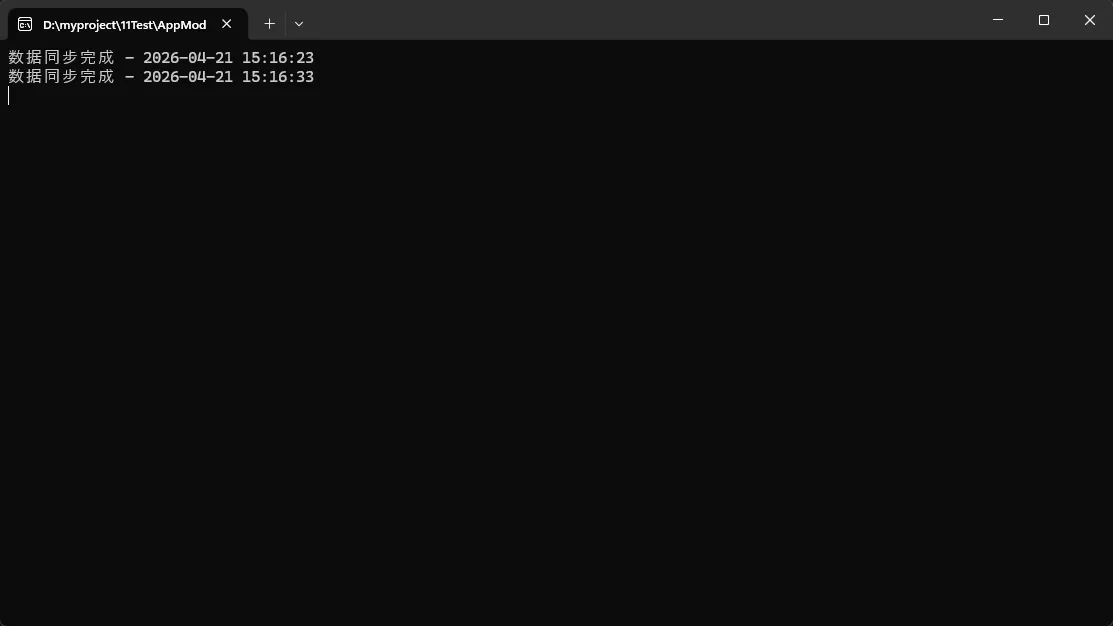
💡 关键要点:
WaitForNextTickAsync是核心方法,返回bool值表示是否应继续- 自动处理取消逻辑,无需手动检查CancellationToken
- 即使业务逻辑耗时变化,间隔依然精准
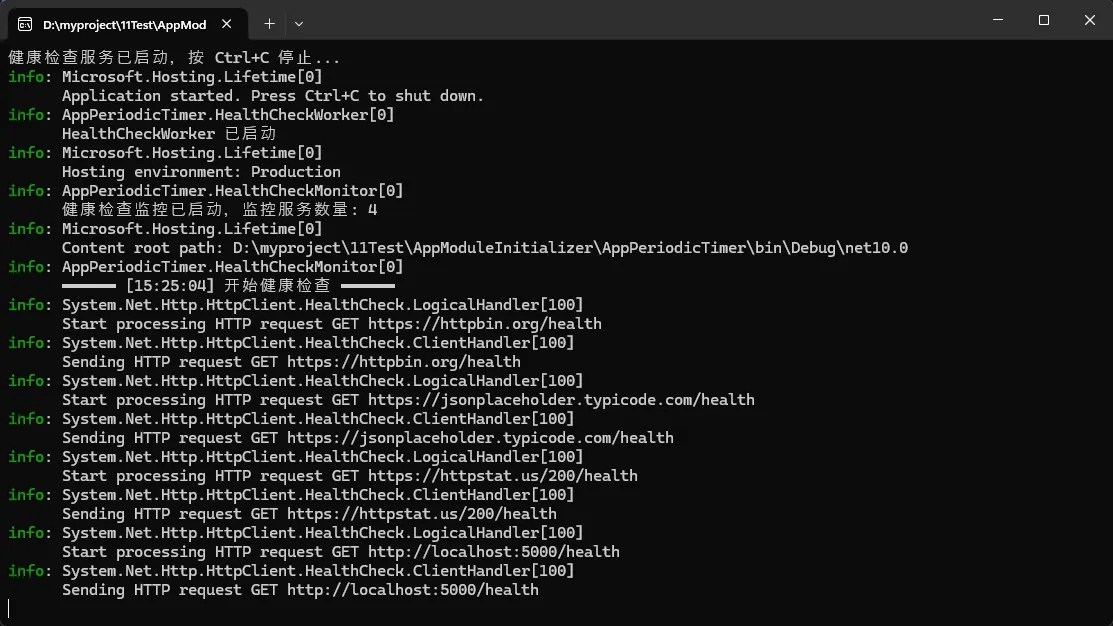
⚡ 场景二:健康检查监控
c#using Microsoft.Extensions.Logging;

namespace AppPeriodicTimer;

public class HealthCheckMonitor
{
    private readonly PeriodicTimer _healthTimer;
    private readonly ILogger<HealthCheckMonitor> _logger;
    private readonly HttpClient _httpClient;

    public HealthCheckMonitor(ILogger<HealthCheckMonitor> logger, IHttpClientFactory httpClientFactory)
    {
        // 每10秒检查一次服务健康状态
        _healthTimer = new PeriodicTimer(TimeSpan.FromSeconds(10));
        _logger = logger;
        // 推荐使用 IHttpClientFactory 管理 HttpClient 生命周期,避免 Socket 耗尽
        _httpClient = httpClientFactory.CreateClient("HealthCheck");
    }

    public async Task StartMonitoringAsync(string[] serviceUrls, CancellationToken cancellationToken = default)
    {
        _logger.LogInformation("健康检查监控已启动,监控服务数量: {Count}", serviceUrls.Length);

        try
        {
            // 启动时立即执行一次,不等待第一个 Tick
            await RunHealthChecksAsync(serviceUrls);

            while (await _healthTimer.WaitForNextTickAsync(cancellationToken))
            {
                await RunHealthChecksAsync(serviceUrls);
            }
        }
        catch (OperationCanceledException)
        {
            _logger.LogInformation("健康检查监控已停止");
        }
        finally
        {
            _healthTimer.Dispose();
        }
    }

    private async Task RunHealthChecksAsync(string[] serviceUrls)
    {
        _logger.LogInformation("━━━━━━ [{Time}] 开始健康检查 ━━━━━━", DateTime.Now.ToString("HH:mm:ss"));

        // 并行检查多个服务,提高效率
        var healthCheckTasks = serviceUrls.Select(CheckServiceHealthAsync);
        var results = await Task.WhenAll(healthCheckTasks);

        LogHealthStatus(results);
    }

    private async Task<(string Url, bool IsHealthy, int StatusCode, TimeSpan ResponseTime)> CheckServiceHealthAsync(string serviceUrl)
    {
        var stopwatch = System.Diagnostics.Stopwatch.StartNew();

        try
        {
            var response = await _httpClient.GetAsync($"{serviceUrl}/health");
            stopwatch.Stop();

            return (serviceUrl, response.IsSuccessStatusCode, (int)response.StatusCode, stopwatch.Elapsed);
        }
        catch (TaskCanceledException)
        {
            stopwatch.Stop();
            _logger.LogWarning("服务 {Url} 请求超时", serviceUrl);
            return (serviceUrl, false, 0, stopwatch.Elapsed);
        }
        catch (HttpRequestException ex)
        {
            stopwatch.Stop();
            _logger.LogWarning("服务 {Url} 连接失败: {Message}", serviceUrl, ex.Message);
            return (serviceUrl, false, 0, stopwatch.Elapsed);
        }
        catch (Exception ex)
        {
            stopwatch.Stop();
            _logger.LogError(ex, "服务 {Url} 检查时发生未知异常", serviceUrl);
            return (serviceUrl, false, 0, stopwatch.Elapsed);
        }
    }

    private void LogHealthStatus((string Url, bool IsHealthy, int StatusCode, TimeSpan ResponseTime)[] results)
    {
        int healthyCount = 0;

        foreach (var (url, isHealthy, statusCode, responseTime) in results)
        {
            var status = isHealthy ? "✅ 健康" : "❌ 异常";
            var statusCodeStr = statusCode > 0 ? $"HTTP {statusCode}" : "无响应";

            if (isHealthy)
            {
                healthyCount++;
                _logger.LogInformation("{Status} | {Url} | {StatusCode} | 响应: {Ms:F2}ms",
                    status, url, statusCodeStr, responseTime.TotalMilliseconds);
            }
            else
            {
                _logger.LogWarning("{Status} | {Url} | {StatusCode} | 响应: {Ms:F2}ms",
                    status, url, statusCodeStr, responseTime.TotalMilliseconds);
            }
        }

        _logger.LogInformation("检查完毕: {Healthy}/{Total} 个服务正常", healthyCount, results.Length);
    }
}
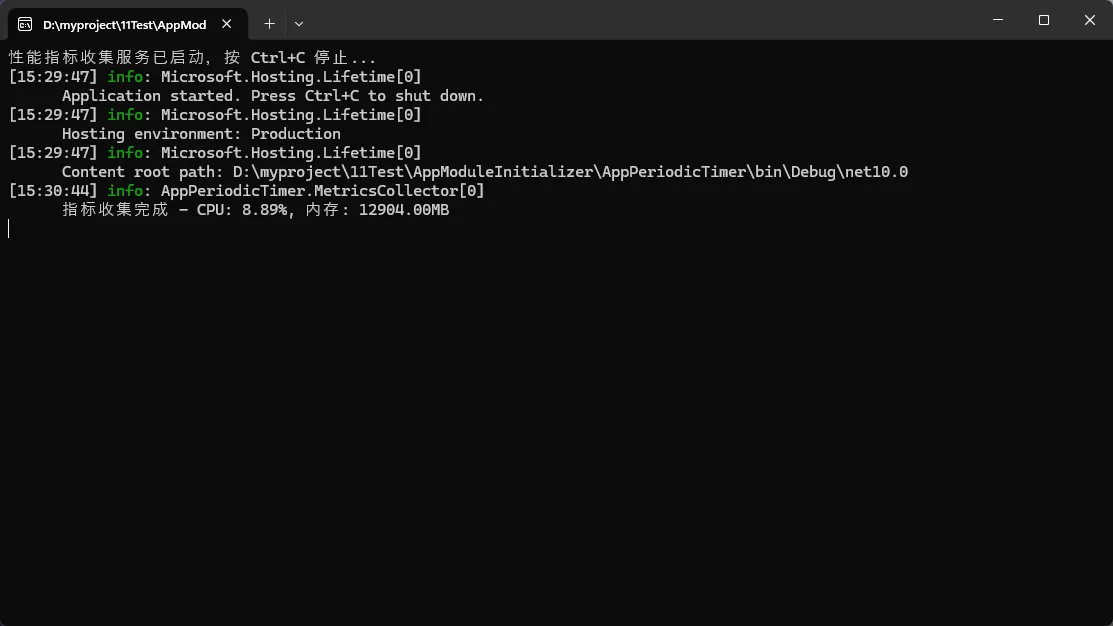
📊 场景三:性能指标收集
c#public class MetricsCollector : BackgroundService
{
    private readonly PeriodicTimer _metricsTimer;
    private readonly ILogger<MetricsCollector> _logger;
    private readonly PerformanceCounter _cpuCounter;
    private readonly PerformanceCounter _memoryCounter;

    public MetricsCollector(ILogger<MetricsCollector> logger)
    {
        // 每分钟收集一次性能指标
        _metricsTimer = new PeriodicTimer(TimeSpan.FromMinutes(1));
        _logger = logger;

        // 初始化性能计数器
        _cpuCounter = new PerformanceCounter("Processor", "% Processor Time", "_Total");
        _memoryCounter = new PerformanceCounter("Memory", "Available MBytes");
    }

    protected override async Task ExecuteAsync(CancellationToken stoppingToken)
    {
        // 🚀 第一次调用前预热计数器
        _cpuCounter.NextValue();
        await Task.Delay(1000, stoppingToken);

        try
        {
            while (await _metricsTimer.WaitForNextTickAsync(stoppingToken))
            {
                var metrics = CollectSystemMetrics();
                await SaveMetrics(metrics);

                _logger.LogInformation($"指标收集完成 - CPU: {metrics.CpuUsage:F2}%, 内存: {metrics.AvailableMemory:F2}MB");
            }
        }
        catch (OperationCanceledException)
        {
            _logger.LogInformation("性能指标收集已停止");
        }
        finally
        {
            _metricsTimer.Dispose();
            _cpuCounter.Dispose();
            _memoryCounter.Dispose();
        }
    }

    private SystemMetrics CollectSystemMetrics()
    {
        return new SystemMetrics
        {
            Timestamp = DateTime.UtcNow,
            CpuUsage = _cpuCounter.NextValue(),
            AvailableMemory = _memoryCounter.NextValue(),
            WorkingSet = Environment.WorkingSet / 1024.0 / 1024.0, // MB
            GcMemory = GC.GetTotalMemory(false) / 1024.0 / 1024.0 // MB
        };
    }

    private async Task SaveMetrics(SystemMetrics metrics)
    {
        // 保存到数据库或发送到监控系统
        // 这里可以是数据库操作或HTTP请求
        await Task.Delay(100); // 模拟保存操作
    }
}

public record SystemMetrics
{
    public DateTime Timestamp { get; init; }
    public float CpuUsage { get; init; }
    public float AvailableMemory { get; init; }
    public double WorkingSet { get; init; }
    public double GcMemory { get; init; }
}
⚠️ 常见坑点提醒
坑点1:忘记处理取消
c#// ❌ 错误做法 - 可能导致资源泄漏
while (await _timer.WaitForNextTickAsync(cancellationToken))
{
    // 没有正确处理OperationCanceledException
    await DoWork();
}

// ✅ 正确做法
try
{
    while (await _timer.WaitForNextTickAsync(cancellationToken))
    {
        await DoWork();
    }
}
catch (OperationCanceledException)
{
    // 正常取消,记录日志或清理资源
    _logger.LogInformation("定时任务已取消");
}
finally
{
    _timer.Dispose(); // 确保资源释放
}
坑点2:长时间任务阻塞
c#// ❌ 错误:长时间同步操作会阻塞定时器
while (await _timer.WaitForNextTickAsync(cancellationToken))
{
    Thread.Sleep(60000); // 阻塞整个线程
    ProcessData();
}

// ✅ 正确:使用异步操作
while (await _timer.WaitForNextTickAsync(cancellationToken))
{
    await Task.Delay(60000, cancellationToken); // 非阻塞
    await ProcessDataAsync();
}
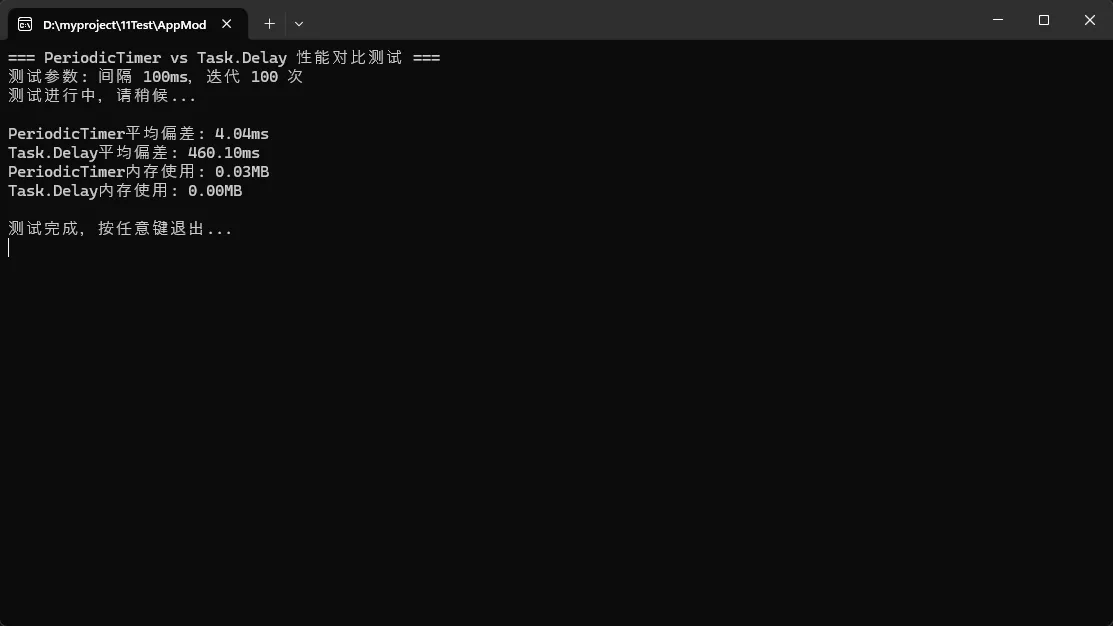
📈 性能对比测试
c#using System;
using System.Collections.Generic;
using System.Text;

namespace AppPeriodicTimer
{
    public class PerformanceComparison
    {
        public async Task CompareTimerPerformance(int iterations = 100)
        {
            var interval = TimeSpan.FromMilliseconds(100);

            // PeriodicTimer测试
            var periodicTimerResults = await MeasurePeriodicTimer(interval, iterations);

            // Task.Delay测试
            var taskDelayResults = await MeasureTaskDelay(interval, iterations);

            Console.WriteLine($"PeriodicTimer平均偏差: {periodicTimerResults.AverageDeviation:F2}ms");
            Console.WriteLine($"Task.Delay平均偏差: {taskDelayResults.AverageDeviation:F2}ms");
            Console.WriteLine($"PeriodicTimer内存使用: {periodicTimerResults.MemoryUsed:F2}MB");
            Console.WriteLine($"Task.Delay内存使用: {taskDelayResults.MemoryUsed:F2}MB");
        }

        private async Task<(double AverageDeviation, double MemoryUsed)> MeasurePeriodicTimer(
            TimeSpan interval, int iterations)
        {
            var deviations = new List<double>();
            var timer = new PeriodicTimer(interval);
            var startMemory = GC.GetTotalMemory(true);
            var expectedTime = DateTime.Now;

            try
            {
                for (int i = 0; i < iterations; i++)
                {
                    expectedTime = expectedTime.Add(interval);
                    await timer.WaitForNextTickAsync();

                    var actualTime = DateTime.Now;
                    var deviation = Math.Abs((actualTime - expectedTime).TotalMilliseconds);
                    deviations.Add(deviation);
                }
            }
            finally
            {
                timer.Dispose();
            }

            var endMemory = GC.GetTotalMemory(true);
            return (deviations.Average(), (endMemory - startMemory) / 1024.0 / 1024.0);
        }

        private async Task<(double AverageDeviation, double MemoryUsed)> MeasureTaskDelay(
            TimeSpan interval, int iterations)
        {
            var deviations = new List<double>();
            var startMemory = GC.GetTotalMemory(true);
            var expectedTime = DateTime.Now;

            for (int i = 0; i < iterations; i++)
            {
                expectedTime = expectedTime.Add(interval);
                await Task.Delay(interval);

                var actualTime = DateTime.Now;
                var deviation = Math.Abs((actualTime - expectedTime).TotalMilliseconds);
                deviations.Add(deviation);
            }

            var endMemory = GC.GetTotalMemory(true);
            return (deviations.Average(), (endMemory - startMemory) / 1024.0 / 1024.0);
        }
    }
}
🎯 最佳实践总结
1. 选择合适的间隔时间
c#// 根据业务需求选择合适间隔
var quickTimer = new PeriodicTimer(TimeSpan.FromSeconds(1));     // 快速响应
var normalTimer = new PeriodicTimer(TimeSpan.FromMinutes(5));    // 常规任务
var slowTimer = new PeriodicTimer(TimeSpan.FromHours(1));        // 批处理任务
2. 优雅关闭模式
c#public class GracefulService : IDisposable
{
    private readonly PeriodicTimer _timer;
    private readonly CancellationTokenSource _cts;
    private Task _backgroundTask;

    public async Task StopAsync()
    {
        _cts.Cancel(); // 发送取消信号

        if (_backgroundTask != null)
        {
            try
            {
                await _backgroundTask; // 等待任务完成
            }
            catch (OperationCanceledException)
            {
                // 预期的取消异常
            }
        }
    }

    public void Dispose()
    {
        _cts?.Dispose();
        _timer?.Dispose();
    }
}
3. 异常处理策略
c#private async Task RobustPeriodicTask(CancellationToken cancellationToken)
{
    var retryCount = 0;
    const int maxRetries = 3;

    while (await _timer.WaitForNextTickAsync(cancellationToken))
    {
        try
        {
            await ExecuteBusinessLogic();
            retryCount = 0; // 重置重试计数
        }
        catch (Exception ex) when (retryCount < maxRetries)
        {
            retryCount++;
            _logger.LogWarning($"任务执行失败,第{retryCount}次重试: {ex.Message}");

            // 指数退避策略
            await Task.Delay(TimeSpan.FromSeconds(Math.Pow(2, retryCount)), cancellationToken);
        }
        catch (Exception ex)
        {
            _logger.LogError(ex, "任务执行失败,已达到最大重试次数");
            retryCount = 0; // 重置以便下次周期重试
        }
    }
}
🚀 总结
PeriodicTimer是.NET** 6+中处理定时任务的最佳选择**,它解决了传统方案的三大痛点:
- 精准间隔:基于高精度计时器,彻底解决时间漂移问题
- 防重叠执行:内置保护机制,确保任务按序执行
- 优秀性能:更低的GC压力和内存占用
通过本文的实战案例,你已经掌握了PeriodicTimer在数据同步、健康检查、性能监控等场景的应用。记住关键的最佳实践:正确处理取消逻辑、选择合适的间隔时间、实现优雅关闭。
互动时间:
- 你在项目中还在使用哪些定时任务方案?遇到过什么坑?
- PeriodicTimer还有哪些应用场景值得探讨?
觉得这篇文章对你有帮助,请转发给更多的C#同行!让我们一起拥抱更好的.NET技术!
关注我,获取更多实用的C#开发技巧和最佳实践分享!
如果对你有用的话,可以打赏哦
打赏


本文作者:技术老小子
本文链接:
版权声明:本博客所有文章除特别声明外,均采用 BY-NC-SA 许可协议。转载请注明出处!
目录