
目录
你是否曾经好奇,当你在C#中使用dynamic关键字时,编译器是如何在运行时决定调用哪个方法的?或者想知道为什么动态调用比静态调用慢那么多?今天我们就来揭开C# RuntimeBinder的神秘面纱,探索动态编程背后的技术原理。
很多C#开发者对dynamic关键字既爱又恨——它提供了强大的灵活性,但性能开销和调试难度也让人头疼。本文将带你深入理解RuntimeBinder的工作机制,掌握动态编程的精髓,让你在需要时能够游刃有余地运用这项技术。
🎯 问题分析:动态调用的痛点
性能困扰
许多开发者在使用dynamic时都遇到过性能问题:
- 动态调用比静态调用慢10-100倍
- 大量动态操作导致应用响应缓慢
- 不理解缓存机制导致重复的绑定开销
调试难题;
- 编译时无法发现错误,只能在运行时抛出异常
- 调用栈信息不够清晰
- IntelliSense无法提供代码提示
理解误区
- 认为
dynamic就是"弱类型"编程 - 不了解绑定器的缓存策略
- 混淆反射与动态调用的区别
💡 解决方案:掌握RuntimeBinder的4个核心概念
🔧 1. 理解绑定器工厂模式
RuntimeBinder采用工厂模式创建不同类型的绑定器,每种操作都有对应的绑定器:
c#using Microsoft.CSharp.RuntimeBinder;
using System;
using System.Dynamic;
using System.Runtime.CompilerServices;

namespace AppRuntimeBinderEx
{
    // 模拟动态成员访问的实现原理
    public static class DynamicHelper
    {
        public static object GetMemberValue(object target, string memberName)
        {
            // 这就是dynamic关键字背后做的事情
            var binder = Binder.GetMember(
                CSharpBinderFlags.None,
                memberName,
                target.GetType(),
                new[] { CSharpArgumentInfo.Create(CSharpArgumentInfoFlags.None, null) }
            );

            var site = CallSite<Func<CallSite, object, object>>.Create(binder);
            return site.Target(site, target);
        }
    }

    internal class Program
    {
        static void Main(string[] args)
        {
            var person = new { Name = "张三", Age = 25 };

            // 使用dynamic(推荐方式)
            dynamic dynamicPerson = person;
            Console.WriteLine(dynamicPerson.Name); // 编译器会生成类似上面的代码

            // 手动使用绑定器(了解原理)
            var name = DynamicHelper.GetMemberValue(person, "Name");
            Console.WriteLine(name);
        }
    }
}
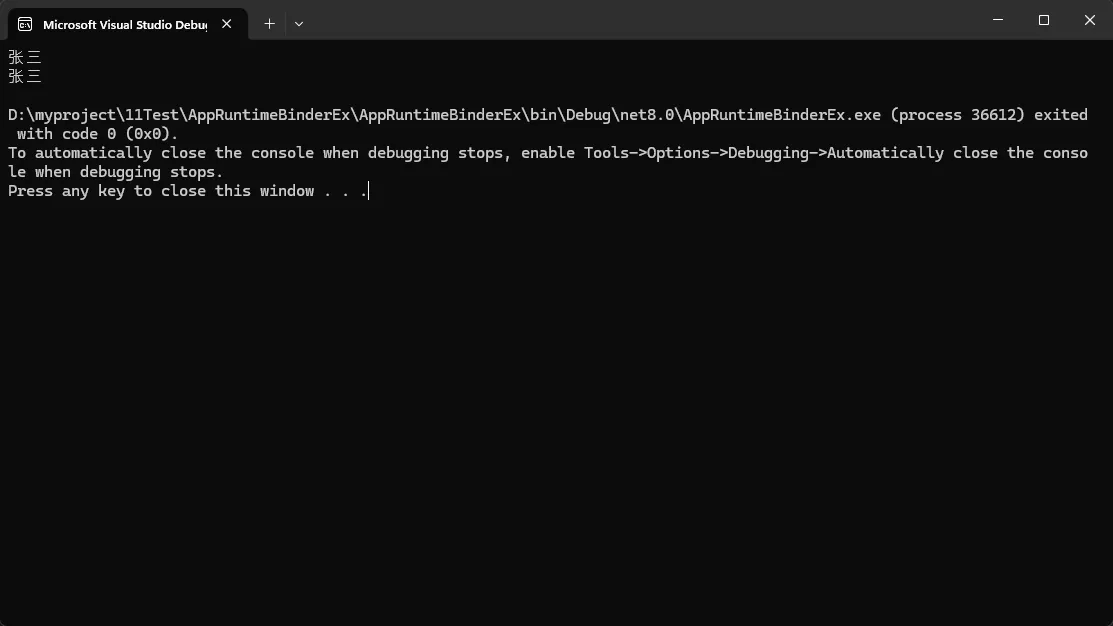
核心要点: 每种动态操作都对应一个专用的绑定器,理解这点有助于优化性能。
⚡ 2. 善用CallSite缓存机制
CallSite是动态调用性能的关键,它会缓存绑定结果:
c#using Microsoft.CSharp.RuntimeBinder;
using System;
using System.Collections.Concurrent;
using System.Diagnostics;
using System.Dynamic;
using System.Runtime.CompilerServices;

namespace AppRuntimeBinderEx
{
    public class PerformanceOptimizedDynamic
    {
        private static readonly ConcurrentDictionary<string, CallSite<Func<CallSite, object, object>>>
            _memberAccessCache = new();

        public object FastDynamicCall(object obj, string memberName)
        {
            var site = _memberAccessCache.GetOrAdd(memberName, name =>
            {
                var binder = Binder.GetMember(
                    CSharpBinderFlags.None,
                    name,
                    typeof(object),
                    new[] { CSharpArgumentInfo.Create(CSharpArgumentInfoFlags.None, null) }
                );
                return CallSite<Func<CallSite, object, object>>.Create(binder);
            });

            return site.Target(site, obj);
        }
    }

    internal class Program
    {
        static void Main(string[] args)
        {
            dynamic testObj = new ExpandoObject(); //匿名对象的类型信息对 `RuntimeBinder` 不可见 ,用这个
            testObj.Name = "Test";
            testObj.Value = 42;
            var optimizer = new PerformanceOptimizedDynamic();

            var sw = Stopwatch.StartNew();

            // 测试1000次动态调用
            for (int i = 0; i < 1000; i++)
            {
                var result = optimizer.FastDynamicCall(testObj, "Name");
            }

            sw.Stop();
            Console.WriteLine($"优化后的动态调用耗时: {sw.ElapsedMilliseconds}ms");
        }
    }
}
实战技巧: 在生产环境中,尽量复用CallSite实例,避免重复的绑定开销。
🎛️ 3. 灵活运用CSharpBinderFlags
不同的绑定标志会影响绑定行为和性能:
c#using Microsoft.CSharp.RuntimeBinder;
using System;
using System.Runtime.CompilerServices;

namespace AppRuntimeBinderEx
{
    public class BinderFlagsDemo
    {
        public void DemonstrateBinderFlags()
        {
            var testObject = new TestClass();

            // 1. 标准动态调用(含null检查)
            Console.WriteLine("=== 1. 标准动态调用 ===");
            CallDynamicWithNullCheck(testObject, "ProcessData", "test");

            // 2. 调用静态方法
            Console.WriteLine("\n=== 2. 静态方法调用 ===");
            CallStaticMethod();

            // 3. 忽略大小写调用(通过反射模拟,dynamic本身不支持大小写忽略)
            Console.WriteLine("\n=== 3. 忽略大小写调用(反射实现)===");
            CallWithIgnoreCase(testObject, "processdata");
        }


        private void CallDynamicWithNullCheck(dynamic obj, string methodName, object arg)
        {
            try
            {
                var binder = Binder.InvokeMember(
                    CSharpBinderFlags.None,
                    methodName,
                    null,
                    typeof(BinderFlagsDemo),
                    new[]
                    {
                CSharpArgumentInfo.Create(CSharpArgumentInfoFlags.None, null),
                CSharpArgumentInfo.Create(CSharpArgumentInfoFlags.None, null)
                    }
                );

                var site = CallSite<Func<CallSite, object, object, object>>.Create(binder);
                var result = site.Target(site, obj, arg);
                Console.WriteLine($"调用结果: {result}");
            }
            catch (RuntimeBinderException ex)
            {
                Console.WriteLine($"动态调用失败: {ex.Message}");
            }
        }


        private void CallStaticMethod()
        {
            Type type = typeof(TestClass);

            var binder = Binder.InvokeMember(
                CSharpBinderFlags.None,
                "StaticMethod",
                null,
                type,
                new[]
                {
                    CSharpArgumentInfo.Create(CSharpArgumentInfoFlags.IsStaticType, null)
                }
            );

            var site = CallSite<Func<CallSite, Type, object>>.Create(binder);
            var result = site.Target(site, type);
            Console.WriteLine($"静态方法调用结果: {result}");
        }

        private void CallWithIgnoreCase(object obj, string methodName)
        {
            try
            {
                var method = obj.GetType().GetMethod(
                    methodName,
                    System.Reflection.BindingFlags.Instance |
                    System.Reflection.BindingFlags.Public |
                    System.Reflection.BindingFlags.IgnoreCase   // 关键:忽略大小写
                );

                if (method == null)
                {
                    Console.WriteLine($"未找到方法: {methodName}");
                    return;
                }

                var result = method.Invoke(obj, new object[] { "ignore-case-test" });
                Console.WriteLine($"忽略大小写调用结果: {result}");
            }
            catch (Exception ex)
            {
                Console.WriteLine($"调用失败: {ex.Message}");
            }
        }
    }

    public class TestClass
    {
        public string ProcessData(string input) => $"Processed: {input}";
        public static string StaticMethod() => "Static method called";
    }

    internal class Program
    {
        static void Main(string[] args)
        {
            var demo = new BinderFlagsDemo();
            demo.DemonstrateBinderFlags();

            Console.WriteLine("\n按任意键退出...");
            Console.ReadKey();
        }
    }
}
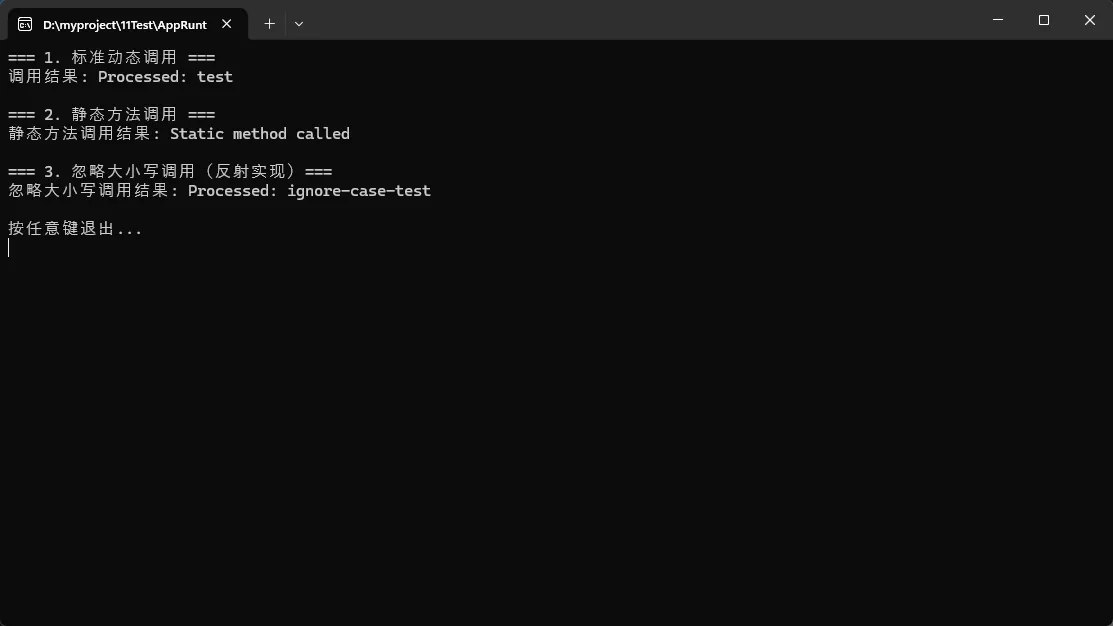
避坑指南: 正确使用绑定标志可以避免很多运行时错误,特别是在处理静态成员和null检查时。
🔄 4. 实现自定义动态对象
通过继承DynamicObject,你可以创建完全自定义的动态行为:
c#public class SmartDynamicObject : DynamicObject
{
    private readonly Dictionary<string, object> _properties = new();
    private readonly List<string> _accessLog = new();

    // 重写获取成员的行为
    public override bool TryGetMember(GetMemberBinder binder, out object result)
    {
        _accessLog.Add($"Get: {binder.Name}");

        if (_properties.TryGetValue(binder.Name, out result))
        {
            return true;
        }

        // 智能默认值
        result = binder.Name switch
        {
            var name when name.EndsWith("Count") => 0,
            var name when name.EndsWith("Name") => "DefaultName",
            _ => null
        };

        return true;
    }

    // 重写设置成员的行为
    public override bool TrySetMember(SetMemberBinder binder, object value)
    {
        _accessLog.Add($"Set: {binder.Name} = {value}");

        // 数据验证
        if (binder.Name == "Age" && value is int age && age < 0)
        {
            throw new ArgumentException("年龄不能为负数");
        }

        _properties[binder.Name] = value;
        return true;
    }

    // 重写方法调用的行为
    public override bool TryInvokeMember(InvokeMemberBinder binder, object[] args, out object result)
    {
        _accessLog.Add($"Invoke: {binder.Name}({string.Join(", ", args)})");

        result = binder.Name switch
        {
            "ToString" => $"SmartObject with {_properties.Count} properties",
            "Clear" => ClearProperties(),
            "GetLog" => string.Join("\n", _accessLog),
            _ => $"Method {binder.Name} called with {args.Length} arguments"
        };

        return true;
    }

    private object ClearProperties()
    {
        var count = _properties.Count;
        _properties.Clear();
        return $"Cleared {count} properties";
    }
}

// 使用示例
class CustomDynamicDemo
{
    public static void RunDemo()
    {
        dynamic smart = new SmartDynamicObject();

        // 设置属性
        smart.Name = "智能对象";
        smart.Age = 25;
        smart.ItemCount = 10;

        // 获取属性(包括智能默认值)
        Console.WriteLine($"Name: {smart.Name}");
        Console.WriteLine($"DefaultName: {smart.SomeRandomName}"); // 自动返回 "DefaultName"
        Console.WriteLine($"Count: {smart.AnyCount}"); // 自动返回 0

        // 调用方法
        Console.WriteLine(smart.ToString());
        Console.WriteLine(smart.GetLog());

        // 数据验证
        try
        {
            smart.Age = -5; // 会抛出异常
        }
        catch (ArgumentException ex)
        {
            Console.WriteLine($"验证失败: {ex.Message}");
        }
    }
}
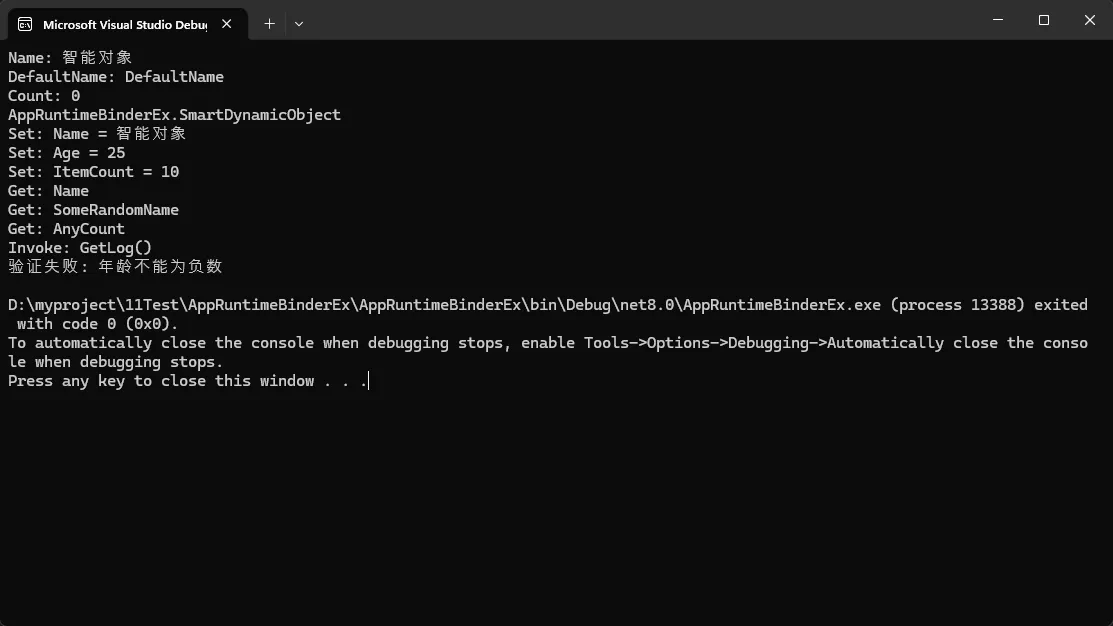
创新点: 自定义动态对象让你能够实现智能默认值、访问日志、数据验证等高级功能。
🎯 性能优化的3个黄金法则
法则1:缓存优先
c#// ✅ 使用静态字段缓存CallSite
private static readonly CallSite<Func<CallSite, object, object>> _getCacheSite =
    CallSite<Func<CallSite, object, object>>.Create(/* binder */);
法则2:类型提示
c#// ✅ 提供类型信息有助于绑定器优化
CSharpArgumentInfo.Create(CSharpArgumentInfoFlags.UseCompileTimeType, null)
法则3:避免过度动态化
c#// ❌ 完全动态
dynamic result = obj.Method().Property.AnotherMethod();

// ✅ 混合使用
var temp = ((dynamic)obj).Method();
var result = temp.Property.AnotherMethod(); // 如果已知类型,使用强类型
💼 实际应用场景
JSON序列化场景: 在处理未知结构的JSON时,动态对象非常有用
插件系统: 加载外部程序集并动态调用其方法
配置驱动: 根据配置文件动态调用不同的处理逻辑
测试框架: 创建灵活的Mock对象
🔥 总结:掌握动态编程的精髓
通过深入理解RuntimeBinder的工作原理,我们可以得出三个关键结论:
1. 动态≠任意 - C#的动态编程仍然是强类型的,只是类型检查延迟到运行时进行。理解这点有助于写出更安全的动态代码。
2. 性能可控 - 通过合理使用CallSite缓存和正确的绑定策略,动态调用的性能开销可以控制在可接受范围内。关键是避免重复绑定。
3. 场景至上 - 动态编程不是银弹,要在灵活性和性能之间找到平衡。在合适的场景下使用动态特性,能够大幅提升开发效率。
RuntimeBinder虽然标注为"基础设施API",但理解它的工作原理对每个C#开发者都很有价值。它不仅能帮你写出更高效的动态代码,更能让你深入理解C#语言的内部机制。
互动时间:
- 你在项目中使用过
dynamic关键字吗?遇到过哪些性能问题? - 除了文中提到的场景,你还能想到哪些适合使用动态编程的情况?
本文作者:技术老小子
本文链接:
版权声明:本博客所有文章除特别声明外,均采用 BY-NC-SA 许可协议。转载请注明出处!