
领导说:"把设备的历史报警数据导出成Excel,今天下班前要。"
你打开VS,知道大概要写什么,但 List 怎么转成表格、Excel怎么生成、文件保存到哪——每一步都要去搜,搜完还不一定对。
两个小时过去了,代码还没跑通。
旁边同事打开Copilot,用一句话描述需求,三分钟后代码跑起来了。
今天这篇,教你怎么让Copilot真正替你干活——不是瞎用,是用对。
📌 上节回顾
「上一节我们学了VS2026的Fluent UI新界面,掌握了六大功能区域的位置和工业开发布局的配置方法。今天在这个基础上,我们进一步学习VS2026内置的Copilot智能助手,把AI真正用进工业开发的日常工作里。」
💡 核心知识讲解
Copilot 是什么?别被名字唬住
GitHub Copilot(微软和GitHub联合推出的AI编程助手,相当于给你配了一个随时待命、永不抱怨的程序员搭档)内置在VS2026里,不需要单独安装。
你可以把它理解为工厂里的"老师傅带徒弟"模式:你说出想做什么,它给你示范怎么做,你看着学、改着用。
和普通搜索引擎不同,Copilot不只是给你一堆链接,它直接给你能跑的代码。
Copilot 的三种工作模式
VS2026里的Copilot有三种用法,对应三种不同的场景:
| 模式 | 触发方式 | 适合场景 |
|---|---|---|
| 自动补全 | 打代码时自动弹出 | 快速补全方法名、参数 |
| 内联生成 | 写注释后按 Tab | 根据注释生成代码块 |
| Chat对话 | 侧栏输入自然语言 | 描述复杂需求生成完整功能 |
「三种模式不是替代关系,是配合关系。写代码时用补全,卡壳时用Chat,最高效。」
自动补全模式:打代码时的实时搭档
你在编辑器里打出方法名的前几个字母,Copilot会用灰色文字预览它猜测你想写的内容,按 Tab 接受,按 Esc 拒绝。
举个工业场景的例子:你打出 // 读取PLC温度寄存器,然后按回车,Copilot会根据这行注释自动补全下面的代码逻辑。
这个模式的核心技巧是:注释写得越具体,补全越准确。
写 // 读取数据 补出来的是通用代码,写 // 用Modbus TCP读取寄存器地址40001的浮点型温度值 补出来的就是带地址、带数据类型的工业级代码。
内联生成模式:注释即代码
这是 Vibe Coding(一种用自然语言描述需求来驱动代码生成的开发方式,核心是"说清楚想要什么,让AI来写怎么做")最直接的体现。
操作方式很简单:在代码文件里写一段中文注释,描述你想实现的功能,然后按 Alt + \(反斜杠),Copilot会在注释下方生成完整的代码块。
⚠️ 生成的代码一定要检查逻辑,特别是涉及设备地址、寄存器偏移量的部分。Copilot不了解你的具体硬件,这类参数需要你手动核对。
Chat 对话模式:处理复杂需求的主力
当需求比较复杂,一行注释说不清楚时,就打开Copilot侧栏,用自然语言对话。
按 Ctrl + \,再按 Ctrl + C,侧栏弹出,直接输入你的需求。
Chat模式有几个工业开发中特别好用的指令:
/explain:选中一段代码,输入 /explain,Copilot逐行解释代码含义,读别人留下的老代码时救命。
/fix:选中报错的代码,输入 /fix,Copilot分析错误原因并给出修正方案,比自己看报错信息快得多。
/doc:选中一个方法,输入 /doc,自动生成XML格式的注释文档,团队协作时规范注释不再靠自觉。
「记住这三个指令,能解决工业开发里80%的"卡壳"场景。」
Copilot 的边界:它不是万能的
用了Copilot一段时间之后,你会发现它有几个明显的局限,提前知道可以少走弯路。
Copilot不了解你的具体硬件型号和通信参数,生成的设备通信代码需要你核对地址和协议细节。它对业务逻辑的理解依赖你的描述质量,描述越模糊,生成的代码越通用、越不贴合实际需求。
另外,Copilot生成的代码不一定是最优解,特别是性能敏感的场景(比如高频数据采集、实时报警判断),生成后还需要你根据工业场景做优化。
把Copilot当成"帮你起草初稿的助手",而不是"直接交付的外包",这个定位最准确。
🤔 你是否也踩过这些坑?
在 Python 项目里直接用 pymysql 拼 SQL 字符串,上线一周后发现 SQL 注入漏洞;连接池没配好,高并发时数据库连接耗尽,服务直接挂掉;换个数据库版本,一堆 SQL 语法要重写……
这些问题,在用上 SQLAlchemy 之后,基本都能系统性地解决。
SQLAlchemy 是 Python 生态里最成熟的 ORM 框架,GitHub Star 超过 9k,被 Flask、FastAPI 等主流框架广泛采用。它不只是"把 SQL 换成 Python 写法"这么简单——连接池管理、事务控制、模型映射、迁移支持,一套全包。
读完本文,你将掌握:
- SQLAlchemy 2.x 连接 MySQL 的正确姿势
- ORM 模型定义与 CRUD 完整实践
- 连接池调优与事务控制的生产级配置
- 3 个真实项目场景的落地代码
🔍 问题深度剖析:原生 SQL 的隐患
很多项目早期图省事,直接用 pymysql 裸写 SQL。这条路走到中后期,问题会一个接一个冒出来。
第一个雷:SQL 注入风险。 字符串拼接 SQL 是新手最常见的写法,一旦用户输入没做转义,攻击者一条 ' OR 1=1 -- 就能拖走整个数据库。
第二个雷:连接管理混乱。 每次请求都 connect() 再 close(),高并发时数据库连接数瞬间打满。或者反过来,连接从不关闭,内存泄漏悄悄积累。
第三个雷:代码可维护性差。 表结构散落在各处 SQL 字符串里,改一个字段名要全局搜索替换,遗漏一处就是线上 Bug。
第四个雷:跨数据库迁移成本高。 项目初期用 SQLite 开发,上线换 MySQL,SQL 方言差异让人头疼。
SQLAlchemy 用统一的抽象层解决了上述所有问题。它的核心架构分两层:底层的 Core(表达式语言,接近 SQL)和上层的 ORM(对象关系映射)。两层可以混用,灵活度极高。
💡 核心要点提炼
在动手写代码之前,有几个概念必须先搞清楚,否则后面会一头雾水。
Engine(引擎) 是一切的起点,它管理数据库连接池,是整个 SQLAlchemy 与数据库通信的入口。一个应用只需要一个 Engine 实例。
Session(会话) 是 ORM 操作的工作单元。所有的增删改查都通过 Session 进行,它负责追踪对象状态变化,并在提交时生成对应的 SQL。
Model(模型) 是数据库表的 Python 映射。一个类对应一张表,类属性对应字段。
连接池 是 SQLAlchemy 默认开启的机制,QueuePool 是默认实现,避免了频繁建立/断开数据库连接的开销。
SQLAlchemy 2.x 相比 1.x 有较大变化,推荐直接上 2.x,Session 的使用方式更清晰,类型提示支持也更好。
🚀 方案一:基础配置与模型定义
环境准备
bashpip install sqlalchemy pymysql cryptography
测试环境: Windows 11 + Python 3.11 + MySQL 8.0 + SQLAlchemy 2.0.x
创建 Engine 与 Base
pythonfrom sqlalchemy import create_engine
from sqlalchemy.orm import DeclarativeBase, sessionmaker

# 数据库连接串格式:
# mysql+pymysql://用户名:密码@主机:端口/数据库名?charset=utf8mb4
DATABASE_URL = "mysql+pymysql://root:123456@localhost:3306/testdb?charset=utf8mb4"

# echo=True 会打印所有生成的 SQL,开发阶段很有用,生产环境记得关掉
engine = create_engine(
    DATABASE_URL,
    echo=False,
    pool_size=10,        # 连接池保持的连接数
    max_overflow=20,     # 超出 pool_size 后最多额外创建的连接数
    pool_timeout=30,     # 等待连接的超时时间(秒)
    pool_recycle=1800,   # 连接复用超过 1800 秒后自动重建,防止 MySQL 的 8 小时断连
)

# Session 工厂,每次需要数据库操作时从这里创建 SessionSessionLocal = sessionmaker(bind=engine, autocommit=False, autoflush=False)

# 所有 ORM 模型的基类
class Base(DeclarativeBase):
    pass
pool_recycle=1800 这个参数非常重要。 MySQL 默认 8 小时空闲连接自动断开,如果连接池里的连接超过这个时间没用过,下次拿来用就会报 Lost connection to MySQL server。设置 pool_recycle 让 SQLAlchemy 主动刷新老连接,彻底规避这个问题。
痛点开场
产品经理拍着桌子说:"咱们得做个带宽管理工具,限制下载上传速度,简单吧?"我当时心想,这玩意儿不就是调个API的事儿么?结果这一弄,三天三夜没睡好觉。为什么?因为Windows压根儿不想让你轻松搞定这事儿。
网上那些"5分钟实现带宽限制"的教程?骗人的。QoS策略、防火墙规则、netsh命令...试了个遍,结果网速该多快还是多快,连1KB的限制都管不住。最崩溃的是,程序显示"限制已应用",但实际下载速度依然飙到60MB/s。
这篇文章我就跟你聊聊:真正能work的方案长什么样,以及那些看起来靠谱实则坑爹的伪方案。
💔 第一次翻车:被QoS政策骗了
最开始我天真地以为,Windows自带的QoS(服务质量)机制能搞定。毕竟官方文档写得天花乱坠,什么"流量整形"、"带宽预留"...听起来特专业。
csharp// ❌ 我以为这样就能限制带宽(图样图森破)
private void ApplyQoSPolicy(double limitKBps)
{
    string command = $"advfirewall firewall add rule name=\"BandwidthLimit\" " +
                     $"dir=out action=allow protocol=any";
    ExecuteCommand("netsh", command);

    // 然后发现...根本不管用
}
结果呢?
速度该多少还是多少!原因很简单:防火墙规则只能允许/阻止流量,没法延迟转发。这就好比你在高速路上立个牌子写着"限速80",但没有摄像头,谁管你啊?
更坑的是,netsh interface tcp set global autotuninglevel=restricted 这条命令看起来像那么回事儿,实际上只是关闭了TCP自动调优。你的下载速度确实会降——因为TCP窗口变小了,但这是系统级降速,不是精确的带宽控制。Word文档下载慢了,但BT下载照样起飞。
🔍 深层原因剖析
Windows的网络栈是这么设计的:
- 应用层发起请求(你的程序在这)
- 传输层处理TCP/UDP(netsh在这瞎搞)
- 网络层路由转发(防火墙在这杵着)
- 数据链路层才真正发包(WinDivert在这搞事)
你在传输层、网络层折腾,包已经准备好了等着发,你最多做到"别发",做不到"慢慢发"。就像水龙头,你只能选择"开"或"关",没法精确控制"每秒滴多少滴"。
踩坑总结:用户态API没戏,得深入内核态。
先看一下效果
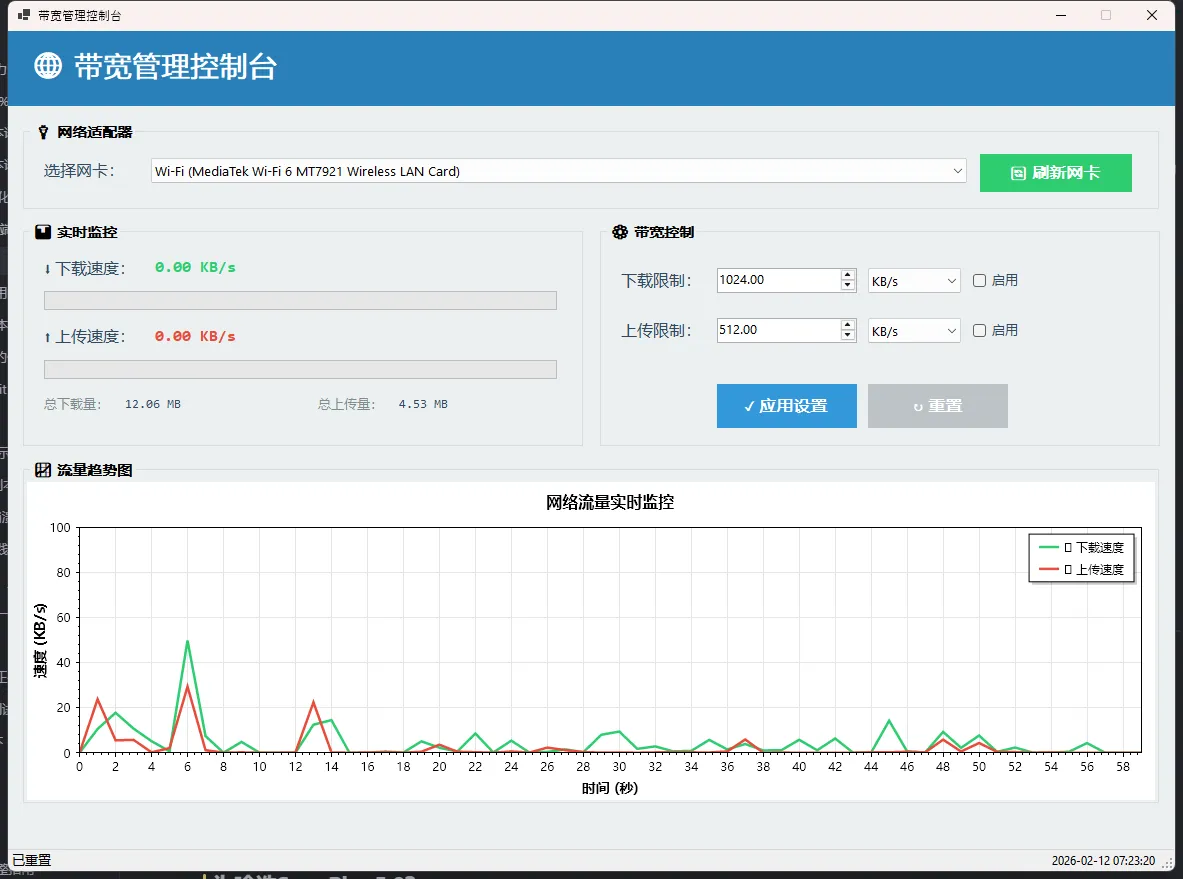
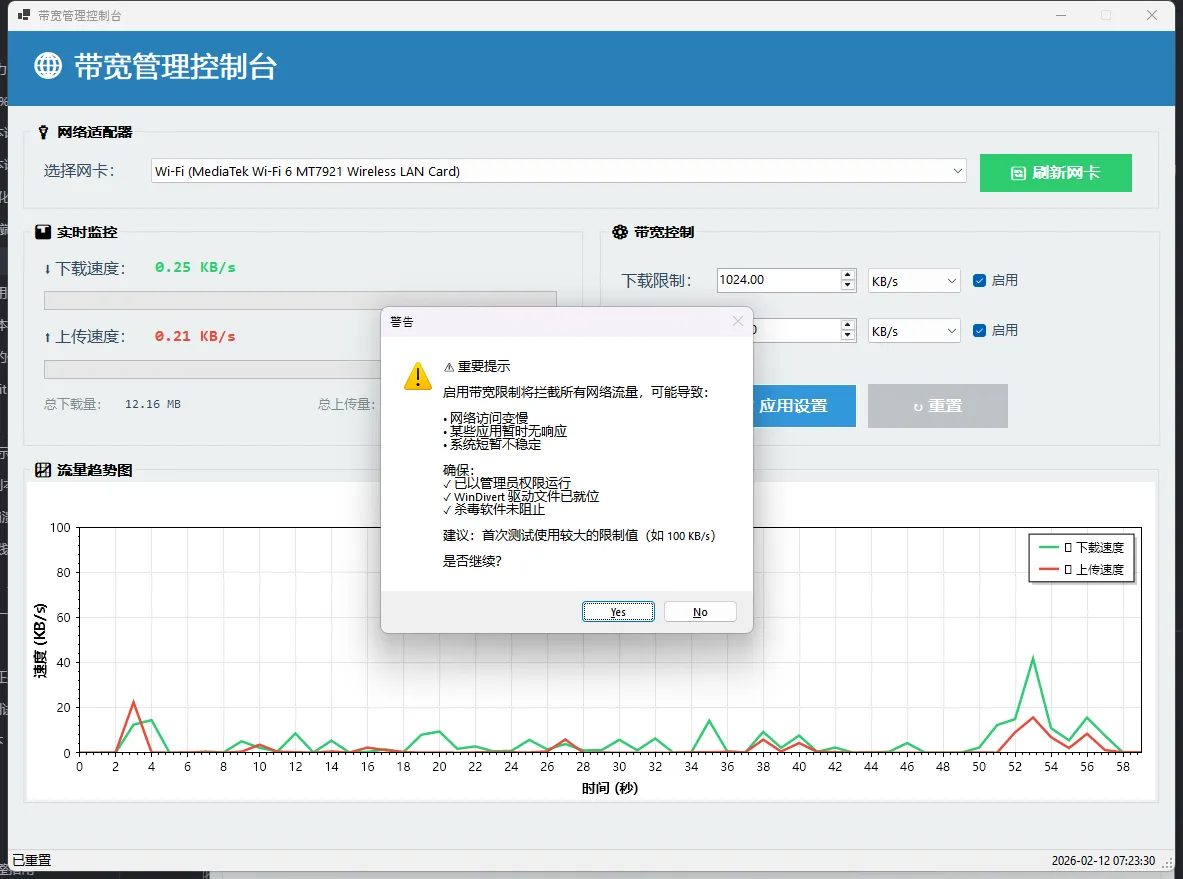
🎯 ScottPlot 5.0实时图表:先把监控搞好看
在找到真正的限速方案之前,我先把流量监控界面整出来了。毕竟数据可视化是王道,老板看不懂代码,但看得懂曲线图。
为啥选ScottPlot 5.0?
之前用过WinForms自带的Chart控件。说实话...丑到爆。微软那审美真的是...而且性能差,60个数据点就开始卡顿。ScottPlot完全不一样:
- 性能爆炸:百万数据点都不带怕的
- API简洁:5.0版本重构后,比4.x清爽太多
- 颜值在线:默认主题就很现代化
但有个坑!网上教程全是4.x版本的,照抄直接报错。
csharp// ❌ 4.x的写法(5.0报错)
plt.Style.Background(Color.White);
plt.Style.Grid(Color.Gray);

// ✅ 5.0的正确姿势
formsPlotBandwidth.Plot.FigureBackground.Color = ScottPlot.Color.FromHex("#FFFFFF");
formsPlotBandwidth.Plot.Grid.MajorLineColor = ScottPlot.Color.FromHex("#E6E6E6");
关键变化:
Plot.Style被废弃了,改成直接访问属性- 数据更新从
scatter.Update(x, y)变成先Remove再Add - Color类型冲突(System.Drawing.Color vs ScottPlot.Color)
🧭 从"跑起来"到"搞明白"
很多人第一次接触 Textual,是从官方文档的 Hello World 开始的。三行代码,终端里弹出一个带边框的窗口——酷。然后呢?然后就懵了。
App 是什么?Screen 又是什么?compose() 里返回的 ComposeResult 到底是个啥类型?这些问题不搞清楚,写出来的代码就是一堆"能跑但不知道为什么能跑"的玩意儿。
我在用 Textual 开发一个本地文件管理工具的时候,前两周基本上就是在和这套结构死磕。踩了不少坑,也慢慢摸出了门道。今天就把这些东西掰开揉碎讲一讲——不是翻译文档,是真正从"为什么这么设计"的角度来聊。
🏗️ App:整个 TUI 世界的地基
先说 App。
简单粗暴地理解:App 就是你整个终端应用的容器。它负责启动事件循环、管理屏幕栈、处理全局按键绑定、控制主题切换……一句话,它是老板。
pythonfrom textual.app import App, ComposeResult
from textual.widgets import Header, Footer, Label

class MyApp(App):
    """一个最简单的 Textual 应用"""

    CSS = """
    Label {
        content-align: center middle;
        height: 1fr;
    }
    """

    def compose(self) -> ComposeResult:
        yield Header()
        yield Label("你好,Textual!")
        yield Footer()

if __name__ == "__main__":
    app = MyApp()
    app.run()
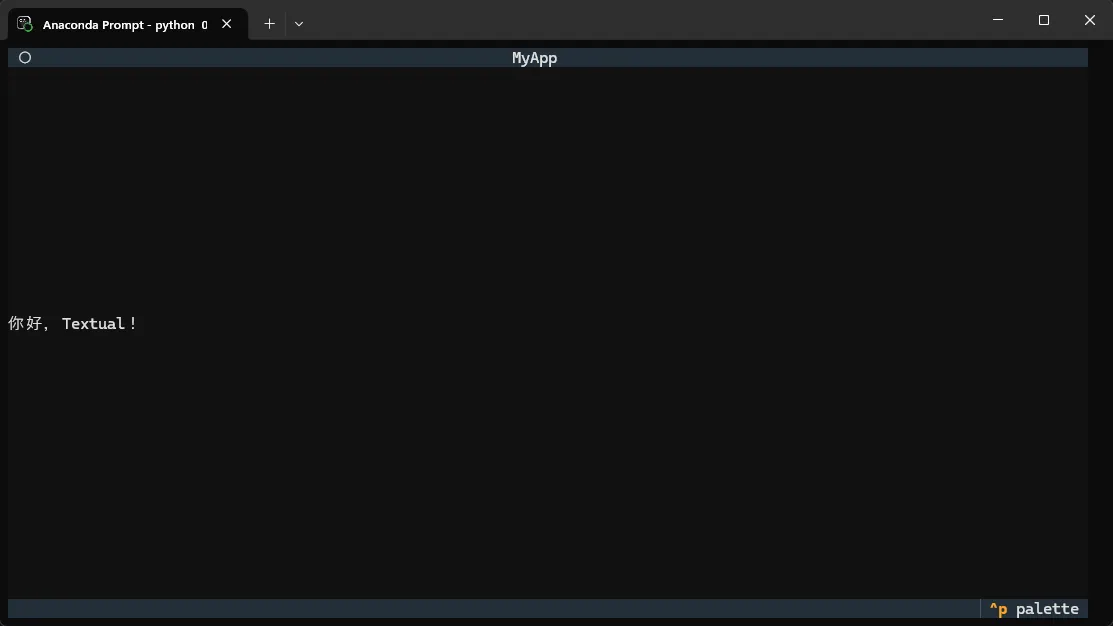
这段代码能跑。但你注意到没有——compose() 出现在了 App 里,而不是 Screen 里。这是初学者最容易混淆的地方。
App 本身也是一个隐式的 Screen。 准确说,当你在 App 里直接写 compose(),Textual 会自动把它包成一个默认的 Screen 推入屏幕栈。这是个"便捷通道",适合写简单的单屏应用。但一旦你的应用有多个界面,这条路就走不通了。
App 的几个关键属性
TITLE 和 SUB_TITLE 控制顶部 Header 显示的内容。CSS 或 CSS_PATH 用来注入样式。BINDINGS 定义全局快捷键。这三个是使用频率最高的类变量,几乎每个项目都要用到。
pythonclass MyApp(App):
    TITLE = "文件管理器"
    SUB_TITLE = "v1.0.0 - Windows 专属版"
    CSS_PATH = "style.tcss"

    BINDINGS = [
        ("q", "quit", "退出"),
        ("d", "toggle_dark", "切换暗色模式"),
    ]
action_toggle_dark() 这个方法不用自己写,App 基类已经内置了。这是 Textual 的一个设计哲学——把常见操作都内置进去,让你专注业务逻辑。
🎯 你的图表,是不是还长这样?
做过数据展示页面的开发者,大概都踩过这个坑:花了好几天把业务逻辑跑通,最后把图表往界面上一放——灰底白线,配色随机,像极了上世纪九十年代的 Excel 报表。
客户当场沉默,产品经理皱眉,然后说了一句话:"这个图表……能不能好看一点?"
问题不在于 LiveCharts 2 不支持美化,恰恰相反,它的主题与颜色系统相当完整。真正的痛点在于:很多开发者根本不知道从哪里下手,或者只会改单个 Series 的颜色,却不知道如何做到全局统一、动态切换、甚至自定义专属主题。
这篇文章会带你系统地把这块知识点打通。读完之后,你将掌握三个层次的颜色控制手段:从最快的内置主题切换,到精细的 Series 级颜色定制,再到面向复杂项目的自定义主题体系。每个方案都附带可以直接跑起来的代码,以及我在项目里踩过的真实坑位。
🔍 问题深度剖析:颜色混乱从哪来?
很多人第一次用 LiveCharts 2,会发现图表颜色"莫名其妙"——多条折线的颜色好像是随机的,换个电脑运行颜色又不一样。这里面有一个底层机制需要先搞清楚。
LiveCharts 2 采用主题驱动的颜色分配机制。 每个 Series 被添加到图表时,引擎会从当前主题的 Colors 调色板中,按顺序取色。默认主题是亮色主题(Light Theme),它内置了一套预设颜色序列。如果你同时有 5 条折线,它们会依次取调色板里的第 1、2、3、4、5 个颜色。
问题就出在这里:调色板颜色顺序是固定的,但默认的亮色主题调色板,颜色饱和度偏低,放在深色背景下会显得很淡;而且一旦 Series 数量超出调色板长度,颜色会循环复用,导致不同系列颜色撞车。
更常见的误区是,开发者试图在 Form 的构造函数里直接设置颜色,却发现设置没有生效。根本原因是:LiveCharts 的主题配置必须在应用程序启动入口(Program.cs)的 LiveCharts.Configure() 里完成,晚于这个时机的设置往往被主题默认值覆盖。
💡 核心要点提炼
在动手之前,先把几个关键概念捋清楚:
- 主题(Theme):全局样式配置,控制调色板、坐标轴样式、系列默认外观等。LiveCharts 2 内置了亮色(Light)和暗色(Dark)两套主题。
- 调色板(ColorPalette):主题中的
Colors数组,定义了系列自动取色的顺序。 - Paint(画笔):LiveCharts 2 基于 SkiaSharp 渲染,颜色的本质是
SKPaint对象,封装成SolidColorPaint、LinearGradientPaint等类型。 - 优先级规则:单个 Series 上显式设置的
Fill/Stroke优先级最高,会覆盖主题分配的颜色。
理解了这三层关系,后面的操作就有了方向感。
🚀 方案一:内置主题切换(最快落地,5分钟见效)
这是成本最低的方案,适合快速改善图表整体观感。LiveCharts 2 在 Program.cs 的启动配置里提供了 .AddDarkTheme() 方法,一行代码切换暗色主题。
csharp// Program.cs
using LiveChartsCore;
using LiveChartsCore.SkiaSharpView;

static class Program
{
    [STAThread]
    static void Main()
    {
        LiveCharts.Configure(config =>
            config
                // 切换为暗色主题,调色板和坐标轴样式全部跟着变
                .AddDarkTheme()
        );

        Application.SetHighDpiMode(HighDpiMode.SystemAware);
        Application.EnableVisualStyles();
        Application.SetCompatibleTextRenderingDefault(false);
        Application.Run(new Form1());
    }
}
切换暗色主题后,调色板会自动换成高饱和度、适合深色背景的配色方案,坐标轴文字颜色、网格线颜色也会联动调整。注意:此时 Form 的背景色需要手动改成深色(比如 #1E1E1E),否则图表控件本身的背景是透明的,视觉上会有割裂感。
csharpusing LiveChartsCore;
using LiveChartsCore.SkiaSharpView;
using LiveChartsCore.SkiaSharpView.Painting;
using LiveChartsCore.SkiaSharpView.Painting.Effects;
using SkiaSharp;

namespace AppLiveChart12
{
    public partial class Form1 : Form
    {
        public Form1()
        {
            InitializeComponent();
            this.BackColor = Color.FromArgb(30, 30, 30); // 深色背景配暗色主题
            initChart();
        }

        private void initChart()
        {
            // 折线图数据系列
            var lineSeries = new LineSeries<double>
            {
                Name = "示例数据",
                Values = new double[] { 3, 7, 2, 9, 4, 11, 6, 8, 5, 13 },

                // 线条颜色
                Stroke = new SolidColorPaint(SKColors.DodgerBlue) { StrokeThickness = 2 },

                // 数据点填充色
                Fill = new SolidColorPaint(SKColor.Parse("#3300BFFF")), // 半透明填充

                // 数据点圆圈样式
                GeometrySize = 8,
                GeometryStroke = new SolidColorPaint(SKColors.DodgerBlue) { StrokeThickness = 2 },
                GeometryFill = new SolidColorPaint(SKColors.White),
            };

            // 绑定到图表
            cartesianChart1.Series = new ISeries[] { lineSeries };

            // X 轴配置
            cartesianChart1.XAxes = new[]
            {
                new Axis
                {
                    Name = "X 轴",
                    NamePaint = new SolidColorPaint(SKColors.LightGray),
                    LabelsPaint = new SolidColorPaint(SKColors.LightGray),
                    SeparatorsPaint = new SolidColorPaint(SKColors.Gray)
                    {
                        StrokeThickness = 1,
                        PathEffect = new DashEffect(new float[] { 4, 4 })
                    }
                }
            };

            // Y 轴配置
            cartesianChart1.YAxes = new[]
            {
                new Axis
                {
                    Name = "Y 轴",
                    NamePaint = new SolidColorPaint(SKColors.LightGray),
                    LabelsPaint = new SolidColorPaint(SKColors.LightGray),
                    SeparatorsPaint = new SolidColorPaint(SKColors.Gray)
                    {
                        StrokeThickness = 1,
                        PathEffect = new DashEffect(new float[] { 4, 4 })
                    }
                }
            };

            // 图表背景色(与窗体深色主题匹配)
            cartesianChart1.BackColor = Color.FromArgb(30, 30, 30);
        }
    }
}
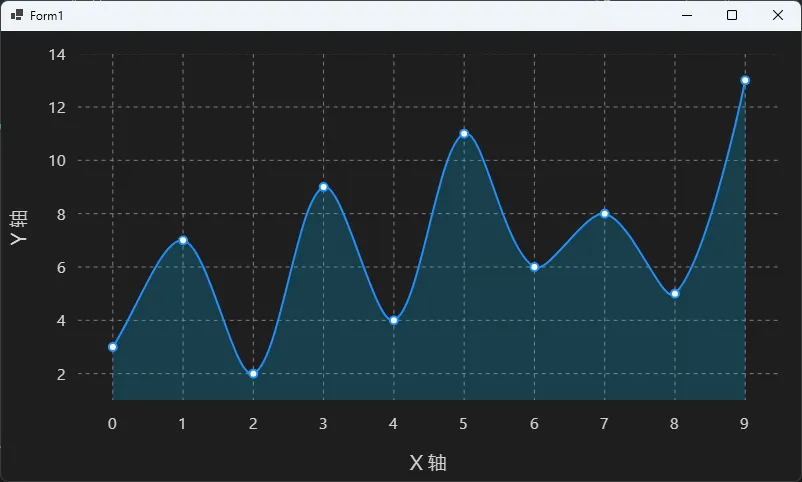
踩坑预警: 不少开发者在 Form 里调用 LiveCharts.Configure(),而不是在 Program.cs 里。这样做的结果是:第一次打开窗口时主题生效,但如果你有多个窗口实例,或者窗口被关闭重新创建,配置会重复执行,可能引发异常。务必把 LiveCharts.Configure() 放在 Main() 方法里,整个应用生命周期只执行一次。
🎨 方案二:自定义调色板与 Series 颜色(精细控制)
内置主题解决了整体风格,但很多项目有品牌色要求,或者需要让特定的折线用特定的颜色。这时候就要深入到两个层次:全局调色板替换和单个 Series 颜色设置。
全局调色板替换
在 LiveCharts.Configure() 里,替换整套调色板:
csharp// Program.cs
LiveCharts.Configure(config =>
    config.AddDarkTheme(theme =>
    {
        theme.Colors = new[]
        {
            LvcColor.FromArgb(255, 0, 122, 255),
            LvcColor.FromArgb(255, 52, 199, 89),
            LvcColor.FromArgb(255, 255, 159, 10),
            LvcColor.FromArgb(255, 255, 69, 58),
            LvcColor.FromArgb(255, 175, 82, 222),
            LvcColor.FromArgb(255, 90, 200, 250),
        };
    })
);

Application.SetHighDpiMode(HighDpiMode.SystemAware);
Application.EnableVisualStyles();
替换调色板之后,所有 Series 在没有显式指定颜色时,都会按这个新序列自动取色,整个项目里所有图表的配色风格就统一了,不需要每个图表单独设置。